My ios 8 Nightmare Has FINALLY ENDED | Apple’s Newest ios 9.2 Update Fixed My Corrupt ios 8.2 Problem

The ios 9.2 Update Fixed A Huge Problem

on My iPad Mini Retina

When ios 8.2 was installed on my mini it became unusable due to extreme battery drain…roughly 9 months later the 9.2 update fixed it!

Strictly speaking my nightmare began in the summer of 2014.   I had read a fair amount about the upcoming new ios…8…and I became obsessed with wanting 2 of the new features:  handoff and continuity.  Ultimately my experience turned into a perfect example of that old adage…be careful what you wish for!
Gorden Kelly Forbe's Writer

On March 9th in 2015 Gordon Kelly, a writer I follow for Forbes Magazine online wrote an article he called “Apple Releases ios 8.2, It’s the Big One” which discussed how Apple’s 8.2 update somewhat miraculously both gave Apple the platform necessary to admit for the first time that there were many huge problems ios 8 had created as well as provided a solution to.

Unfortunately, I was one of many of the people who experienced huge problems with ios 8.  Maybe in retrospect it was exactly because I was so excited to try ios 8 out that I ended up making my first big mistake…I was one of the first to download ios 8 when it was released.


A Corrupt ios 8 Resulted in Huge RAM Issues for My iPad Air

I’ve learned a lot since then.  One important thing that I’ve learned is to never be one of the first to download the newest ios.  The reason is because Apple’s servers become extremely taxed immediately after they release a new OS.  Overworked servers mean more things can go wrong.  In my case it meant that the copy of ios 8 that my iPad Air downloaded became corrupt somehow…leading to a severe loss of functionality.  My newish Air, (it was less than 1 year old) was brought to its knees when ios 8 was installed.  The problems appeared to be within its RAM…my iPad couldn’t keep data in its short-term memory banks long enough to accomplish even the simplest of tasks.

After many, many hours spent diagnosing, documenting and discussing the issues, Apple’s answer was to do a complete restore of the ios…using a computer.  But for reasons too long and complicated to get into here…that was not a viable option for me.

During a visit to Apple’s Genius bar a month or 2 after ios 8 was released my husband and I both ended up buying new Air 2’s.  I don’t remember why he did…maybe he was still using a pre-Air iPad up until then. But the reason I did was because I’d been thinking about getting a 2nd one for awhile anyway.  I’m such a heavy user of iPads that I use up a battery charge rather quickly.  I wanted a 2nd one to cycle my use to while the other one was charging.

The new Air 2 I bought in November 2014 was only a 64GB version (that’s what my husband purchased too,) because I thought it would be more of a ‘fill in’ machine in the long run and it would serve as my primary iPad for only the shorter term period of time necessary until the original Air could be fixed. I set it up as a new iPad so that I’d keep as much of the 64 GB’s free as possible. As our ios 8 problems continued however, for much longer than I’d anticipated, I did end up filling up that 64GB’s rather quickly (so did my husband!)

My original Air continued to hobble along but essentially I kind of gave up on it for a while.  It wasn’t really bricked, because I could use it for some tasks like photo and video editing, and it could be restored…I just couldn’t do it at that time because I needed a computer to do so.  Once I realized that the 64GB Air was filling up faster than I’d imagined it would, as yet another short-term solution, I decided to get another Air 2, this time the 128GB model (this is the same size as my original Air.)  I thought that I would use this one until I could actually do the full restore.

This was where I made my second big mistake.  I restored the new iPad Air 2 using the original Air’s backup.  Sadly, I learned that backups of iPads or of ios devices in general aren’t really all that useful for much.  The reason is because many of the events that would incapacitate an iPad and that would compel you to use that backup, also negatively impact the backup too.  So there’s a really good chance that your backup has the exact same problems built into it that you’re actually trying to fix!

Looking down a high tech rabbit hole

Restoring A New iPad Air 2 Using a Corrupt Backup Corrupts the New One Too | ios 8.2 Corrupts My iPad Mini

By restoring my new Air 2 using the original Air’s backup, I corrupt the new one’s ios too!  In retrospect…duh!  So now I had 2 barely functioning 128GB iPads and one fully functioning but almost completely ‘filled up’ 64GB iPad.

Sadly, the situation that prevented me from using my computer to do a complete restore still prevailed.  So I relied primarily on my iPad mini (I’d originally purchased this mini…it was the first Retina mini at roughly the same time as my original iPad Air in November 2013.)  My mini was both a workhorse and a savior…until ios 8.2 rolled out.  I was so excited to read Gordon Kelly’s news above that I immediately attempted to update all 3 iPads.  The reason that I risked updating my new work horse iPad mini was because we also fell victim to the infamous Wi-Fried problem.

We’d already taken down my 89 year old Dad’s network with our messed up ios 8 devices.  My husband’s and my combined devices literally broke 2 of his Verizon modems*.   We helped him to replace the 1st modem we broke during our visit, but after we left he had to replace it again all by himself.  Our home network too was so severely impacted from ios 8 issues that we even considered adding a 2nd network for a brief period of time.

The good news for us was that following the 8.2 update our network problems slowly began to resolve…the network never worked the same as it had pre-ios 8…but at least it worked much of the time.  We figured out work-arounds for the times that it didn’t.  The one constant network problem that we continue to experience is that ios devices are so aggressive in their backing up of media content…photos, videos and iWork apps projects, that all of our bandwidth is taken over for this purpose making the network unavailable to us to use for even something as simple as a Google search.  This occurs despite the fact that we use the highest bandwidth option available in our area which is 50 mbps up and 15 down.

But a huge unforeseen problem cropped up …ios 8.2 broke my work horse iPad mini!

The way that ios 8.2 broke my mini was completely different from how ios 8 had broken my iPad Air.  Instead of RAM problems I had constant battery and heat problems.  It seems that the update caused quite a few apps to run constantly which resulted in draining the battery and caused it to be in a constant state of extremely high usage.  This in turn caused it to feel very hot…even while it was asleep!  When it was unplugged the battery was drained completely in less than 3 hours…even if it was sleeping!  So, while I could still use my mini, my usage had to be really quick…and I had to make sure I charged it every hour or so.

I Bought A New iPad Mini Air

The day before we left on vacation in June 2015 my husband stopped at Best Buy and picked up a new mini for me…the iPad mini Air with 128 GB’s and cellular capability.  We planned to be gone around 3 weeks and he knew that I needed a mini that actually worked!  I realized just now that I did fail to mention that some of those earlier purchases were made for the same reason.  We were leaving to go somewhere, and I needed to bring an iPad that actually worked with me.  I continue to use that mini as my primary ‘purse’ tablet today (March 2016.)

What my husband would look like as a robot

We Bought a New Mac Mini to Restore My 2 Corrupt iPad Airs & to Backup All of our ios Devices to iCloud

By the end up of the summer in 2015 I still hadn’t had the time I needed to deal with the issues that prevented me from restoring my iPads using my Windows computer.  My Windows desktop was still unusable.  A big part of the reason is that I’m too stubborn to just let someone else fix it.  I want to learn how to do it myself because I built it with my son’s help.  He now lives far away and I need to have someone else work with me because I don’t trust myself to open it and get all the components sorted out and working by myself.  It has 4 or 5 huge drives with lots of data and I don’t want to risk messing up that data.  But just finding someone to do that alongside me has been part of the challenge.  I did find someone but that ultimately didn’t pan out and I’ve not taken the time to revisit it yet.

The accumulated amount of time that I spent messing around with ios 8 issues was staggering. I contend that all the time I spent dealing with ios 8 problems was really the time I would have used to fix my computer.

We thought that we were though the worst of it (I’m referring to ios 8 problems here,) but when we arrived back home from a 3 week summer vacation trip, shockingly, we encountered another huge problem.  Both of our iClouds had completely stopped backing up our vacation photos and videos.  They’d stopped as we were entering the 3rd week of our vacation, but we attributed that to low bandwidths at the hotels we stayed at.  Once we were back home we discussed the problem with Apple Geniuses and they told us that the sheer volume of our iCloud libraries combined with the large amount of new content was probably to blame…they’d seen it happen before.  

We decided to stop messing around with icloud over-the-air backups entirely and we bought a new Mac mini that I plugged into one of the 2 monitors that I use for my Windows machine.  I backed up each device on the mini and then finally I used it to restore each of the iPad Airs. That process was really time consuming too!

I Sometimes Wonder If Apple Secretly Intended to Bolster Their Stagnant iPad Sales with Corrupt Releases of ios 8!

OK, I know that Apple couldn’t/wouldn’t really have done that…because if they did that would end up backfiring right?  Yet the net effect didn’t seem to hurt them as much as it helped them…in our scenario at least!  Because the net result of all our ios 8 problems ended up that we purchased 3 new iPad Airs, one new iPad Air Mini and one new Mac Mini along with a huge backup drive for it (that we bought at our local Apple Store.)

With both of my iPad Airs finally restored, I was just in the beginning stages of addressing the restoration of my work horse iPad mini, when the ios 9.2 update was released.

Guess What!  ios 9.2 Fixed My iPad Mini!!!

It’s sort of scary how thrilled I am by this freak occurrence. I’m certainly thrilled because now I don’t have to do the restore. But I’m also sort of thrilled because Apple support experts, both Geniuses and Online Support, told me that this would never happen!

When troubleshooting the problems with them we discovered many, many app crash reports…which I don’t entirely understand…but each meant that I needed to delete that app.  Sometimes this improved the situation temporarily.  But the most problematic app it seems was Safari…which of course is an app that’s part of the OS and one that can’t be deleted.

So no matter how many apps I removed it wouldn’t solve my problem. A complete restore appeared to be the only solution. But, lucky for me that I’m slow and I just hadn’t gotten to it yet!  I haven’t yet researched what ios 9.2 was intended to fix…but I know for a fact that:

ios 9.2 Fixes Problems That Were Brought About By a Corrupt ios 8.2
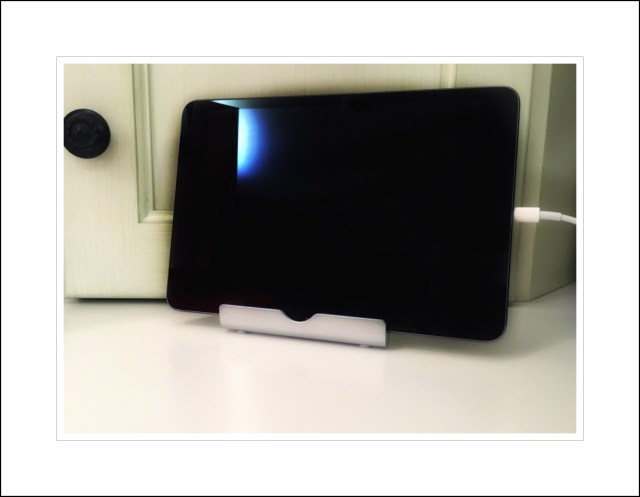
My iPad mini Retina Work Horse

My iPad mini retina aka ‘the work horse’ taking a well earned break after enduring untold ios 8 issues

And that’s why I’ve written this post…so that if there are other people out there who continue to experience the the types of battery drain and heat problems I did, which were brought about by the ios 8.2 update…ios 9.2 will probably fix them!!!

It was so phenomenally unlikely that this would happen that I decided to wait almost a week and really run the fixed mini through it’s paces.  I’m really happy to report that no amount of heavy usage has negatively impacted performance.  I’d stopped updating apps quite a while ago and had almost 200 apps needing updates. Almost all of those came off without a hitch and it did this in the background while I played videos and edited hi-rez photos. I ran as many of those things as possible in the new multi-tasking mode…and it just wouldn’t quit. It’s a work horse again :-)

Here’s what Gordon Kelly had to say about ios 9.2 and what’s known so far.


*I know what you’re probably thinking…that it’s impossible for an operating system to physically break a modem right?  I know because I thought the same thing myself…but it appears that can actually happen!  While I don’t understand all that much about networking…one thing I do understand is that DNS settings are important.  We found it hard to believe ourselves at first, but we were finally able to confirm that it was our ios 8 devices that changed many of the DNS settings of my Dad’s modem/router.  Apparently these aren’t easy to change back and Verizon’s solution was to send him new ones rather than attempting to fix them from afar.  

That might be part of the problem with our network too.  But our network is very complex with a hardware firewall and we just haven’t wanted to venture there yet.  The firewall does, in theory, protect our network from some of these types of things, which is probably why ours continues to work, albeit sluggishly oftentimes.  But it probably needs bandwidth optimizing, and this will require a service call from our network guru…so that’s why we haven’t gotten around to it yet.

Update January 2016:  It took me a while but I finally figured out that the only remaining network issues that we’re experiencing are those related to the aggressive practices of iCloud Photo backups.  I updated this in the post above and have written more here about it.

Later on…in 2017 we added MacOS Server Caching which I  write about in this post, to solve our iCloud Photo backup problem…which it did, beautifully. But…that solution appears to have been short-lived! Because when Apple came out with High Sierra OSX a few months later, they decided to get rid of MacOS server caching. Why is anyone’s guess. Ostensibly it’s because High Sierra now performs many of the same server functions…but not the one and only one that we use, which is the caching feature. There is no replacement for that…so our solution is to not upgrade to High Sierra! Apple just seems to go out of their way to annoy their users sometimes!

Comments

Please leave any comments for me in the comments area immediately following my bio…and thanks!
Posted in Apple's New ios 8, ios, ios 8, ios 9, iPad, Tech Tips | Tagged , , , | Leave a comment

How to Get Some of the Best Free Apps for iPad & iPhone and iPod Touch in 2015

Apple Gives Apps Away for Free Frequently…You Just Need to Know Where to Look

Afterlight usually costs $.99.  It’s a great photo editing app that gives ios users all the missing features of Apple’s previous (but now discontinued) iPhoto app.  In my mind Afterlight represents the missing link for iPad and iPhone users to be able to perform all of their photo editing functions right on their ios devices.  Afterlight provides the extra editing tools that aren’t standard or builtin to every ios device.  The most needed tool in my opinion is photo frames, however all of the added tools Afterlight includes are:

  • Adding textures
  • Adding photo filters
  • Adding frames

How to get Afterlight for Free

If you would like to acquire the Afterlight app for free, Apple is giving it away to all ios users for a limited time only by downloading the Apple Store app to your ios device.

Here’s a link to the Apple Store app

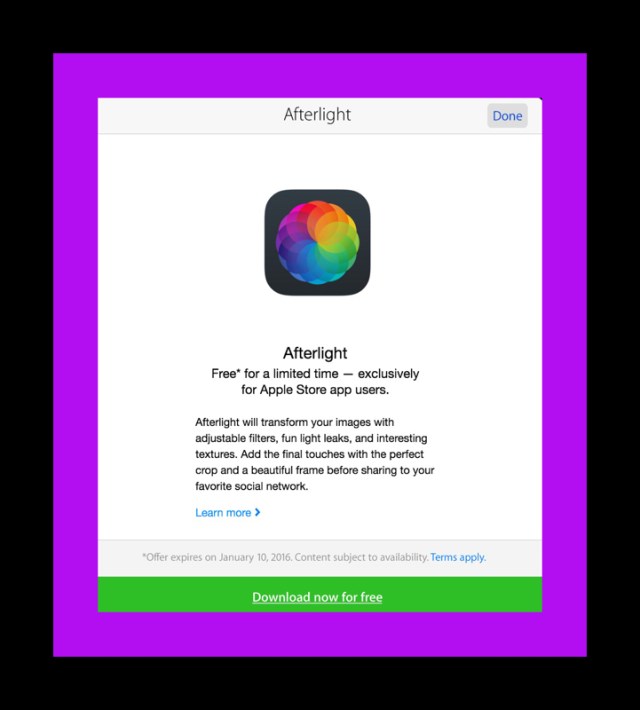
Once you’ve installed the app, open it and look around.  As you’re exploring the offer for Afterlight should reveal itself.  It will look like this:

image

When you tap on ‘Download now for free’ the App Store app will open and a promo code will be displayed that you can copy and paste when asked for it so that the app is free.

When you’re done you’ll see this message:

image

Apps Free to New iPad, iPhone and iPod Touch Users

Apple occasionally gives away some of their amazing productivity apps for free.  I’ve written previously about some of the individual iLife/iWork series apps created by Apple for ‘desktop’ publishing needs. Apple’s publishing apps, better known to MAC users as the iLife or iWork apps are oftentimes offered for free to new iPad and iPhone owners.

If you’ve recently purchased a new iPhone, iPad or iPod Touch there’s a good chance that you can pickup a copy of many of these apps for free just by visiting the App Store on the new device and searching for them by name. If you can’t find them that way, use Safari to view this article and tap on the links I’ve provided below:

Links to Sites me of Apple’s Most Popular iWork/iLife Apps for iPad

  • Pages |  Word Processing | Retail Price $9.99
  • Keynote |  Apple’s answer to Power Point |  Retail Price $9.99
  • Numbers |  A spreadsheet app similar to Excel |  Retail Price $9.99
  • iMovie |  A video editing app | Retail Price $4.99

Apple's iLife apps

One last way to find these apps in the App Store.  After opening the App Store app tap on ‘Featured‘ on the bottom menu.  Then tap on ‘Apps Made by Apple’ (see below).

image

Apple Offer’s Free Apps for All Just for Updating to ios 8

When Apple released ios 8 they made all of the iLife apps available to iPad, iPhone and iPod Touch users just for updating to the newest ios.  Here’s a link to Apple’s information about that.

Every Week Apple Makes One App Available to Everyone for Free…

To find the free app of the week, open the App Store app on your ios device and tap on the ‘Featured‘ tab on the bottom menu.  Then drag the screen to scroll to where you see a section which displays special apps Apple spotlights that week.  You’ll see one rectangle displaying the free app of the week similar to the screenshot below.

image

A Good Way to Find Some of the Best Free Apps

in the App Store

image

One good way to find some of the newest apps that Apple offers for free in the App Store is to use the bottom menu ‘Explore‘ tab and then look for a category entitled ‘Great Free Apps.’  Below are 2 screenshots showing some of the free apps currently available.  There are 2 main categories included here…Best New Free Apps and Favorite Free Apps.

2015 May Be Remembered as the Year That the iPad Finally Replaced Computers…(for at least 99% of computing needs)

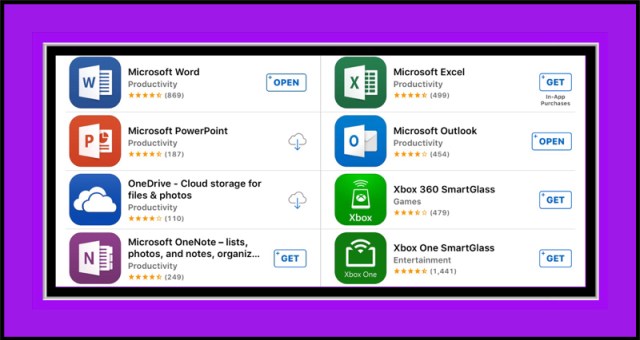
For Windows’ users the Apple iLife apps can be regarded as Apple’s version of Microsoft Office.  Each app is powerful and great in its own way.  Now that Microsoft has finally released their own ios apps for Office, which are free for most basic features…if you own all the Office apps in combination with all of the iLife/iWork apps you can accomplish virtually any publishing function that you might need to using just an iPad!

Links to Some of the Most Popular Microsoft Office Apps for iPad

Microsoft Office ios apps

The ‘Free’ Aspect of Microsoft’s Apps Is a Moving Target

Microsoft really wants you to subscribe to their ongoing subscription based Microsoft Office 365 program.  To encourage users to do so Microsoft makes some of their Office apps’ advanced features only available to those who do subscribe.

This seems to be changing on a  frequent basis, so it’s possible that the ‘free‘ aspect of each app may be different over time.  For example, PowerPoint, is a free app for all its basic features except if you happen to own the new iPad Pro.  Microsoft states in their description of the app that if you want to use PowerPoint on an iPad Pro, you must subscribe to Microsoft Office 365.

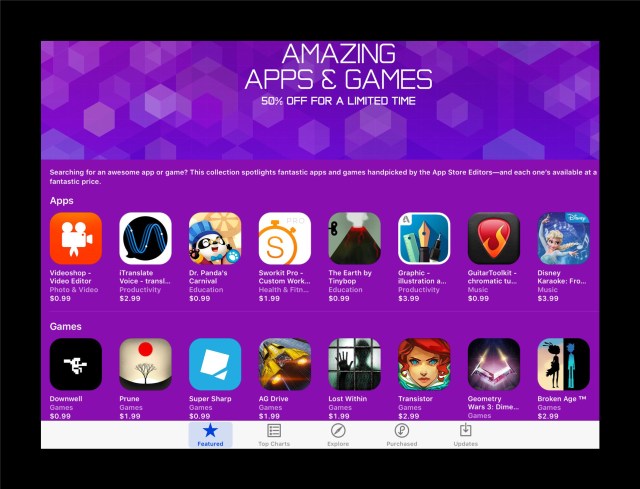
In Addition to Free Apps Apple Usually Offers a ‘Sale’ Section Where Apps are Reduced by 50%

What you might find in the App Store on any given day varies a lot.  Oftentimes, there’s a ‘sale section’ in which Apple features apps that are currently offered for half price.  The timeframe is usually limited so it’s a good idea to check this area frequently to see what has just become available.  You can find it by opening the App Store app and sliding or scrolling the top large bar of rectangles to the right (see the screenshot below to view current sales.)

50% off apps

Finding Apps in the App Store Isn’t Always Easy

To help, Apple also offers ever-changing categories of apps which can aid greatly in finding apps of a certain type.  You can find these categories by opening the App Store and tapping on  ‘Explore‘ in the bottom menu.

Below is a screenshot showing some of the current categories featured. You may notice the categories entitled ‘Free Apps‘ and ‘New to the App Store‘…together both include most of the  best apps currently available from Apple.

image

Apple also groups app into collections.  This provides yet another good way to find apps in a certain category.  For example, I was searching for an alternative keyboards to try out on my husbands new iPad Pro…but I wasn’t having much luck.   While writing this article I discovered that Apple has a collection for that, shown below in the left screenshot…my search was finally successful!


Posted in Apple Products, ios, ios 8, ios 9, ios apps, iPad Pro, Microsoft Office for ios, Microsoft Office for iPad, Photo Editing on ios, Photography, Tech Tips | Tagged , , , | Leave a comment

What’s Filling Up My C: Drive? I Was Stunned to Learn Window’s 10 Secretly Downloads to all Windows’ 7 & 8 Computers

I just ran across an enlightening article in the UK newspaper Express revealing Microsoft’s questionable practices regarding Windows 10

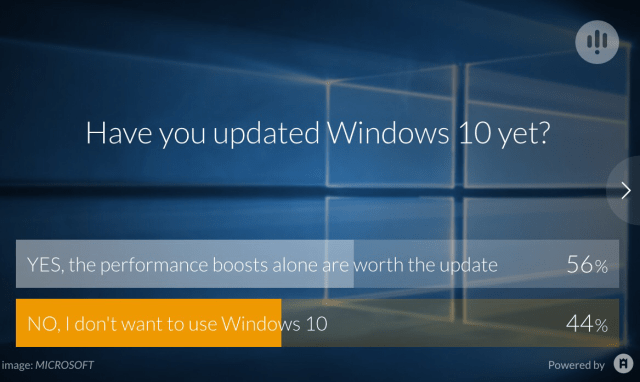
Windows 10: Microsoft says its silent background updates are for your own good

Below is the complete article .   I’ve reprinted it here for convenience, but please remember that I didn’t write this.  I’m just sharing it because I feel it’s information that all Window’s users should know.  The article is chock full of links to more articles which elaborate on the many points highlighted.

Microsoft has become increasingly pushy about its new Windows 10 operating system GETTY

Microsoft has become increasingly pushy about its new Windows 10 operating system GETTY

Earlier this year, it emerged the Redmond technology firm was silently downloading the 6GB Windows 10 installer file onto all Windows 7 and Windows 8-powered PCs.

Microsoft would even start the install process behind the PC owner’s back – in an effort to increase adoption, which the US firm hopes will hit one billion devices within the next 18 months.

The Technology blog The Inquirer recently spoke to General Manager of Microsoft’s Windows and Devices team, Jeremy Korst.

Mr Korst addressed the controversy surrounding Microsoft’s decision to automatically download the 6GB Windows install file.

“User feedback we’ve had is that users who have come from Windows 7 or Windows 8 are ‘very satisfied’ with the upgrade process,” he said.

“We’ve got a lot of feedback around customers who want us to make it easier, so we’re trying to facilitate that.”

“The thing is – the user is still in control. You still have to accept the upgrade when prompted to go through the process, and even then you have 31 days, your entire first month to revert back if for whatever reason you’re not happy.”

User feedback regarding Windows 10 is generally positive
“You’ve got two sets of users, one is the average user who wants to make sure they’ve got the most secure and always up to date version of Windows, and the feedback we get is that people want that to be as simple and seamless as possible.”

“Then there’s a set of customers like you and I who want more information.”

“We’ve heard that feedback and we are starting to give more information about what’s coming in the latest updates so if a particular developer or IT pro or tech enthusiast needs that information then they can get it.”  Microsoft Mr Korst was also asked about the data collection baked into Windows 10.

Windows 10 automatically install its 6GB installer file on all Windows 7 and 8.1 PCs GETTY

Windows 10 automatically install its 6GB installer file on all Windows 7 and 8.1 PCs GETTY

Installed with Express Settings, Windows 10 Home can track and share the websites you visit, the searches you make, your purchases, calendar details, location, contacts and the voice commands you use with virtual assistant, Cortana.

Microsoft claims your personal information is seldom recorded and sent back to its servers and whenever it does, there is always an opt-out.

Speaking to The Inquirer, General Manager of Windows and Devices Mr Korst: “Any data that we do collect is purely for enabling the customer experience.

“But part two is putting the user in control in terms of what data is collected, so while information collected that Cortana may use, or that an auto-complete may use, is about choices over whether information is used and collected.

Windows 10 users have experienced a number of glitches and bigs following the new update GETTY

Windows 10 users have experienced a number of glitches and bigs following the new update GETTY

“We think we earn trust by being transparent over the data being collected. It’s one of the core pillars of more personal computing.

“Our other responsibility is then to deliver a spectacular product so that when a customer does agree to allow that information to be used, it creates a great customer experience in return.”

The news comes days after Microsoft rolled out its first major update to the Windows 10 operating system.

The blockbuster new update brings performance fixes, visual tweaks, new functionality for virtual assistant Cortana and IT-level Windows 10 management tools to your PC.

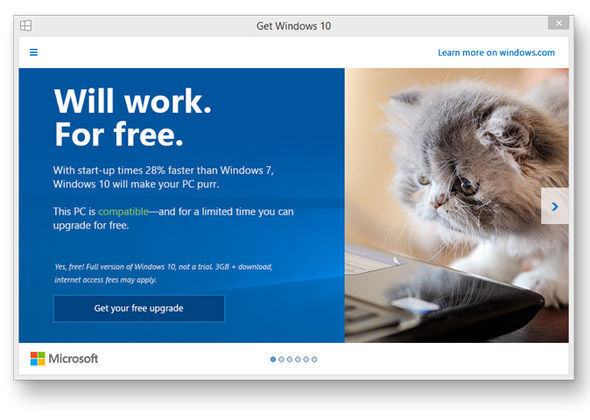
Microsoft currently advertises the free upgrade for its new OS in a series of pop-up adverts MICROSOFT

Microsoft currently advertises the free upgrade for its new OS in a series of pop-up adverts MICROSOFT

Dubbed Threshold 2, the update has also been dogged by the familiar controversy that has surrounded Microsoft’s new operating system since it launched this summer.

Windows 10 users have complained about multiple issues with the latest update. Microsoft has had a number of key issues with Windows 10 since its release earlier this summer.

Users have reported slow boot-up speeds, trouble with wifi connections, privacy concerns and issues with child safety features following the jump to Windows 10.

Windows 10 is currently a free operating system upgrade to customers running genuine versions of Windows 7, Windows 8 and Windows 8.1.

If you have managed to get your version of Windows 10 up and running smoothly – Express.co.uk has rounded up SEVEN top tips to master your new operating system.

And if you are feeling negative towards the new operating system, here are the WORST features Microsoft included in Windows 10.

Posted in Computers, General Technology Articles, Tech Tips, Windows 10, Windows 10 Problems, Windows 10 Upgrade | Tagged , , , | Leave a comment

Everything You Want to Know About iPad Pro | First Day Sales on November 11th, 2015


It’s finally here!  The new larger iPad which everyone has been speculating about for years.  I’ve seriously been wanting this tablet for years…(read my earlier post about the rumors)…but now that it’s here I’m not so sure…

Apple's Publicity Photo of iPad Pro

I thought I wanted the iPhone 6+ for years too

But when push came to shove, I just couldn’t handle the size of it and dropped it often.  Luckily I had purchased Apple Care for it…but after one replacement in less than a year the handwriting was on the wall…Apple Care will only replace a device twice.  So I’m the proud new owner of the 6s…and I also have a brand new (Apple Care Replacement) 128GB iPhone 6+ in the now discontinued gold color…that I need to sell but haven’t yet.

iPad Pro Will Go On Sale Wednesday at Apple’s Online Store and In Local Stores

The above title links to a great article telling you more about the ‘on sale’ details, and where I first learned the news.

Gallery of iPad Pro Photos


Some of iPad Pro’s features:

  • Apple’s new A9x cpu chip promises to be 1.8x faster than the current iPad Air 2’s…making it very capable of editing 4K video footage…yet battery performance should be 10 hours.
  • The pixel count is doubled compared to the iPad Air 2’s, so it’s Retina display is said to be immersive yet twice as fast with graphics processing as the Air 2.
  • Every aspect of data management and control is said to be far superior to the Air 2 and better than many computers.
  • Ultra-fast networking with download speeds of 866Mbps for wireless and 150Mbps for LTE.  These are hard to compare to the Air 2 because Apple doesn’t publish those speeds.
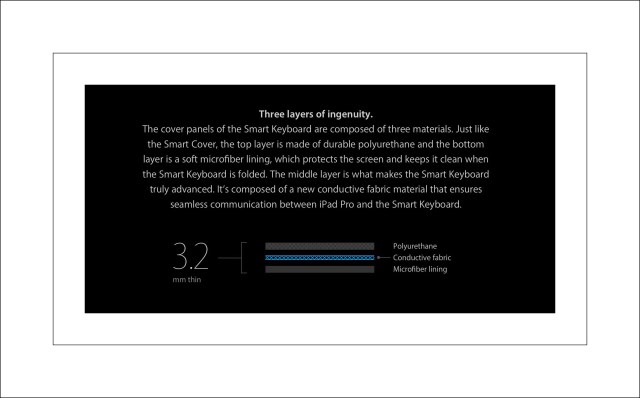
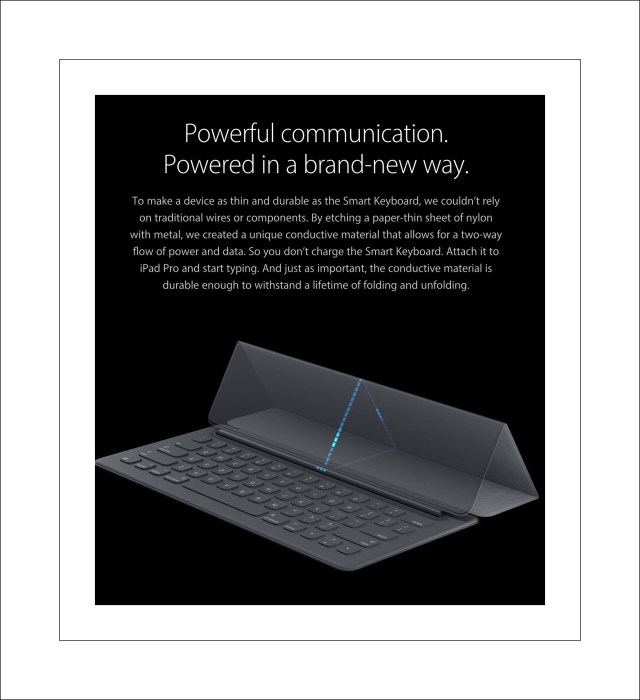
  • An additional smart connector which is used to attach Apple’s new smart keyboard
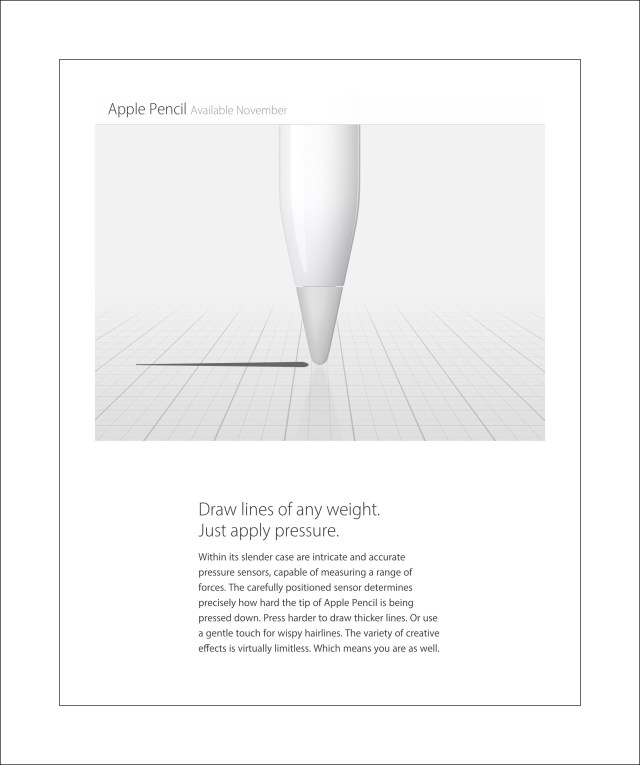
  • Apple’s amazing new Pencil appears to be the first fully featured stylus to work with ios devices and can be charged directly from the iPad Pro’s lightening port
  • Apple’s new SIM plan alternatives for short term ‘unlocked’ cell coverage in 90 countries.

We Just Ordered Ours…for testing purposes :-) &

I Realized We Need a Case So Here’s Size Info

iPad Pro Size Compared to iPad LineupPrice for a Fully Loaded, Fully Accessorized,

Fully Protected iPad Pro is $1446

If you want to get the fully loaded version of iPad Pro with 128GB’s and cellular the price is $1079…or $250 more than the similarly equipped iPad Air 2.  If you want to add Apple Care protection to that is $99.  The new smart keyboard is $169 and the new Apple pencil is $99.

Earliest Review Links | Steve Jobs Take on Stylus’s &

Who Knew Multi-Touch was a 2007 Innovation!

At the close of first day sales iPad Pro’s earliest reviews have been overshadowed by those for it’s newest accessory.  In true Apple fashion the new stylus is called simply Pencil.  But there’is nothing simple about Pencil.  Read Tech Insider’s article about the high praise Pencil is receiving from some of the industries top tech writers including those from Ars Tehcnica, The Verge, Tech Crunch and Wired.  They’ve also included an ironic video clip of Steve Jobs denouncing the concept of pairing a stylus with the iPhone…it’s hilarious in hindsight…yet his introduction of Multi-touch wasn’t.

Apple Stylus called Pencil

Links to more great information

Apple Videos:

Apple’s beautiful marketing literature for the iPad Pro (with a links to the Apple’s Keynote introduction and stunning marketing video too)

Tech Specs

Apple Smart Keyboard $169

Apple Pencil $99

Very Cool Apple Pencil Video

Details about Apple SIM

Non-Apple Links:

Quick Overview of iPad Pro’s Keyboard

Detailed Comparison Between Microsoft’s Surface Pro 4 and iPad Pro

Why I may not want to get the iPad Pro…

                                                                (but did anyway)

This Part Can Be Easily Skipped…it’s just one girl’s opinion  

This is a really tough pill to swallow for me because I’ve been longing/lusting after the Pro for a very long time.  But if I’m being completely honest and frank about it, I have some huge concerns.

There are a few unanswered questions remaining about the Pro.  Apple promotes the specs as being vastly superior to those of the Air 2, which I’m writing this on…and I don’t doubt the truth of that.  But is it still just a tablet?  Will I be able to view flash videos?  Will writing for websites be easier?  Can I do anything on the Pro that I could do on a computer?

What about the storage space?   128GB’s isn’t very much for a powerful device like the Pro.  My most recent iPad Air 2, which I’ve had for about 1 month now (and which is also 128GB’s) is already 1/2 full.  I have 56GB’s available from the original 128GB’s.

I setup this Air 2 as a brand new device…I didn’t restore from backup (because all my backups were ‘corrupt’ due to ‘over-the-air’ updates of ios 8 from Apple.)   So frankly, I’m worried that my new extremely powerful tablet will fill up within the space of a few months!

Our New iPad Pro

My last concern is a hard one to verbalize…I just have this gnawing, sort of gut-wrenching feeling that Apple is trying to hard to lead in technology at the expense of their customers.  Granted they are a very rich company that can throw bazillions of dollars into new tech research…but if they can’t follow through and keep customers happy because their products lack the polish their shiney exteriors present…I for one won’t continue to immerese myself in the Apple ecosystem forever…every camel’s back has a breaking point, and last years ios 8 fiasco is still too raw and too unresoveled for me to be super enthusiastic…but I wanna believe.

Thinking about it, isn’t it ironic that, during the Keynote addresses, Tim Cook sort of goes on and on about ‘Customer Satisfaction‘ but in the real world his stats seem hard pretty to replicate in our environment.  For sample, do you know anyone who gushes about their Apple devices after last year’s ios  8?  Maybe it’s kind of like Catholicisim and the Pope…both of which aren’t really all that popular in Western cultures anymore, but they still dominate in terms of the World’s religions.  Probably because they have become very 3rd world focused and let’s face it the populations in 3rd world countries are huge!  But I don’t think it’s so much of an analogy (3rd world citizens probably aren’t buying tons of Apple devices.)

So please Apple, get your act together and don’t disappoint!

I don’t really need/want a car made by you…my Watch is nice, but not earth shattering…but I do need powerful, amazing devices that work beautifully and stand the test of time (and by time I realistically mean a year or 2 tops!)

Posted in Apple News, iPad, iPad Pro | Tagged , , , | Leave a comment