
This Fix is for Anyone Who’s Imported Bookmarks from Android
After buying the new 9.7″ iPad Pro and using the Android to ios import tool to set it up, Safari became unusable on all my ios devices. I scoured the Internet for a solution and didn’t find one. Then I happened upon what I now know is a bug that’s not been reported anywhere else, that caused all my Safari speed and crashing problems. My method to fix it solves the problem completely.

Audience members at Apple’s latest live event.
Part 1 | The WARNING & Some Possible Solutions
Importing Bookmarks Using the New ios 9 Feature to Migrate Android Content to ios Contains a Bug* that ” Slows Down Safari So Severely That it Can’t Function Properly & Often Crashes”
Introduction to The Problem
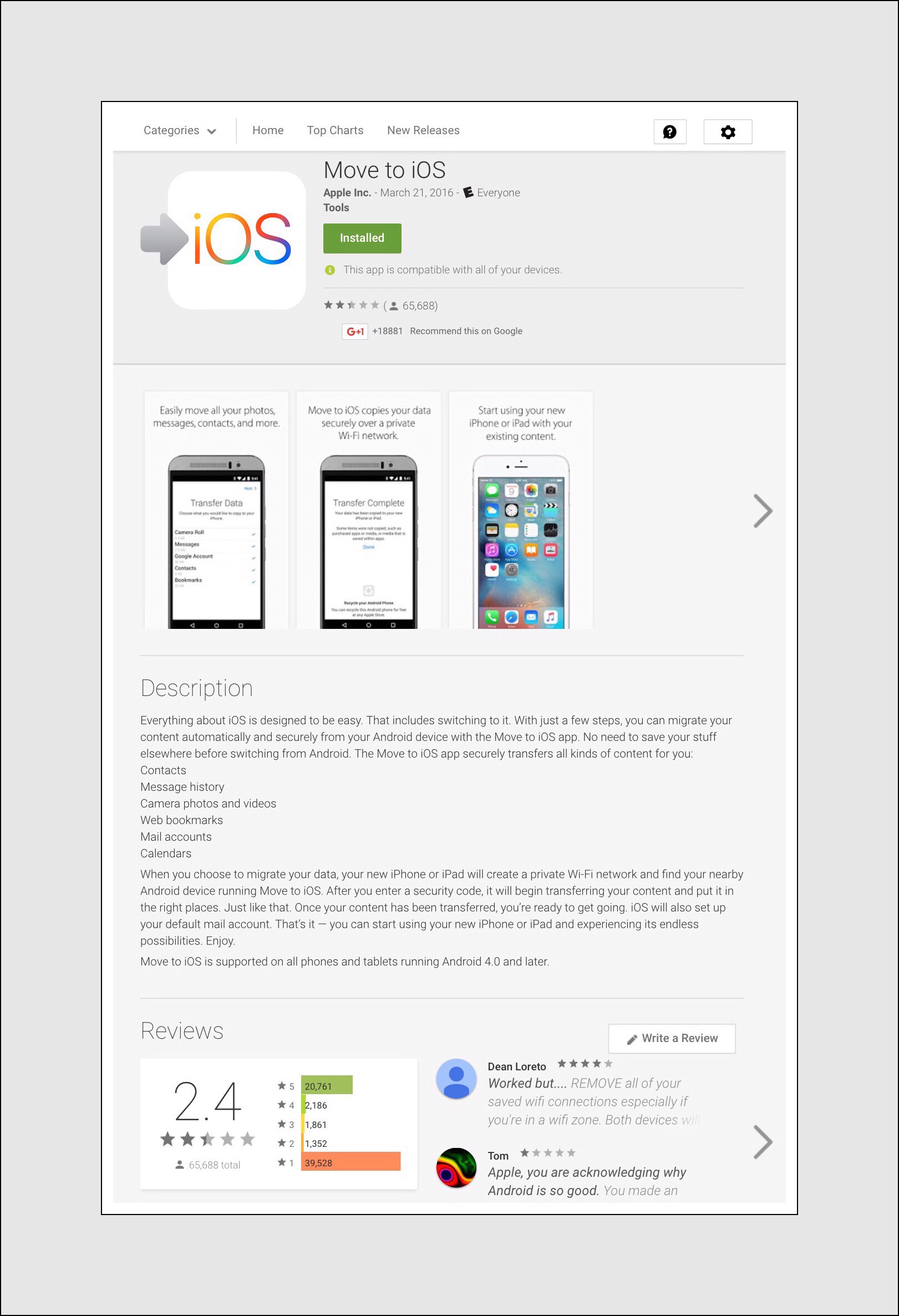
Apple’s new ‘Import to ios App’ in the Google Play store has been downloaded upwards of 65,000 times by users as of mid-April. That’s an astonishing number given that it’s been available for less than a month. That number alone speaks volumes about how many people want the ability to migrate their content.
Whether the reason for migration is because users are actually switching from Android to Apple, or because they use both and just want to have their content available on both OS’es. It’s possible too that some people may even figure out a way to use this new functionality to share their content with friend’s who are on the competing platform. I haven’t examined the ins and outs enough to know if that last scenario is even possible, but the sheer numbers alone indicate that a lot of users have desired this capability for a very long time!
But I’m writing this post because I encountered 1 frustrating problem when I imported my Android (really Chrome’s) bookmarks into Safari. The problem emanates from how Safari handles all the bookmarks that were imported using Apple’s new migration tool. The tool itself is an app is found in the Google Play store, but created by Apple, it’s called simply Move to ios.
Link to the ‘move to ios’ migration tool
More Details About the Bug
*I found no evidence of anyone else reporting this bug. But after trying my method to fix it, and finding it solved the problem, that confirmed the bug’s existence. This bug only arises if you’ve stored a lot of bookmarks in Chrome…especially if you’ve merged bookmarks from several sources such as from Desktop and Android mobile devices. During the merge process many single bookmarks that don’t appear in folders are added to the Favorites or Bookmark Bar category…it’s having a ton of bookmarks in this category that causes the problem.
The problem only arises if you have a lot of bookmarks in Chrome.
I’m not sure exactly how many Chrome bookmarks I have currently…but it’s a lot. I’d guess the count to be close to 1000. All of my Chrome bookmarks were created using various Android devices. They are all organized into folders and subfolders, although I’m aware that my organization still needed some work. Unfortunately, for migration purposes any preexisting organization is completely ignored. All of my 1000+ bookmarks were unceremoniously dumped into my meticulously organized Favorites in Safari on ios.
Because it’s so important and it’s this one aspect that lies at the heart of the problem (I think) it’s needs to be emphasized that when you import your Android (aka Chrome) bookmarks using this tool, it will eliminate any of your prior categorization or organization of them.
When this occurs those bookmarks will populate in your Favorites everywhere they appear in Safari, including on Safari’s toolbar and on the webpage that appears when you open a new tab. If you open a new tab you’ll see them displayed as colorful icons or boxes that were auto-generated by Safari. They’ll be positioned to follow any preexisting Favorites you may have created, and will immediately follow any frequently visits sites in Safari too.
The new import to ios App

There was one thing I found out about after-the-fact that I didn’t notice before I began my import. Apple states on their webpage that explains the process, that you should be sure to update the Chrome app beforehand. I didn’t consciously do this, but the settings on my Samsung have auto-updates for apps enabled, so it should be a moot point in my circumstance.
After the import has been completed, you may not even notice the new bookmarks at first. If you actually go looking for the newly imported bookmarks you may not even find them. There is no new folder created in Safari’s bookmarks labeled ‘Chrome Bookmarks’ or even a more generically named one called ‘Imported Bookmarks,’ so you may initially think that they didn’t even import at all!
Your only indication that the bookmarks did transfer initially may be that Safari begins to act strangely.
Diagnosing the Problem
First, if you did recently import some of your Android content using Apple’s new app, and then you began to experience a serious speed problem whenever you open Safari, this bookmark issue is probably the culprit.
Second, the best way to tell for sure is to open Safari and then to open a new tab using the + icon in the upper right hand corner. If you see a ton of colorful boxes like those below on the next screen that displays, (especially if you hadn’t seen those boxes previously,) then the culprit that’s crippling your Safari is the bookmarks that you imported.


The degree to which speed is affected has, I believe, a direct correlation to the number of bookmarks that were imported. In my case I estimated in the high hundreds and probably over 1000 bookmarks were imported. So, to reiterate, the net effect of dumping a huge volume of ‘individual’ bookmarks into the Favorites group using the ios import app, causes Safari to quite literally grind to a halt.
I really wish I’d made a video tape of how useless Safari became after this occurred…but I didn’t know if my fix would work…it was just an educated guess…but a bit of a longshot too. The good news is that it did work. The bad news it that it worked so well that the fix was immediately populated to all of my devices, thereby removing a whole slew of bookmarks almost instantaneously. So short of me completely restoring a device that I just got working again by doing the whole import over again, there is no good way for me to demonstrate to you how awful things had become. But later in this post, in the section entitled ‘How My New iPad Pro 9.7″ & Our Original iPad Pro 12.9″ Became My 2 Favorite iPads to Use’ I give a much more detailed description of the specific ways in which Safari misbehaved.
The 3rd place to look for clues is again inside the Safari app…this time inside of the bookmark management tool that you access by tapping on the open book icon that appears immediately to the left of the address bar (at the top of the screen.) If you don’t use Safari bookmarks a lot, or you don’t spend time navigating around in this section a lot, getting lost is pretty easy. But figuring out your way around here isn’t all that difficult either, and once learned this section may become your best friend. It may also prove to be the only alternative available to you to fix the Safari speed problem so following along here could be even more helpful than you realize!
The steps to follow involve tapping on each command once in the order shown:
Step 1
Tap the Open Book Icon (next to the address bar at top) – Tap the Open Book Icon Again (but this time the one at the top of the column) – Tap Once on any and all Left-Pointing Grey Arrows (they’ll have titles in them like Favorites) until you reach the word BOOKMARKS in grey displayed at the top.


Step 2
Tap Favorites – then scroll to the bottom of all the Favorites displayed here. If you do use bookmarks at all, then you should find preexisting entries in this column. If you don’t, either you’ll find this section empty or there will be some standard entries here that Apple added to all new devices.
Either way you will need to scroll past the preexisting bookmarks here to find the new ones. Because this is the location that Apple has chosen to dump all of the bookmarks that it imports from any import utility, but more importantly, from the bookmarks that are transferred during the migration from Android to ios.
It’s probably worth mentioning that when the imported bookmarks are displayed here, you won’t see the large colorful boxes that accompany each individual bookmark, instead you’ll just see an open book icon next to each entry. So the only way to identify the new bookmarks is by having prior knowledge of what was there previously.
The Solution
How to Fix the Problem
There are only 2 real alternatives available to solve this problem. The first alternative is to delete all of the imported bookmarks. The second, much less desirable alternative, is to move all of the individual bookmarks into bookmark folders that aren’t located underneath the Favorites category at all, but rather are located directly under the ‘Bookmarks’ section…but ideally creating bookmark folders first and then moving them all into their appropriate folders. You might be wondering why I keep suggesting creating bookmark folders. The main reason is because if you have so many bookmarks that they are causing the aforementioned speed problem, then having them sorted into categories can be a big help to you when searching for them. But the second, more speculative reason is because that’s how I have mine organized…and by duplicating exactly what I did I’m hoping that your problem will be solved too!

Here’s a link that explains how to organize bookmarks and create bookmark folders in Safari for both ios and OS X (by idownloadblog)
I did attempt the second solution above, but I did so using ios devices. Because that’s precisely where the problem was obvious and ios devices are what I had at my disposal. At the point in time in which I attempted this, I wasn’t even yet aware of the fact that these bookmarks were the exact reason why Safari was acting so nonresponsively! I really was just trying to manage and organize this new deluge of bookmarks that suddenly showed up in all my Safari browsers.
But there are 2 inherent problems with the 2nd alternative:
- If you have upwards of a thousand bookmarks like I do, the fact that each one must be handled individually using Safari in ios makes this a cumbersome, time consuming chore, even under the best of conditions.
- But more important is the fact that managing Safari bookmarks using ios is an online task which requires that the Safari app acts responsively. Unfortunately, this is the exact problem that you’re trying to fix! While it might be possible to do so using a network with gigbit speeds, in tandem with using a high performance cpu like those found in the new iPad Pro’s…I can definitively state that this is not doable using a 50/15 mbps network and a standard iPad Air 3.
So, alternative 1 is the only real solution. But even attempting that solution if you only have ios devices at your disposal is very problematic. Once again the problem lies in the ability to manage bookmarks in ios on anything other than an individual basis. Right now, at least to my knowledge, there is no good way to manage ios bookmarks using batch processes. Therefore, each bookmark would need to be deleted individually…and manually. It’s just not really doable if you have a lot of them! I know because I tried this too.
Using an Apple Computer to Delete All Imported Bookmarks is the Fastest, Easiest Method
In fact, this is really the only solution that makes sense, because using Safari in OS X you can delete a lot of bookmarks altogether in just a few key strokes.
That’s how I both solved my problem and how I figured out that the bookmarks were indeed the cause of problem behind Safari’s aberrant behavior and it’s ‘slow as molasses’ speed.
My Exact Steps It took me less than 5 minutes to wake up our MacMini, login to my user account, open Safari, then find and figure out how to ‘group select’ multiple bookmarks and press the Delete Key.

How to select all the bookmarks at once on a Mac:
Open the list of bookmarks you want to delete. Find the first bookmark in the list and select it so it’s highlighted while holding down the SHIFT key at the same time. Then scroll to the bottom bookmark and select it too (so that it’s highlighted) while keeping the SHIFT key held down. All the bookmarks including the top and bottom one’s you selected will be highlighted now. Press the delete key to get rid of them all in one fell swoop!
I’m a Windows person (always have been, always will be) and I don’t have a clue about how to use most OS X commands…but this one was actually intuitive, and by intuitive I mean it was done just like it would be done in Windows!
In less than 5 minutes the problem that had plagued me for weeks was solved!
But, that wouldn’t have been the case had I not recently purchased an Apple Computer to backup all of our ios devices with. We did this because our iCloud backups completely stopped functioning last summer (in 2015.)
So, if you don’t have an Apple computer, I have a few other suggestions for things that I haven’t actually tried, but that make sense to me now that I understand what the real problem is.
Things to Try if You Don’t Have an Apple Computer
- Borrow a friends Apple Computer
- Make an appointment at the Genius Bar and ask them to delete them all
- One aspect I haven’t investigated is whether or not iCloud Drive gives Windows users the ability to manage iCloud bookmarks via either the iCloud Drive Windows app or the web app.
I don’t currently have a functioning Windows PC, so for that idea your all on your own.
Part 2 | The Story Behind How I Isolated, Diagnosed and then Figured Out A Solution to the Problem
In this section I’m going to go back to the beginning to explain how it all began, and what led to me to finding the solution that worked for me
The reason I’m including all the detail below is because I’m not entirely sure why my solution worked. I’m not entirely certain about why all my bookmarks being dumped into the Favorites category created the huge problem that it did. Something just doesn’t sit right with me about my theory…I don’t understand WHY it happened in the first place! That’s why I was really surprised and thrilled when my solution worked!! But because I don’t yet really know why, that part bothers me just a little.
So I thought that by explaining in more detail what actually occurred, and what the problems that I experienced were, maybe someone else who stumbles across this might be able to provide that explanation for me.
There’s one thing I’m certain of. I wasn’t able to find anyone else online who had encountered this exact problem under the same set of circumstances as me. That might be because this feature is brand new. But it might not. It might be that our particular set of circumstances created a problem that others haven’t and won’t experience. If that is truly the case, then no one else will ever really seek out this post and my solution…only time will tell.
My guiding philosophy behind the topics I choose to devote my time and energy towards is this:
- If I’m unable to find online resources already available on a given topic
- If I encounter situations that seem to require more time and energy than normal…especially if it’s a lot more
- If it seems likely that someone else may also encounter my exact or a similar scenario
If all 3 of the above conditions are met and if I discover or derive information that seems to shed new light on the topic then it’s a topic I deem worthy of writing a post about. My readers might be surprised to learn that while my criteria may appear to be unduly exclusive, it has the opposite effect in real life. I’ve begun perhaps 40-50 posts that are still in various phases of the draft process and which I haven’t yet finished. Some of those may never be finished as new bug fixes are constantly being released as well as newer software and hardware. But I digress…my point is this:
If just a few people do encounter this same situation and manage to find my solution and it actually solves their problem too…then my time was well spent. :-)

Link to Good Article I Ran Across:
A Few a Weeks After I Wrote This I Ran Across A Really Useful Article on Forbes, Written by Miguel Helft, About How He Easily Made the Switch from Apple to Android and Including Some Great Tips
It All Began Because I Was Super Excited When I Discovered That Apple Had Finally Given ios Users An Easy Way to Import Their Android Content in ios 9.3…So Excited That I Didn’t Think Twice About Testing it Out with My Shiny New iPad Pro 9.7″
I was so thrilled with my discovery when I began setting up my new iPad Pro 9.7″ that I decided to video tape the whole import process, just in case I wanted to write a post about it later on. Apple’s website provides you with the basics of the process, but I was still a bit curious to see how and what the exact content might be and where it would be imported to. Once the import was complete I found out that all of my camera roll photos, some of my apps, and some contacts had been carried over to the new iPad. A quick check didn’t reveal any imported bookmarks however.
But later on I was puzzled when I first noticed a large group of colored icons appearing in the ‘new tab’ screen in Safari. I didn’t immediately make the connection that these appeared because of the Android import I’d done because when I first saw them they were on a different iPad…not the Pro that I imported my Android content directly too. This also occurred on a different day…at least a day or 2 after the import which frankly, I’d completely forgotten about due to its underwhelming consequences (underwhelming because I’m so heavily invested in the ios platform I think that I just don’t have a lot of Android content.)
Around the Same Time I Started Noticing Worsening Safari Speed Issues That Were Intermittent…But We’d Been Experiencing Speed Issues for a Long Time That We Attributed to iCloud Photos Backing Up
Yet it seemed my speed issues were getting worse. They weren’t consistent however. My husband didn’t experience the newest speed problems that I was having. That they were intermittent made it tougher to pinpoint the causes too. I began to think that there was one iPad Air that primarily exhibited this speed degradation. It’s one of the newest models but it’s storage capacity was almost entirely used up and I knew from past experience that could account for some irregular behavior.
To muddy the waters a little more, prior to getting my new smaller iPad Pro we had been experiencing a lot of network problems in general. We found that switching our ios devices into Airplane mode whenever we experienced bandwidth issues solved the problem. Our network bandwidth or speed issues continue to plague us. They are the worst in the evening hours and oftentimes (pretty much daily in fact,) they are so bad that they prevent our ability to accomplish simple things like streaming TV shows. I spent a lot of time trying to find a good solution to that problem too, and ultimately came up with Airplane mode as the fastest, least invasive solution. Because I was unable to find any blog or website that provided an easy solution to this problem, I wrote my own blog post about our solution which you can find here.
When this new speed issue with Safari first cropped up, it seemed to me that switching the majority of our devices to Airplane mode helped. The fact that we (or really I) have quite a few ios devices definitely amplifies the problem too.
Looking back, that may have helped some because the problem arose during tasks which involved 2 way communication with the Internet. But the reality was that each device handled this situation differently depending upon the normal factors that impact overall performance of is devices. Things like speed of the cpu, how full the device’s storage was, how many background tasks were running, even which version of ios each one was running contributed to increasing the number of variables I needed to look at.

That’s a really long explanation for why (I think) I didn’t immediately make the connection between these new speed issues and the Android import. It didn’t even dawn on me at first that all the new bookmarks that showed up under favorites had anything to do with the Android import.
I had just finished updating all of our devices to is 9.3. I did that slowly because I had experienced several instances of corrupt ios installs during ios 8’s reign…so many in fact that I wrote a post about that too! I learned from that experience to only download new versions of ios under scenarios when our bandwidth is strongest. That usually happens to be in the middle of the night or early morning. In addition to our my many devices, we also take a lot of photographs and screenshots. My husband’s tend to be extremely high resolution whereas mine tend to be higher in volume due to many iterations of screenshots that I use as illustrations on my website’s. So, even though we subscribe to the highest bandwidth available to home or small business networks in our area, our bandwidth doesn’t seem to be nearly enough for our situation (especially given Apple’s new aggressive approach for iCloud photo backups.)
The Focus of My First Research
In truth our network problems and speed issues really only began when we updated our devices to ios 8 (remember WiFried?…if not you’re very lucky!) So I began my research by focusing on what all those new colored icons really were and why they just appeared one day on all of my devices. I should mention too that I’d not seen the use of colored icons on the ‘new tab’ screen previously because all of my favorite or toolbar bookmarks were organized into bookmark folders. I didn’t have any single bookmarks on the toolbar…so previously I’d only seen grey folder icons displayed when I opened a new tab.
It took me quite a while to figure out where all the new ‘Favorite‘ bookmarks had come from. Although I first noticed them on the screen that ios displays when you open a new tab, they also appeared in my bookmarks listing that you pull-up using the open book icon. Whether it was in the list or on the new tab screen, once I displayed them I needed to scroll for a long time to reach the end of them.
All the bookmarks were mine…I could tell by the content. But there didn’t seem to be any chronological order to them. They seemed to be from all different years and in no kind of order that I could ascertain. I really thought that they appeared because they were some new feature of ios 9.3.
Below are 2 examples of the screens I discovered (there were probably at least 100 in total that I scrolled through. All these new colorful icons appeared underneath my preexisting Favorites folders. Those folders, which appear on the Safari toolbar, contain my most frequently used bookmarks.


How My New iPad Pro 9.7″ & Our Original iPad Pro 12.9″ Became My 2 Favorite iPads to Use
My husband and I found that after the novelty of first using the 12.9″ iPad Pro wore off that we just didn’t want to use it very much…partially I think because it’s pretty heavy. But for me it as also because my husband and I were sharing it and we’d set it up using his Apple ID, so much of my content wasn’t really on it. And he got annoyed when a lot of my screenshots started showing up in his camera roll. I also really hated the virtual keyboard that so many others love. I couldn’t type accurately or anywhere approaching the speed that I could on any other iPad’s onscreen keyboard. So, we ended up only using the new Pro when we wanted to use Apple Pencil or when we wanted to stream something…because that iPad is an amazing media player!

But something changed when I received the new 9.7″ Pro. Shortly after getting it I found myself gravitating towards using it and the 12.9″ Pro more often too. The reason why in retrospect is because that’s when I began encountering this unusual speed problem with many of my older iPads using Safari. As I mentioned earlier, I knew the speed problem was intermittent and I thought it was unique to the one iPad Air that was reaching it’s storage limit. But once I began to really pay attention to it, I realized that the problem was occurring on all of my iPads and even my iPhones. All my iPads that is except the 2 Pro’s.
In case you forgot already because it was paragraphs ago, my problem was that each time I opened Safari the speed of the iPad that I happened to be using at that moment ground to almost a complete halt. It could literally take me 10 minutes just to successfully enter a Google search term. I had to keep tapping on the address bar over and over again just to begin entering text. Once I was able to enter text I could only type two letters at a time because the iPad would sort of freeze up for a few minutes before I was allowed to enter a few more letters. This stop and start process was extremely annoying!
Once I finished entering my query I had to wait even longer for Safari to respond to my search input. After it did that opening each new page was really slow too. Then I would go through the whole excruciating process all over again to change up my search terms. It was awful and I was certain that it was due to iCloud photo backups which were aggressively usurping all of our fairly ample bandwidth.
But, slowly it began to dawn on me that this only happened on all my regular iPads and iPhones…it never occurred on the 2 Pro’s. It also never occurred on my husbands devices.

Putting 2 and 2 Together
Looking back on it now it seems so obvious. I guess what they say is true about hindsight being 20-20. In reality it took a few weeks time before I finally made the connection that this problem only arose with my ‘less endowed’ devices. In my defense I had just undergone an excruciating foot surgery that had laid me up for 10 days completely. In fact, that’s really why I ordered the new Pro…I hoped it would give me something fun to look forward to while I was keeping my foot elevated for the required 23 hours a day for the first 10 days. But, I was also loaded up with pain meds and had a negative reaction to those which caused me to primarily sleep those first 10 days. So in reality I wasn’t using the new Pro or really any iPad most of the time.
As my foot improved and my pain med consumption decreased I began to play with the new Pro. I loved lots about it and started using the larger Pro for comparisons. And instinctively I think I realized that I didn’t have the speed issues when I was using those 2 iPads…but I did with every other one…so I just gravitated towards using those 2 without even thinking about it. When I finally did stop to think about it I realized that I never encountered the Safari speed problem with the Pros!
I decided that it was because they had both better cpu’s and higher amounts of RAM which acted as mitigating factors. Once I had that much figured out it didn’t take me long to figure out that the 1000+ new favorite bookmarks must have originated from my Android device. Then the last piece of the puzzle emerged although it was really a bit of a stretch I thought, but I decided that maybe the bookmarks themselves were actually causing the speed problem.
Testing Out My Theory
Acting on my hunch I went into Safari on an iPad Air and attempted to delete some of the new ones. But this is normally a slow process using ios because each bookmark has to be deleted individually in real time. Even with Safari functioning at peak performance, this is an onerous task. But with a misbehaving Safari the task at hand appeared to be impossible to accomplish…because there’s no way to batch delete them.
Lucky for me we had our recently purchased Mac mini! I’d barely used it, but it was keeping itself busy with backing up all of our iCloud content to Time Machine.
I knew I could batch delete bookmarks on a Windows computer, although the process varies by browser. But I discovered that I could do the same thing on a Mac. And it was really quick too!! A few nights ago I did just that in under 5 minutes!
And my guess about the cause of slow Safari’s on all my iPads except the Pros was spot on!
Once all those bookmarks that I’d imported were deleted, in just a few short minutes Safari returned to normal speeds on one after another of each of my ‘regular’ ios devices!












 vsatips