
Updated November 2017
New Information Causes Evernote to Crush Apple in this Ongoing Comparison!
How My Usage Has Changed Since Writing This a Year Ago (in September 2016)
Over the last year my use of Evernote has decreased dramatically as my use of Apple Notes has increased. This is due to only one factor…speed. Granted we’ve had bandwidth issues at home….and pretty significant ones at that. And those do impact my use of Apple Notes too…but less. Since I’m a beta tester I have access to the beta forums and even correspond on occasion with Evernote’s development team…and it appears that my problems are far from universal, which all of a sudden whilst writing this helped me to realize that it’s another more unique factor that’s impacting speed too.
My problems are most likely caused by bandwidth issues which are in large part caused by my Apple devices and the aggressive manner that iCloud takes over bandwidth when backing things up. You see, I have a lot of iPads… and Apple devices in general. So many in fact that Apple continues to discourage me from buying any more, which sort of boggles my mind! I grew so frustrated recently I was compelled to write this post on ‘Why Apple Doesn’t Want You to Buy Their New iPad.’ But I’ve strayed a bit from my point which is, under the right circumstances…where bandwidth may be limited…Evernote performance may suffer so much it becomes virtually unusable.
As I mentioned above, this can also impact Apple Notes significantly too…but just not as much as it does Evernote. However, it also dawns upon me that what was once my main reason for even writing this update, should really be the thing that inspires me to work more closely with the Evernote dev team to try to solve the speed issue. Especially because I just discovered one other huge factor which will push my usage once more much further towards Evernote!
A Huge Discovery I Made Today Moves Evernote Up Much Higher in this Ranking Comparison
New Information Places Evernote Once Again in the Lead (read below)
Apple offers users no method of backing up their notes a 2nd time! Even a simple Export database would suffice! For anyone who’s lost a bunch of data…once is usually enough to get people to be more proactive in making sure they backup their data. I could be entering my 2nd instance of losing significant amounts of data right now…not due at to factors under my own control it seems…but here the backup issue is iffy too…so I’m worried…but I stray yet again.
Of course both Apple and Evernote backup your notes databases on their cloud servers. This is why you can get a new device and have all your notes magically appear on it. But one backup is not enough!
If you keep important data in your notes that you rely upon, then you need to create a backup of the backup too…any good computer consultant will tell you that. And guess what! The only way to accomplish this in Apple is to copy each individual note! That’s simply ludicrous in this day and age…to not be able to Export your entire database somewhere else! But it does sound like Apple doesn’t it? For some odd reason they prefer to control their users much too much…yet they don’t service them well enough to command that sort of loyalty. Just in case you missed my recent highly compelling reason why Evernote should rank higher than Apple Notes, let me boldly repeat it:
Apple Does Not Provide a Backup Method for Apple Notes!!!
The Only Way to Backup Apple Notes as 2017 Draws to a Close is By Manually Copying Each and Every Note Yourself!!!
Backing up Evernote on the other hand is a cinch. You just go into settings, look for Backup, and then your biggest decision is where to place the backup file! That’s all there is to it…you’ll be done before you’ve would have even copied that first note in Apple Notes! Although, I should mention too that copying notes in Apple notes is really slick and I love the way they do it…I just wouldn’t want to use it over and over again until I got all of my 1000+ notes copied!
My Orignal Comparison Below:
Evernote used to be the best…but now, it’s unclear…
2 Recent Events Have Changed the Playing Field for Notes Apps Entirely…
The First event was…when Apple launched ios 9. They completely overhauled their Notes App. I don’t know why, but I was really surprised…maybe because these changes had been requested for so long and it looked like Apple just wasn’t listening. But Apple did finally add a lot of great features to Notes making it a real contender for serious note takers.
In a few days (on September 13th) ios 10 will come out for all users (it’s been available in beta for a while now.) ios 10 has added even more new features to the Notes app…including a big one…collaboration…this was one realm that Evernote still held a significant edge. So I’ll rewrite the final version of this after 10 is out. But the fact is that Apple Notes now poses a serious threat to Evernote.
The Second event occurred…when Evernote overhauled their pricing scheme, severely impacting Free users. This was just a few months ago. To many, EV seemed to have completely changed their focus. Many people were really angry. I was too at first…ironically, I’m not even a free user! But I feared my credibility might be affected, because I may have been of EV’s most vocal supporters.
What made everyone so upset was that for years and years Evernote had been free for all users with almost the full-blown feature set available to everyone. I could be wrong…but I think EV began as a free app…then sometime later they added a few advanced features that they charged an annual fee of $49.00 for. Several of the main paid features were focused on security. I’d previously written about them in this article telling users how to secure their data and how to encrypt text within notes.
But the more I read and thought about it, I realized that there was no reason to be angry.
Evernote primarily competes with Apple’s and Google’s note products. Yet EV’s main product has always been free. Obviously a vast percentage of Apple & Google’s earnings come from their other products…Evernote’s earnings do not. The company was struggling to remain profitable yet they wanted to keep their ‘bread & butter’ product in its esteemed position as market leader. Primarily because EV is run by people who love and use the app themselves. Something had to give. Restricting free users’ privileges to only allow the syncing of data between 2 devices seemed a good compromise and it might also serve to encourage heavy users to consider paying for Evernote.
Evernote truly does offer a great product and they need to be able to adjust as circumstances change, in order to keep things that way. The playing field is constantly changing and the fact that Evernote tried to find the best way of adapting while continuing to keep their product amazing actually allows me to respect the company a little more. Needless to say…I’m still a fan. I just don’t think that Evernote’s free version is the best free note app for everyone in the world anymore…which is something I’d been preaching for quite some time.
Introduction
For years Evernote has offered a note utility that was unparalleled, but it appears that Apple wants to change that. The upgrades to last year’s version of Apple Notes were impressive. Since I didn’t use the ios 10 beta version, I’ll be installing it when everyone else does on September 13th. I’ve already mentioned that note collaboration will be included as a new feature…but I suspect there will be many more upgrades too. The end result will probably make some of what I’m writing here today obsolete in a week or two. So, instead of going into minute detail about each and every feature, I’m keeping this post focused on larger, more significant feature differences (which hopefully won’t change too much in the coming weeks.)
My Perfect Trilogy of Note Taking Apps
Pre ios 10 and if you don’t mind paying for Premium versions
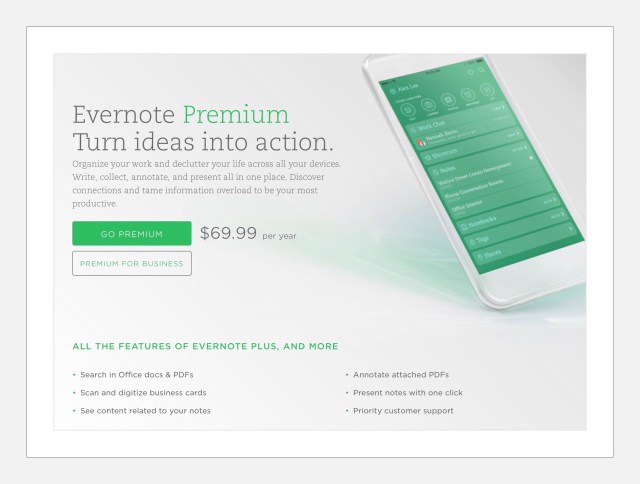
Evernote Premium $70 per year
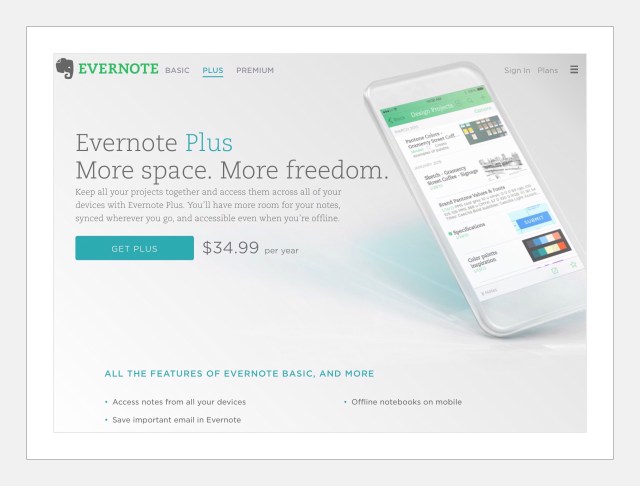
The Evernote Premium upgrade costs $69.99 per year. Evernote also has a mid-priced subscription that’s $35 per year. For the Premium price you get several important features, but the 2 that are most important to me are:
The feature that’s the absolute most important one for me is the ability to go back in time. If some information in a note disappears or gets terribly messed up, you can use this feature to find the missing or mixed up content to fix your note. If you rely on the data that you store in Evernote a lot, like I do…this feature is invaluable!
The other feature that I cannot live without is the ability to annotate PDF’s. Frankly, I don’t know what it would be like if I couldn’t do this because I use it a lot and can’t remember a time that I didn’t. In fact, in general, Evernote’s annotation features are pretty amazing and I’d be hard pressed to live without them.
Apple Notes Free
Since Apple overhauled the Notes app in ios 9 and added multi-tasking, I’ve begun to use the app a lot more. Prior to that, I’d just use it when I was out and about and had to write down something quickly. The problem with that was I oftentimes forgot where I’d noted something. That combined with my years worth of notes which weren’t organized at all because Apple provided no good method for that…made finding anything a nightmare!
But now I use Apple Notes all day long and everyday for two things. Taking notes as I research things and then creating rough drafts prior to publishing on a website. I absolutely LOVE Apple Notes now and it’s definitely improved my productivity a lot! I used to use Evernote for this first task (mentioned above)…but I spent way too much time formatting data after it was captured. Formatting is not Evernote’s strong suit! So this is how I use Apple Notes daily:
I use iPads for almost everything, and research is always a big part of my daily routine. As I’m researching, I open Notes using the slide over, multitasking mode and write things down or paste captured data quickly. I spend very little time formatting because Notes makes that so quick with the shortcuts they added on the keyboard. My notes look great visually and they’re easy for my ADHD addled mind to use readily.
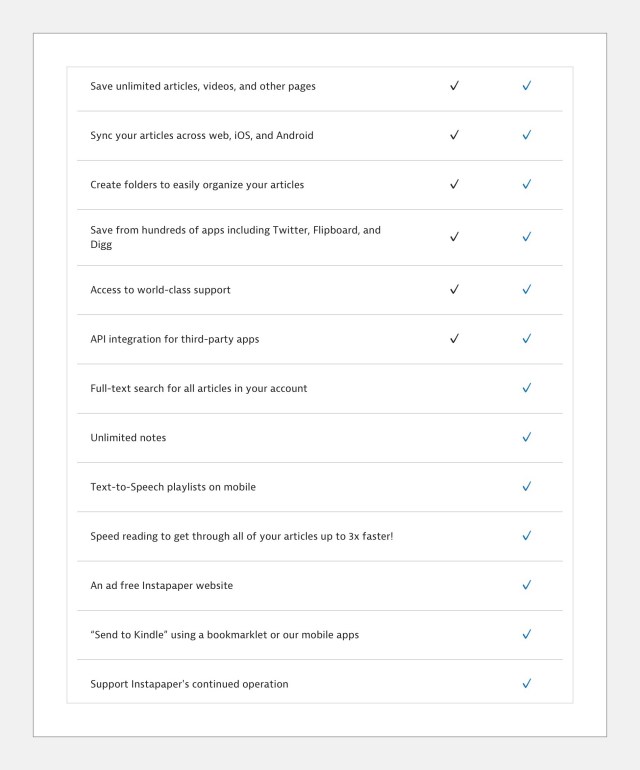
Instapaper Premium $30 per year
Like Evernote, Instapaper offers a free version too. I used it for years before deciding to upgrade to their paid plan. Why am I including it here? You might be wondering this because Instapaper isn’t a note taking app…it’s a ‘read later’ app. Instapaper lets you save online content for offline reading later, and it does so in a simple, clean format that’s wonderful! It’s also highly customizable by users but my favorite feature is Instapaper’s tts (text-to-speech) tools…I can listen to my reading list in exactly the way I chose to…this is also highly customizable. I made a really short, pretty low quality (…OK, most of my videos are pretty low quality actually…just because you like something that doesn’t automagically make you any good at doing it) YouTube video about how to use the Playlist feature.
I’m including Instapaper here because I do use it for note taking…but in a really simple ‘pass through’ manner to get some great looking, beautifully formatted notes. Essentially I’m taking advantage of the simple, beautiful style Instapaper has created to save information that would otherwise be filled with ads, links and lots of extraneous information that I don’t want in my notes. If you’d like to learn more about how I use Instapaper, you can read this post I wrote about ‘read later’ apps and how much they improve my productivity by allowing me to multi-task easily and quickly.
This is how I use Instapaper. When I run across an article that I want to save that’s got ads and extraneous junk all over the page…I just save it to Instapaper with 2 simple taps. It’s saved instantaneously! Then I open Instapaper, open the article, tap on the Share icon and email the Full Text article to Evernote. I can select which notebook I want it saved to right there and enter the name of it preceded by @ on the Subject line of the email. The end result is a perfectly clean, well formatted copy of the article!
Prior to following the above instructions you need to turn on Full Text Sharing in settings on the ios app. This isn’t a high profile feature in Instapaper, but it’s really useful. It allows you to send a clean, well-formatted copy of any article to anyone.
My premise for sending Full Text articles is this. If you send someone just a link, there’s a 50/50 chance they won’t ever really go read the article. But if you send them the whole article in a nice, pleasing visual format, chances are they will at least skim it, which is better than never even looking at it at all.
Full Text Share is a setting on Instapaper’s ios app. When you turn it on you can send a beautifully formatted article via email to anyone…rather than just the link. This feature is available to all users…not just Premium users. I emailed the developer just to make sure and realized when he replied that super support is yet one more aspect of Instapaper that I really love!

Features in Which Evernote’s Better
Evernote is the Best Option When Working With A Lot of Images Because it Gives Users Powerful Annotation Capabilities That Apple Notes Lacks
Image Annotations, Image Crops and PDF Annotations Are All Accomplished During Note Writing
One feature I love in Evernote is the ability to crop and annotate photographs, screenshots and PDF’S from within any note. This was always available through a standalone companion app called Skitch, but the workflow was cumbersome. Now the Skitch functionality has been incorporated right into the main editing functions of Evernote so that you can annotate notes on the fly quickly and easily. So easily in fact, that I oftentimes import images into temporary ‘scratch’ notes just to use these annotation features. Then I export the image out to use somewhere else and I delete the note. Once you grow familiar with these features, you’ll realize a lot of people are using EV for this.
This will change when ios 11 is released. Annotations have been reworked extensively so that both note apps will be fairly equal in term of annotating images and PDF’s.
- In Evernote you can create links to notes. This is especially useful for sharing notes with yourself. For example, if you want to refer to another note, in the body of a note you’re currently writing…you can just go to the other note and create a ‘private link’ for it then paste that link into what you’re writing.
- Evernote is better for sharing content. There are so many ways to share things from Evernote. In Evernote you can share an entire notebook with someone else and adjust what the ‘sharee’s’ privileges are too. Using EV’s Work Chat feature you can share a note with someone else and the note just shows up in their Evenote app. Work Chat is great for collaboration…so multiple people can contribute to the content of one note. Apple Notes have no way of collaborating currently. Apple announced at their Live Event on Sept. 7th, that they were adding collaboration to all their iWork apps…Pages, Keynote and Numbers specifically…but rumor has it they’ve added it to the notes app too!
- Evernote has Apple beat by a significant margin when it comes to providing users with a variety of organizational tools. In Apple Notes you can store notes in folders. In Evernote it’s similar in that you store notes in notebooks. But Evernote gives you a 2nd level of organization that they call stacks which are used to group similar notebooks into. In addition, Evernote provides a rich tagging system that gives users sophisticated sorting and hierarchical alternatives. So the take away here is that if you had a large amount of data you’ll be storing, Evernote will probably serve your long term needs much better.
- Although Apple Notes can be faster for my day-to-day use in the areas of research and draft writing, Evernote is much faster when it comes to actually finding that data quickly when you need it at a moments notice. One reason is that there are more organizational tools but the other big reason is that Evernote’s search utility is awesome! It can even search inside OCR scanned documents and photos! Apple notes search is more basic and not easy to find or use. That’s why I use Evernote almost exclusively when we are traveling to store all of our travel receipts, itineraries and details like contacts, contracts and location details. When I arrive at an international destination and need to find out the location to pickup our pocket wifi or the name of the service that should be meeting us and where, I’ll find that information in seconds within Evernote.
- Adding lots of photos or images into notes in Evernote is faster because you can batch select and add them. In Apple Notes images are added to a note one at a time.
- Evernote provides a pretty sophisticated in-note camera that can take quick images of business cards, documents that are OCR enabled and regular photos. The camera works almost completely automatically and Evernote has some auto-sort and auto-format features by document type too. Apple notes has no comparable feature.
Features in Which Apple Notes is Better
Working With Numeric Bullet Points is Easier in Apple Notes
Apple Notes has finally solved the numeric bullet point problem that so many applications share…including Evernote. The problem is this. If you are using numbered bullets and you want to break and show an example underneath one of your bullet points…there is no good way to continue with your numbering scheme.
Evernote (or most any app) will add the next number anytime you begin typing on a new line. So in the example I describe above…when you want to go back to your numbered bullets the numbers will begin all over again at 1. Somehow Apple figured out a way to fix this problem. So, if you’re using Apple Notes with numbered bullets, when you need to create a break just do so and stop using bullets. Then when you want the numeric bullets to begin again you can just manually add the next number and Apple will recognize what you’re trying to do and will reformat the number to look exactly like it should. Exciting!!!!
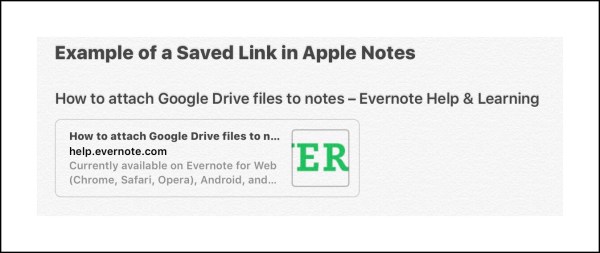
- Evernote is best at saving a copy of a well formatted webpage or an online article. But Apple Notes saves individual links in a better way. When you save a link in Evernote…it just looks like a regular link. When you save it in Apple Notes (via the Share extension) it looks like this:
- Apple Notes is faster to use in multi-tasking mode on an iPad. Because Evernote does everything through the Evernote server…it’s just slower, which oftentimes frustrates me when I’m writing. So I now use Apple Notes for all my draft writing and for researching topics that I’m writing about.
- Apple Notes also lets you indent and outdent easily. In fact, in general Apple Notes just is better at formatting overall. Update: Evernote brought back the ability to indent and outdent, which adds a surprising amount of flexibility for formatting.
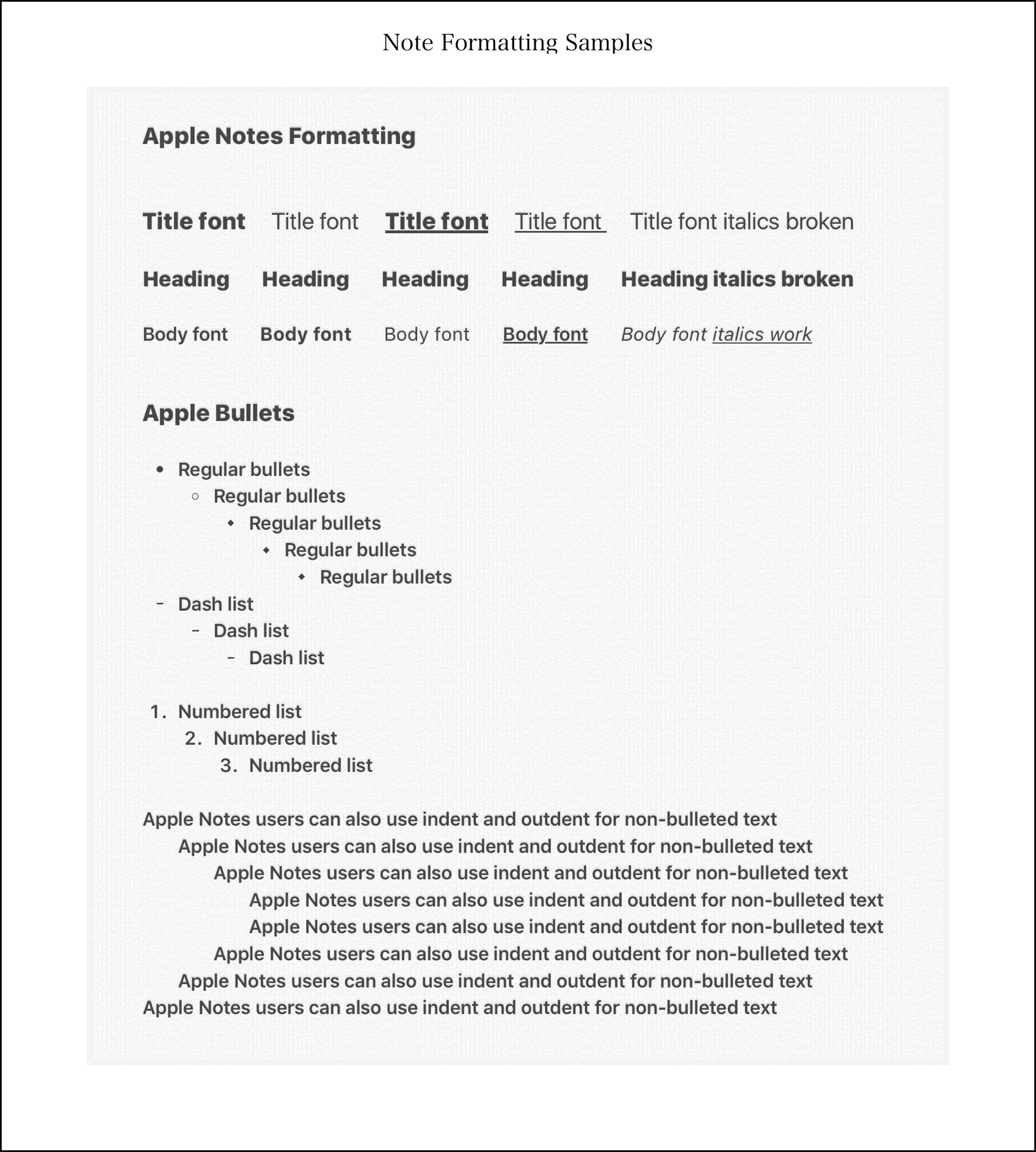
- In Apple Notes you can use 3 different font sizes, which is 2 more than Evernote gives you. The regular body font size, a headline size and a Title size, which is the largest. In Evernote you’re limited to only one size of font unless you use my workaround that I wrote about here.
Examples:
this is a title font
Here’s a heading
Here’s the regular body font
What Needs Improvement?
Apple Notes Searches
Searching in Apple Notes is not a good experience. This is perhaps the biggest downfall of Apple Notes. You can spend 10 minutes searching for the search bar…and even then you may not find it.
Here’s why. You can only search within a specific category of notes…for example, say in iCloud notes, or Gmail notes. So you need to be in the correct location for the search bar to even appear. Once you’re there, like most Apple searches on ios, the search bar is still hidden from view. To reveal it you need to drag or swipe downwards on the entire note column. If you’ve positioned yourself correctly you should see the search bar emerge at the very top of the screen.
This is an awful way to search for a couple of reasons. First, if you don’t search often, you’ll end up having to look up how to do it each and every time. Second, there is no high level search utility to search all your notes at one time. If you have several types of email accounts with notes turned on like I do, then you need to search through each one separately. I have iCloud, Gmail, my own domain email and Yahoo. Each email account for my own domain appears as a separate category…so I need to conduct the same search 8 times! Actually, make that 9 times…because there’s an extra category called ‘On iPad‘ but I have no clue what it’s used for.
In comparison, Evernote’s search functionality is perhaps one of the most sophisticated I’ve ever encountered. While it doesn’t always work up to spec…even at half capacity it’s extremely useful and adept!
Evernote Formatting Options
Apple Notes use of 3 different font sizes is great! In Evernote there’s only one font size available. Neither app provides users with a choice of fonts. In addition to the 3 font sizes, Apple Notes provides bold, italics and underlines, which are pretty basic but they get the job done. The one feature I miss in Apple Notes the most is the ability to highlight text.
Evernote does provide highlights. Evernote also provides a strike-out option. But even with these added features, Apple Notes 3 font sizes actually give users the ability to create more variations than Evernote does…or maybe not more variations exactly, but better differentiated variations…the sizes make a big difference! The one thing missing from both note apps is the ability to change the color of fonts. This doesn’t seem to me to be a terribly complex coding situation…but maybe I’m missing something.
Both apps also provide numeric and regular bullets, but Apple has a 3rd option too…dashed bullet points. Evernote also has a 3rd option…check boxes. In Evernote, you can indent bullets as often as needed. You can outdent bullets too. But you can’t indent or outdent any other text…only bulleted text. I believe this was changed recently, (I’m using a beta version however) …I just discovered that I could indent and outdent lines of text even if they aren’t bullets! Apple Notes give users the ability to indent and outdent regular text too….making this now a non-issue for comparison purposes. Once again while this might not seem like a big deal…it ends up offering a lot more versatility. So overall, Apple Notes wins my vote for better formatting options.
Emailing Notes isn’t Great in Either App
Sadly, both notes apps have big problems emailing notes, which is something that I just can’t understand…how hard could it be…right?
Evernote’s main problem is that the emailed note is sent through Evernote’s servers. No ‘Sent’ email ever appears in your email account. Yet, roughly 50% of the time the email isn’t sent! This seems to occur most often for longer notes with lots of data and/or images. The best way to work around this is to always email yourself the note too. That way if you receive the email you know your recipient did too.
One other clumsy aspect of Evernote emails is the way users’ messages are managed. The ones that are appended to a note for emailing. You’re provided with a smallish blank area in which you can type a message. But if you pause to come back to it later, or if you accidentally tap in they wrong place…your entire message is wiped out and you need to begin again! This seems to happen often.
In Evernote’s defense their Work Chat feature is a more robust way of sharing notes…but that can only be used with other Evernote users.
On the face of it, Apple Note’s email feature appears to work much better. The interface matches the regular email interface with very similar features…for example, saving drafts to finish later is handled well. Apple’s notes, when displayed in an email, appear to be formatted nicely…but the fonts all seem bigger than they are in the actual note…a lot bigger actually. Yet even that is acceptable. What isn’t acceptable in Apple Notes is what happens if you try to email a note that has images.
At first it appears that all the images are removed…but they aren’t. They are all just grouped at the very end of the note. If there are many images, you can spend a good amount of time trying to reposition the images back within the flow of the text. It’s quite possible that this is a bug Apple will fix in the future…but Apple’s track record for fixing annoying little bugs like this isn’t great…so I wouldn’t wait around for it to happen! 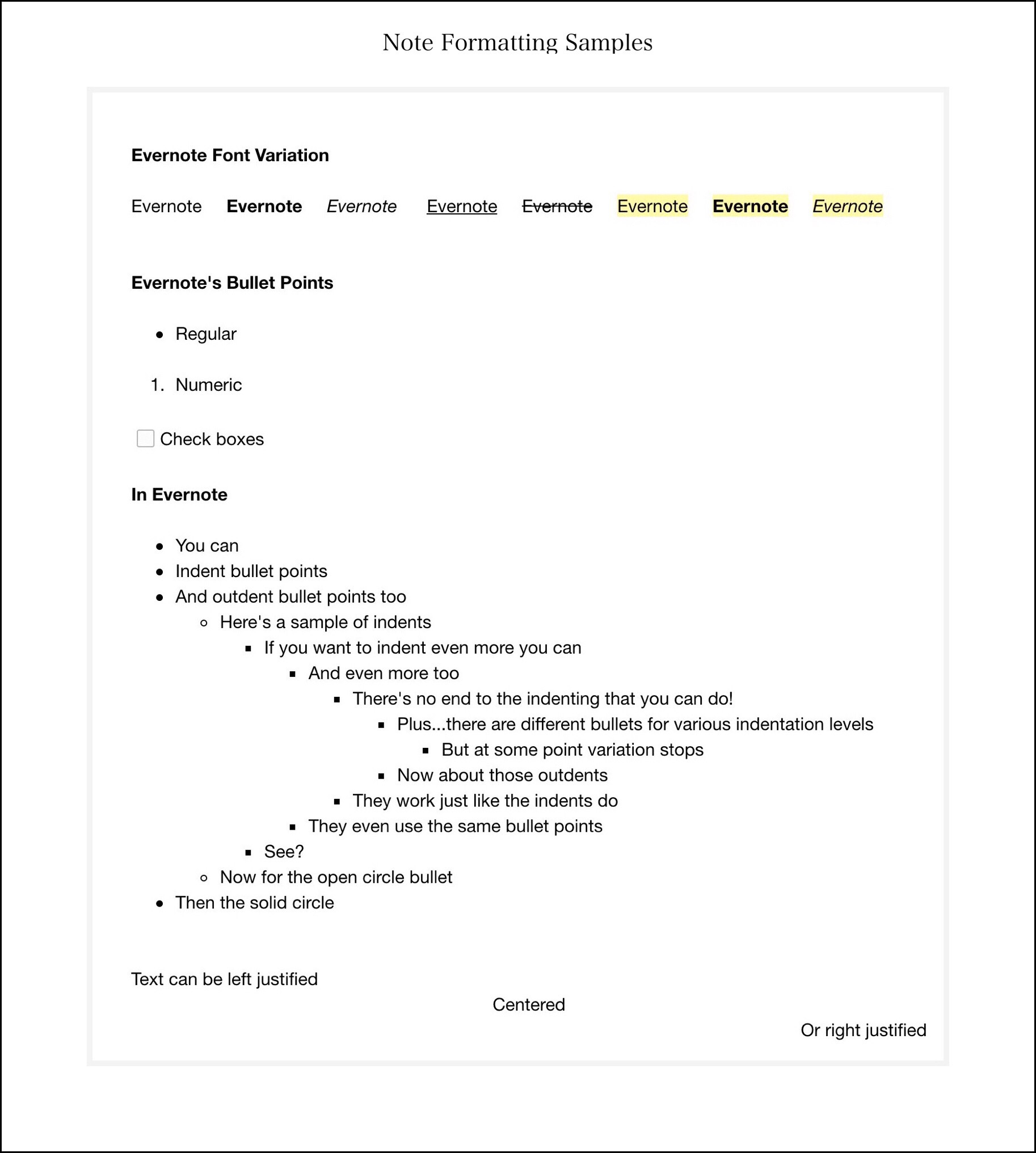
Conclusion
When it comes right down to it, although I may use Apple Notes a lot more, because I use it everyday for big chunks of time, it’s still a lower level application that I use for lower level work. Evernote’s richer feature set, combined with the company’s focus on continued improvements (more frequently than once a year which is how often a new ios is released, and therefore how often Apple Notes is upgraded,) means that imo Evernote will always remain one step ahead of Apple. EV will continue to innovate at a higher level than Apple Notes will in terms of both features and functionality.
All My Guides to Using Different Sizes and Colors for Fonts in Mobile Evernote

📱
Here’s a list to the 4 guides I’ve written to using different colored fonts, different sizes fonts, different fonts, and different colored highlights for my 2 favorite notes apps…Evernote and Apple Notes. They are listed from most current to oldest.
How to Change Font Colors and Sizes in Evernote 8 for ios
How to Use Different Colored Fonts and Sizes in Apple Notes for ios
How to Change Fonts, Font Colors and Sizes in Evernote Apps on Mobile Devices





















 vsatips