Export & Save Photos in the Highest Resolution Possible | iPad & iPhone

Updated January 2018

A pretty town we visited

Photo resolution is really important for my website illustrations…but not in the way that you might think. While it’s important to have great images which can be clearly seen, it’s equally if not more important to have a website that actually loads the page quickly enough to not frustrate people. Finding this fine line is a constant challenge for me and it’s perhaps the one thing that I spend more time on than any other when writing this blog.

Introduction & Objectives

iPads are great tools for editing photos, yet anyone who’s used iPads a lot for this purpose has realized that the final resolution that your photos are exported in can vary a lot. Some apps let you adjust this…some don’t. But if you use photos a lot in your professional work you do need to know what control you’ll have over the final resolution of the photos you’re exporting.

This quick guide includes my favorite editing apps which do allow some user control over final resolution output.

Frankly, for me, if an app doesn’t offer user control over exported photo resolution and file size…well then the app is isn’t worthwhile for me!

The Apps I Discuss

  • Pixelmator
  • Snapseed
  • Enlight
  • Photogene⁴ | Photogene⁴ only can be used in ios 10 or lower
  • PhotoToaster
  • OneEdit Pro

How to Use This Guide

This guide is essentially a visual one aimed at giving you a very quick way of referencing how to change resolution for each of my favorite apps. Think of these as simple cheat sheets for each app.  Each one shows you where in the app you need to go and then how to go about changing what you need to, to assure that the best resolution is used when exporting your photos.

Also each cheat sheet links to that editing app in Apple’s apps store.

Pixelmator App |

One app I use a lot I’m not including a cheat sheet for is Pixelmator. I’m not including it for the simple reason that Pixelmator has no setting to change resolution because photos always kept at the same resolution that they were when imported into the app. In that sense, Pixelmator works as closely to the iPad’s built-in photo editing utility as is possible.

‘Pixelmator is an amazing photo editing app that probably works more like Photoshop than any of the others I’ve used.’

That includes Adobe’s own Photoshop apps for ios too!  It uses layers, and most of the tools are designed to function exactly like Apple’s own apps do, so for people who use Pages in particular, there’s less of a learning curve. There is in-app help, which is good, but that can’t come close to addressing all of the powerful features this app offers…so expect a significant learning curve (unless you use Pages with images and Photoshop already.)  The tools offered are too numerous to list here but some include adding shapes and text in ways which make this app a great graphics layout tool, painting, drawing and retouching down to a single pixel size with tons of brushes, a clone tool, a lot of great easy customizable filters (my favorites are sharpening, light bleed and bokeh effects,) and quite a few preset templates as well as integration with iCloud.


The visual guides:

Setting the Highest Export Resolution for Most Popular  ios Photo Apps

Snapseed App |

I was under the assumption that Snapseed saved photos in their original resolution unless that was changed. Something I read recently led me to think that I may be incorrect in my assumption. Since Snapseed is owned by Google, there doesn’t appear to be an easy method to contact support…so I don’t have anymore information about final resolution output currently. I’ll add an update here if I learn anymore. But, my gut instinct tells me that isn’t correct. I’m fairly confident that my original assumption still holds true, meaning that resolution won’t change unless you change it.
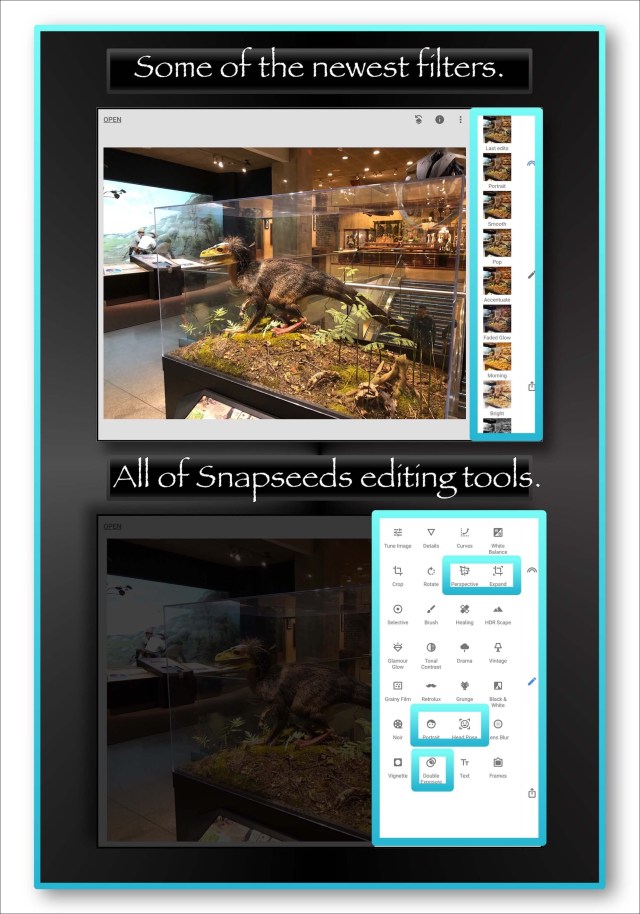
Image 846

I love Snapseed and use it a lot because it offers a broad range of tools including fine-grained user controls, a great sharpening and noise reduction tool, a lot of really great customizable filters for HD, dramatic, grunge, retrolux, vintage, noise, black & white, glamour glow and tonal contrast filters, as well as a repair tool, a selective adjustments tool, and the ability to add great looking text. They also offer a lot of in-app tutorials for doing advanced editing. In late 2017 some newer, sort of ‘instant’ filters were also added which bundle several edits together to create effects many people would want as ‘stock’ tools. Most of these are displayed in the top image of the screenshot above.

Additional updates Google made in 2017 add a whole host of new tools which I also love. One for me that’s really important is called Expand which you can use to add black or white space to the outside edges of an image. By doing this I can now take advantage of Snapseed’s borders and frames  which are destructive normally. Some other new tools include White Balance, Curves, Double Exposure and 2 which allow you to enhance faces, Portrait and Head Pose.

Screenshot Below Shows the Pre-Updated Version of Snapseed.

Snapseed

This Screenshot shows the newest version as of January 24, 2018

Image 847

Enlight App |

Enlight is one of my favorite apps because of the broad range of editing tools they offer. Everything from great preset filters to fine-grained tuning controls, to adding text, manipulating and retouching actual images, and they have some really cool artistic filters like painting and drawing too. This app also offers more tools for borders, frames and collages than the vast majority of apps out there…however their borders are destructive (unlike Photogene⁴s) meaning that they do encroach upon the image…with one exception. If you use their Instafit tool you can add cool decorative or solid colored borders that aren’t destructive.

But it is also unclear in Enlight’s settings whether or not you can set the app up to maintain a photo’s original resolution.

Enlight App

Photogene⁴ App |

It appears to me that Photogene⁴ does allow you to save your exports in the original resolution…however I’ve not thoroughly tested that aspect. One important thing to note here is that while Photogene is an amazing app that I use daily in my work for adding borders to photos that fall outside the original photo’s dimensions…thereby not obstructing any portion of my image…the app is no longer supported. It still generally works great but can exhibit some flukey behavior. In fact when you open the app, Apple displays a warning telling you that the app hasn’t been optimized for the current ios and it may function slowly…and it sometimes does.

So sometimes the app won’t open properly. My workaround for this is to open an image in Snapseed 1st and then use Snapseed’s ‘open in’ share extension utility to reopen the image in Photogene…which bypasses the glitch. The only issue with using my workaround is this…now that I know Snapseed does decrease resolution, that would probably occur before the image was passed on to Photogene.

It’s worth it to me to deal with the glitches because of the broad range of editing tools Photogene offers including some great frames, nondestructive borders, unique filters, a lot of fine-grained user controls, a clone and retouch tool and adding text and annotations to images.

Photogene

PhotoToaster App |

I’m not entirely certain if PhotoToaster allows you to maintain the original resolution of photos entirely. It’s not completely spelled out in the settings I show below, and I’ve not tested it or researched that aspect yet.  If I do discover anything useful I’ll update it here.  In general PhotoToaster and the suite of apps it’s a part of (developed by East Coast Pixels…these guys were originally with Adobe) offers a broad range of quick filters, great assortments for textures, light bleeds and frames, and one of the best fine-grained sets of user controls available.

PhotoToaster App

OneEdit Pro |

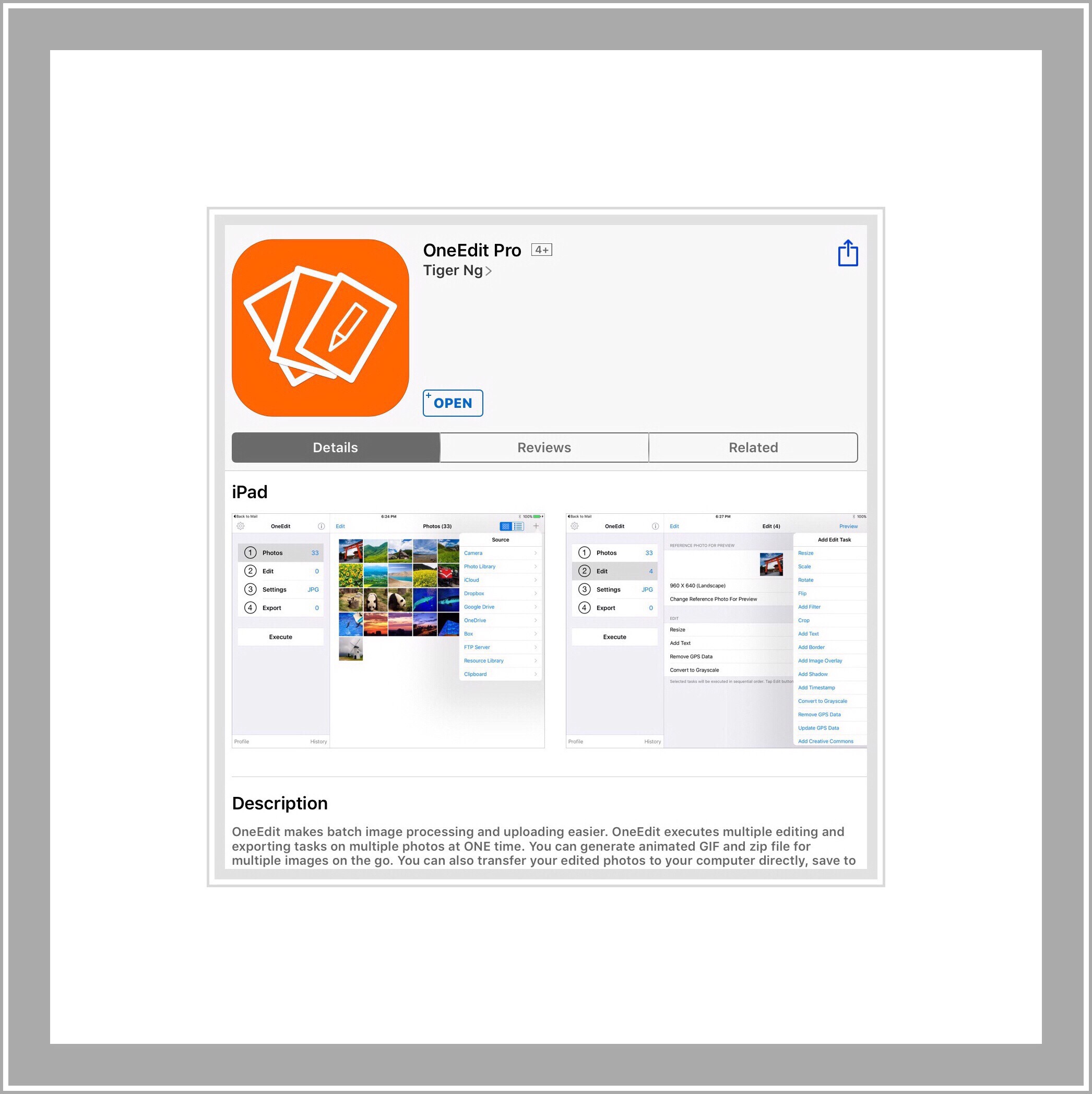
OneEdit Pro is unique in this group because it’s a batch editing app. It’s an extremely useful tool which has lots of different features that you can use to change a whole group of photos at one time. You can do things like remove metadata, add text or watermarks, add borders or use roughly 20 different filters which change the image look…like sharpening, or pixelating. You can also batch scale the size of photos or batch crop them.

Because this app is so different from the others, and because it doesn’t give you direct control over the exact export resolution and file size, I’ve not included a cheat sheet. But if you decide to buy it, it costs $2.99 which is well worth it for all the features it has. I especially love the huge number of options you have while exporting. You can export all your images into various grid layouts, or into a PDF, as well as export them to most cloud services. After purchasing it if you use the App Store’s listing of the app, find the link to the Developer’s website to view some videos showing how to use it. Even watch the older ones because the app structure has always remained constant so they are useful too.
OneEdit Pro
No one has written a good tutorial for this app. I’ve thought about doing it but it would just be too overwhelming of a task because the app can do so much. What I primarily use the app for is scaling and cropping photos and then applying multiple borders to them (like in the screenshot above) for use on my websites and in videos on my YouTube channel.

I Made 2 YouTube Videos Which Demonstrate Some of One Edit Pro’s Features

I made the first video right after Apple added screen recording to ios 11’s beta. In it I demonstrate how I apply multiple borders. A 2nd part adds some more of the apps features…but I should warn you that neither are great videos. I was entirely new to screen recording and it was very glitchy too. I was using the older version on One Edit and an old iPad that I wouldn’t mind getting messed up with beta software.

Add Borders to Photo in Batches (Many Pics at Once) with One Edit Pro | iPad & iPhone | Part 1

Batch Edit Many Photos at Once with One Edit Pro | iPad & iPhone | Part 2

I’d planned to update these with completely new videos. But now my channel has been terminated from YouTube’s Partner Program, effective in Feb 2018, in their huge ‘abolishment program’ of small Channels.

I don’t think I can afford to stay on YouTube anymore as my earnings there while not huge, were significant enough to really mess me up by their loss. If YouTube hadn’t gone to great lengths to cutoff all of the avenues in which small channels like me earn, it might have been possible…but things like Patreon will be closed to us too.

I’m looking at other video sharing sites to replace YouTube for my channel. One thing you could to do help would be subscribe to my channel (assuming you like it) because if I could get the subscription numbers higher while I try to figure out a new plan, maybe I could stay here.

If you read reviews of the app you’ll notice many addressing the glitches which were fixed when OneEdit Pro was updated in 2017. One problem was that after edited photos were exported you’d sometimes receive an error message telling you that the export failed…but it didn’t! The error message was the error…because the photos exported just fine. Another was that you couldn’t  rely on the final file size show in the app. In fact finding out what an image’s actual file size is on an ios device continues to be challenging, which is why I’m describing my best methods next.

The Best Way to Find Out the File Size of an Image on ios

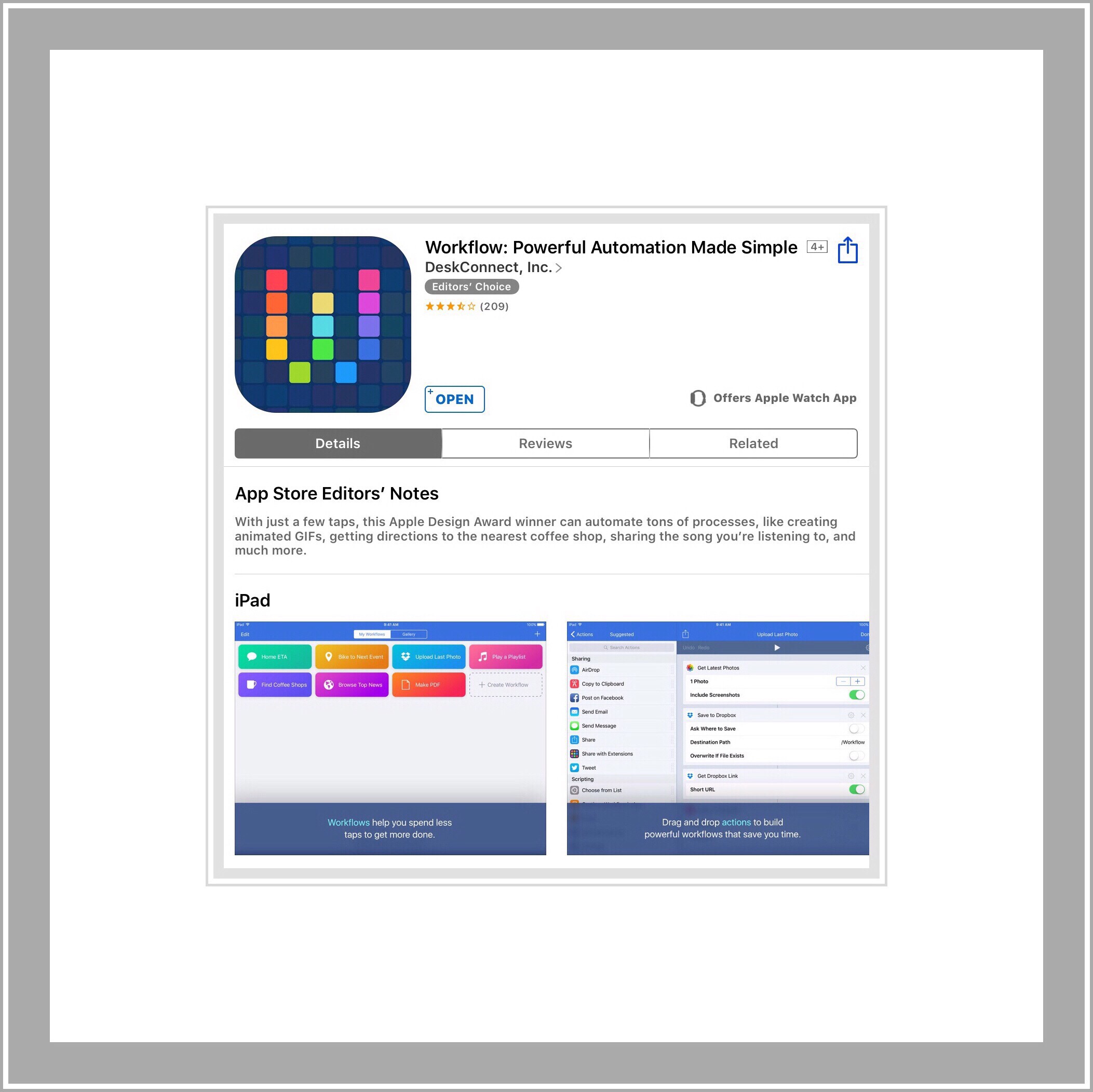
I use 2 different methods currently. Many times the sizes shown by various apps isn’t correct. The one I find to be most reliable is Photogene⁴. Snapseed used to be accurate but lately it hasn’t so that must have been goofed up in an update. I use a great app called Workflow that lets you automate tasks. The app is so great that Apple purchased it recently and has made it free. Workflow provides a lot of already built workflows and there’s one for determining file size of photos. I tweaked that to let me select multiple photos at one time.
Workflow app
The other method I use is a website called Tiny PNG. I know it sounds counter-productive to have to upload images to a website…but Tiny PNG is such an excellent photo optimizing utility…better than any app I’ve found which claims to do the same thing, that it’s  worth it. You can batch upload images to Tiny PNG and it will automatically compress the images too if that’s what you want…I usually do.

Tiny PNG
I uploaded the screenshot above of Tiny PNG to Tiny PNG. The site told me it’s file was was 748 kb which is too large for a single image to use on this website. Because I use a lot of images. Each one takes more time for the webpage to load. So using Tiny PNG I reduced it to 238 kb’s. The original screenshot size was much larger…over 1 mb, but when I applied the borders to it using OneEdit Pro, the final image that was exported was 765 kb, which I then compressed using Tiny PNG. The difference in quality is imperceptible I think.

Link to a great article that explains a lot more about photo resolution, photo quality and how these are affected by photo editing apps.

Chart of Photo App Resolutions

This chart shows some of the apps he tested and the resolution they use natively.

I ran across the above article right after I published this post. In it Rob DePaolo discusses in great detail more about this topic as well as provides a great comparison of several of the most popular ios photo apps. I thought I understood a lot about this but his article filled me in on some points I was confused about.

Comments

Please feel free to leave me any comments or questions by scrolling down further past my bio.


Posted in Apple's New iPhones, iWatches and ios 8 Announcements, ios, iPad | Tagged , , , , | Leave a comment

Amazon & Alexa Cyber Monday Deals | All Week Long

Amazon Encourages Purchasing Using Echo’s Alexa Even More With Cyber Monday Deals

Last week when I first posted about finding the Dot available with Quantity discounts a friend asked if that would be the best deal on Dots during Thanksgiving. Obviously I have no insider knowledge when it comes to Dot pricing but since I just read an email from Amazon with even better Dot pricing today I felt like I should let everyone know about it.  In addition to the these great Cyber Monday prices…if you order using Alexa you’ll receive a $10 credit or gift card just for trying out this new way of ordering via your voice!

My Short YouTube Video Demonstrating Voice Purchasing Using Alexa

Here’s a link to the YouTube video today demonstrating voice purchasing Using Alexa.

Alexa & Echo Cyber Monday Deals

If you already use Alexa in your home (similar to Siri but available in a standalone tower that functions  as a great speaker too) you recognise how useful Alexa can be…even without Google searches!  In this fast paced world knowing immediately what I should wear for today’s weather and having the fastest, easiest alarm to set in the world are my 2 favorite uses…a 3rd is finding local times for movies.

Alexa is fast and convenient…more so than Siri…minus the Google searches of course!

But the Echo, normally $179.99 (available today for $139.99 if ordered via Alexa in black or white) can be a little too pricey for placing Alexa all around your home.  That’s where Dot comes in!  It does everything that the Echo does but in a tiny footprint and at a fraction of the cost!

Why is Dot so Great?

Last week I wrote a post because I was so excited to see that Amazon was now offering Quantity discounts for purchasing multiple Dots. I was excited because I’d lost out on getting a deal on the first gen Dot. Plus that it’s a brand new 2nd generation device with a lower price tag and a smaller footprint too. That’s why I love the Dots  so much…and with the Quantity discount you can afford to strategically place Alexa in all the best locations around your house for both the functions I already mentioned as well as many smart home features we’ve yet to delve into much.
Cyber Monday Dot Deals

So, Cyber Monday Deals for Dot are truly the best I’ve ever seen today…$39 for a black or white Dot…which may possibly be combined with the Quantity discounts I wrote about last week….although I’m not sure on that part.  Again this price is if you order the Dot via Alexa.

Details About Dot Quantity Discounts from My Post Last Week

Quantity Discounts Available for Buying Echo Dot

Here’s a link explaining more about the quantity purchasing discount deal. Amazon doesn’t give a time frame for how long this option will be available but I suspect it will end as they deplete their inventory. One reason that I don’t own the Dot yet is because I ran across a great deal for it (the gen 1 version) a few months back, which I learned about one day and decided to take advantage of it the next. Sadly, the next day that deal was no longer available. In retrospect, because gen 2 just came out this was actually a blessing in disguise!

Below Are the Codes for The Quantity Deals Available

DOT3PACK Buy 3 save $20
DOT6PACK Buy 6 get one free
DOT12PACK Buy 12 get 2 free


How to Use Amazon’s Quantity Discount Codes

First go to the product page for Dot and enter 3 (6 or 12) in the Quantity field before you click on add to cart. Then go to your shopping cart. If you forgot to update the Quantity you can do that in the shopping cart too.

Next copy and paste the appropriate code (example DOT3PACK) right above the shopping cart…into a small box that appears under Payment Method…then click on Apply.

You should notice that the price in your order summary has changed to reflect the discount.

Then click on Place Your Order.

Other Notable Cyber Monday Deals

This isn’t intended to be an all inclusive listing of all the Cyber Monday Deals. It’s primarily a list which includes my favorite device deals, devices that I know certain family members or friends may be interested in…or in a few cases deals which I plan to take advantage of myself. To make sure I don’t forget anything I may be redundant with a few items!  Note that I’m an Amazon Associate so my immediate family members cannot order using these product links because I earn a small commission on a purchase.

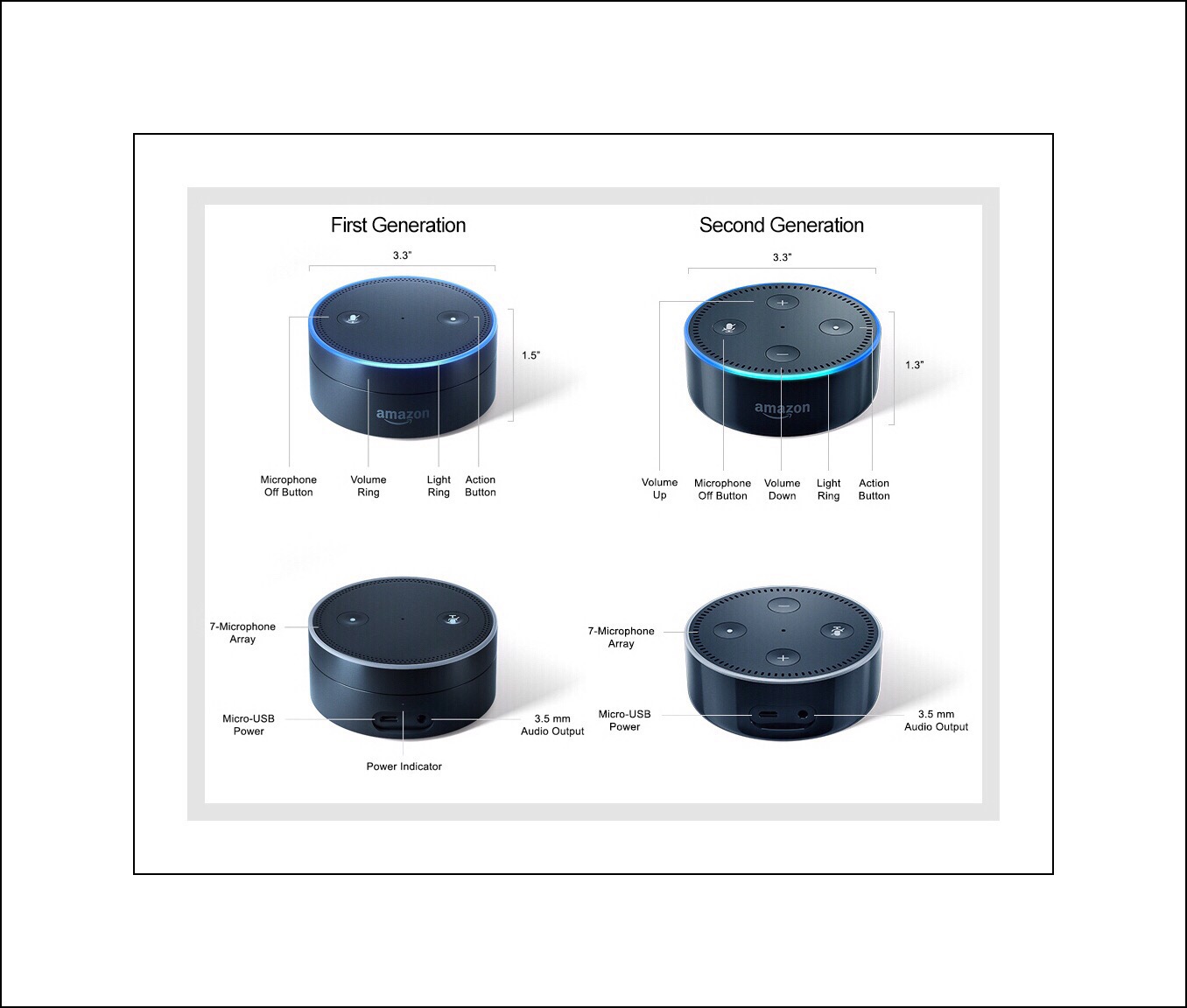
Comparison of Gen 1 and 2 Dot |  Photo Credit & Source:  AFTV News Dot Comparison

Amazon Echo & Dot Deals

Dot

Black Dot $39 (list $50)

White Dot $39 (list $50)

Echo

Black Echo $139.99 (list $179.99)

White Echo $139.99 (list $179.99)


Pre-Order an Evo Battery Base for the Gen 2 Dot

(Photo above)

I ran across this really cool battery base for the gen 2 Dot…making the Dot really portable! It’s available for pre-order but won’t actually really be available until Dec. 31st…so not in time for Xmas. Which makes me wonder if I should pre-order this one or look for one that’s currently available for our upcoming Xmas cruise. But I really like this one because it’s cool looking, the gen 1 model got great reviews, and the company that makes it makes good products. 

  So I’m still trying to figure that out…but this Cyber Monday pricing is definitely making it a contender! 

Evo Battery Base for Gen 2 Dot in White $35 (list $49.99)

Evo Battery Base for Gen 2 Dot in Black $35 (list $49.99) 

img_5091

Amazon Fire Tablets

3 Available Options:  | 7″ | 8″ HD  |  10″ HD |

A Little Background About Amazon’s Fire Tablets

Amazon’s 7″ tablets are the smallest they offer and slightly older technology (5th gen) as compared to their newest HD Fires that come in an 8″ and 10″ size.  The 7″ model comes with 8 or 16 GB’s of storage and only offers WiFi connectivity.  Whereas the 8″ table is called an HD display which offers a higher resolution display and more onboard storage…16 or 32 GB’s…but still only WiFI connectivity…although newer standards for those.

During Prime Days I ordered the 10″ Fire tablet and after learning my way around the modified Android OS, I really love it! One thing to note is that the modified version of Android that comes with it is Reid exclusively to Amazon’s Undergroud App Store…which purports to include all of its apps for free. But upon wanting to get a certain app, the price for it stuck…and this seems to happen occasionally enough that it warranted a call to Support (super easy to do because Amazon’s tablets have built-in caller support!)

Support didn’t really shed any light on the mystery however…but they did enter a Problem request on my behalf….which frankly I’ve forgotten to look for the response to!  But this because less of an issue for me when I figured out that I could add Google Play’s App Store without having to root the tablet or having to do anything technically challenging. Doing so opens up a whole new world of possibilities and for me, makes the inexpensive tablet well worth its price. I purchased the ‘with Ads’ version because the prices were so great and they are a total nonissue because they just appear on the lock screen…and they don’t seem to have any impact on our bandwidth.

Amazon doesn’t appear to have a Cyber Monday deal for the 10″ tablet…but I can tell you from experience that it’s a rather large tablet, and had I not purposely purchased it for viewing movies and TV shows while traveling (it’s the only device that you can download Amazon content to) I would have gotten the 8″ model instead.

Amazon Fire 7″ Tablet is available in 4 colors

7″ Amazon Fire Tablet with 8GB’s, WiFi, an SD Card Slot & Ads on Lockscreen

Black 7″ 8GB Tablet with Ads $33  (list price $49.99)

Amazon’s 8″ HD Fire Tablet also comes in 4 colors currently

8″ New Fire HD Tablet with 16 GB’s, WiFi, an SD Card Slot & Ads on Lock Screen

Black 8″ 16GB Tablet with Ads $59.99  (list price $89.99)

This is the SD Card Amazon recommends for both tablets

Amazon Recommends This SD Card by ScanDisk

32 GB ScanDisk SD Card for Fire Tablets $9.99  (list price $19.99)

Amazon Fire TV

Amazon has several great streaming devices that work exceedingly well for finding and streaming Amazon’s free Prime content. Since we cut the cord to our cable provider last month, we’ve been relying heavily on these kinds of streaming devices.  We got Amazon’s regular Fire TV unit, which isn’t on sale from what I can tell but this Fire Stick device, which competes head to head with Goolgle’s Chromecast is really competitively priced and offers all of the same great features that our much more expensive box offers.

Amazon Fire Stick TV $29.99

Amazon Kindles

I read almost everything in the Kindle format because I love how well Amazon’s Kindle apps function on iPads, and because Kindle versions of books are almost always about a quarter of the price of a hard copy version. Plus that I’m impatient…when I decide upon  a book…I want it now!

Since Amazon began in the industry as a book seller…they have perhaps the best availability of any book seller in the world!

I’ve only ever used one actual Kindle device…which was the original Kindle we purchased for one of my son’s many years ago…after he lost interest in it!  But more recently he regained interest…probably because he really doesn’t use any tablets currently, and we subscribe to Kindle Unlimited…which is a great deal for any family that reads a lot!

Kindle Unlimited

Kindle Unlimited…

is One Main Reason Why Using Kindles or the Kindle App on Mobile Devices is So Great!

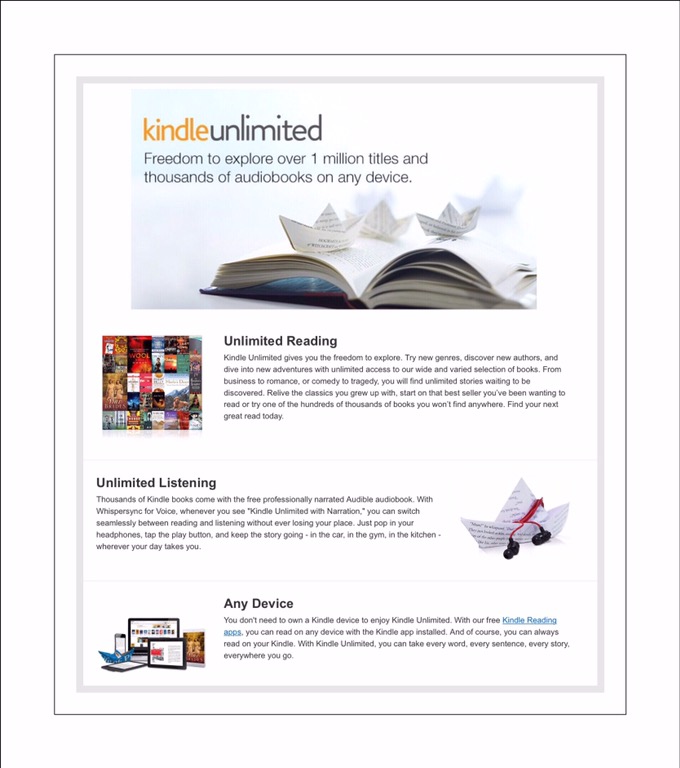
Kindle Unlimited is a monthly subscription for 1000’s of books, audio books and other print content. You can try out the service for 30 days for free and if you like it, it’s $9.99 a month thereafter.

Here’s a Link to more information on what Kindle Unlimited is all about

Below are 2 Links to help you find Kindle Unlimited content including magazines, books, Audible narrated books and more.

Link 1 to Kindle Unlimited Content Organized by Type

Link 2 to the Complete Listing of Amazon’s Kindle Unlimited Library of Titles

My Favorite Kindles on Sale for Cyber Monday


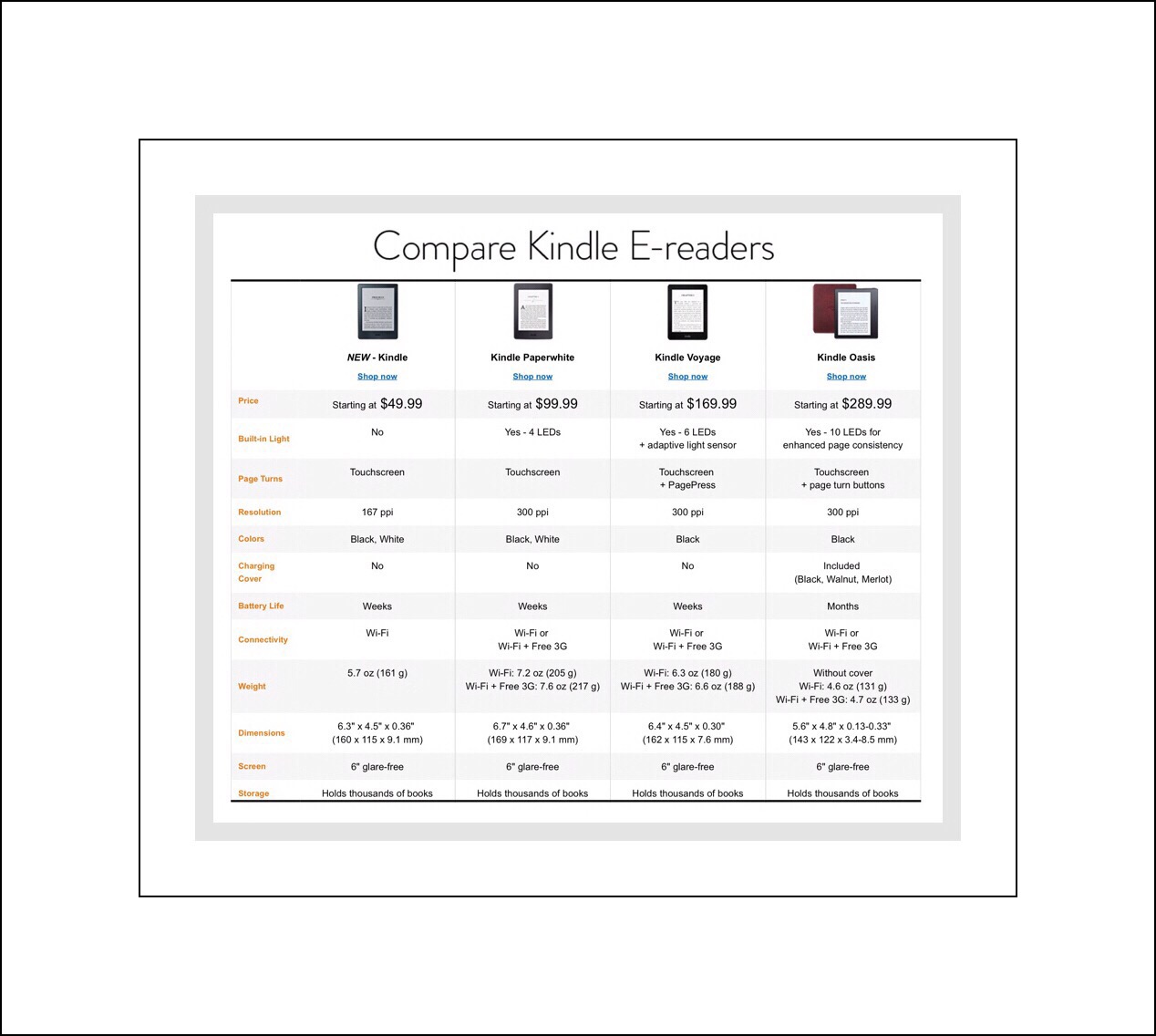
Amazon’s Newest is a 6″ Model Which is Available for Pre-Order $49.99

The newest Kindle offers a paper-like reading experience with no blue light disturbances, glare free reading outdoors, but no LED backlighting or no 3G connectivity.

Newest 6″ Kindle in White $49.99 (list $79.99)

Newest 6″ Kindle in Black $49.99 (list $79.99)

Paperwhite E-readers $99.99

Amazon’s next step up in Kindle is also 6″ but offers higher resolution (300 ppl versus 167) backlighting, WiFi & 3G)

Black Paperwhite $99.99

  White Paperwhite $99.99 

Compare all of Amazon’s Kindle E-Reader Devices

How To Kindle Books

The All-New Echo Dot Beginner’s User Manuel $8.99 paperback $2.99 or free for Kindle Unlimited

Fire Stick – Learn How to Unlock the True Potential of the Fire Stick TV $2.99 or free for Kindle Unlimited

 Comments

Posted in Amazon, Amazon Prime, Tech Tips | Tagged , , , | Leave a comment

My Family’s Awful Experience Invaded By a Botnet Led to the Creation of vsatips

Photo credit: portalgda via Visualhunt.com / CC BY-NC-SA

vsatips

This Site was Created to Help Other Families

Learn From Our 2 Year Nightmare

As a stay-at-home mom, I was beginning to see the light at the end of the tunnel. One child had already left the nest for college, and the second would follow soon. I was beginning to explore the idea of returning to work, and never really had any intention of starting my own website. I’m new to web creating and writing as well, so please bear with me as I try to tackle the learning curve of both!

In 2009 my family’s home computer network was invaded & taken over by a botnet…

Initially we didn’t realize it was a botnet that was responsible. We just knew that our problem was persistent and intractable. We had lost control of our home network & all of our computers and devices.

__________________________

Cool glass tablet from Parks & Recreation

This Post Began as an Addendum to My ‘About Me’ Page

My ‘about me‘ page focuses on…well, learning more about moi  :-)

It doesn’t discuss the subject of Botnets, nor do any of my other posts currently. But Botnets did play a huge role in who I am today. Since this is the one and only post I’ve written to date about these events, and because I’ve begun a new series of posts about network and digital security with the first one being an introduction to home firewalls, I’ve ended up linking to this page fairly often. To me, that’s preferable to my retelling our whole Botnet story over and over again…which is an endeavor fraught with anxiety.

Consequently, this post has ended up containing a mixture of my family’s horrifying Botnet experiences as well as more biographical and early career information about myself.

 I’ve tried to blend these two topics because they are so intertwined. Hopefully readers wanting to just learn more about our Botnet experience won’t mind. Please leave comments at the bottom if you do or have suggestions!

In The Beginning:  When We 1st Realized We had a Problem…But We Weren’t Able to Identify its Source

My story began as my years of being a stay-at-home mom were winding down. I was (inexplicably it seemed at the time) thrown head first into the tech side of things when my family’s home network and our computers were invaded by a botnet, although at the time we had no actual knowledge of what specifically had invaded our home network yet. We did have knowledge of, or at least we sensed that our loss of control was impacting every single family member including a new live-in houseguest & even one family member who lived far away while he attended college. We were all growing increasingly frustrated and worried by a steady stream of bizarre computer occurrences. Each of us experienced  random instances in which our computers displayed really aberrant behavior…acts which appeared to occur freakishly of their own accord.

Worse yet was our frequent inability to use our own network. This was a network I’d personally setup just a few years prior with the help of a good friend’s tech savvy husband.

My role as a stay-at-home Mom afforded me a unique opportunity.  I was the only one who had both the available time to figure things out as well as (a semblance of at least) the wherewithal to do so. In the ’80’s I’d been pretty good with tech things when I first sold and then consulted for clients in the healthcare industry.* My responsibilities focused on all aspects of outpatient administration and systems for patient registration, scheduling, billing and insurance processing.

iPad art

*At the pinnacle of my short consulting career I was widely regarded as one of the nations’ experts on outpatient billing and insurance processing systems. There weren’t many consultants around at the time doing what I did because healthcare consulting was a pretty new field.

I worked for one of the now extant ‘Big 8 Accounting Firms.’ My firm back then was known as Coopers & Lybrand. Today it’s called PricewaterhouseCoopers or PwC. Our industry was young back then. Accounting firms were a late arrival following their lengthy battle to obtain the legal rights needed to gain entry into the field of consulting…a circumstance which likely explained my perceived ‘expert’ status!

It Was in the Fall of 2009…Around 25 Years Later…When My Family’s Ordeal Began

Faced with this present situation at home, I (somewhat begrudgingly at first) embarked upon a crash course to get up to speed:

  • 1st with current computer technology
  • Next with network technology
  • Last with setting up good security measures for both.

My ultimate goal was to prevent a recurrence of losing control of our network, our devices (primarily Windows computers back then) and protect both our personal data, our credit card information and our user accounts. Because throughout the 2 years time period, all of those were affected at various points in time…and some were repeatedly.

Internet server laptop

Our ‘Invasion Ordeal’ Persisted For Almost 2 Years From Start to Finish

The main reason it took us so long to correct the situation was because the learning curve for me was huge and botnets by their very nature are designed to keep their activities well hidden. Just diagnosing the problem alone took a year and a half!  

This was despite the fact that we were greatly assisted by several great network consultants and hardware technicians who we brought on board at various points in time throughout our ordeal. They too experienced significant learning curves regarding network intrusions, malware and especially botnets.

Back then, which was almost 10 years ago, it seemed like very few individuals had encountered similar phenomenon.

In hindsight however, we discovered this wasn’t entirely true.**

What was true however and what set us apart from the pack was that through a series of slightly unusual  circumstances we did become aware of our invasion. Thus we were able to document a lot of compelling evidence that decisively confirmed our final diagnosis and led to our final successful outcome regaining control over both our network and our devices.

Final Diagnosis 1 1/2 Years Later:

A botnet had taken over our network and all the devices connected to it!

img_3170

Why Did it Take So Long to Diagnose?

Our Botnet tried very hard to avoid detection…and most do. Because detection makes remediation possible…although even once detected, we learned getting rid of a Botnet isn’t easy or for the faint of heart. If/when this occurs you must be prepared to lose some data, spend money on new devices and expect a degree of failure on the path of success for a final resolution.

It probably bears repeating that botnets are designed to avoid detection at all costs! That aspect cannot be emphasized enough! Even today in 2018, Botnets continue to thrive and infect millions of unknowing victims’ computers…turning many different kinds of devices into slaves which will continue to perform their dirty work….the work of hackers and criminals. Oftentimes today botnets attack things like IoT devices with greater frequency…at least according to current news stories.

How and Why Did We Figure Out it Was a Botnet?

What made our situation different was that we did figure it out. There were 3 reasons that we were able to do so.

  • First, our Botnet grew more greedy with time, usurping more and more of both our computers’ and our networks’ resources.
  • This greediness led to made frequent network and device outage problems, which in turn motivated us to investigate.
  • 3rd, a lot of Botnet activity occurs during victims typical sleeping hours…but we kept atypical schedules.

But ours was an atypical household in regard to schedules. Our household was composed of first 2 and then 3 teenaged boys who didn’t necessarily follow traditional sleep-wake patterns. I too had always been a night owl. As our problems grew so did my penchant for late night computer sessions. This in turn led me to discover that the vast majority of our problems really exhibited themselves during the early morning hours…the hours I should have been sleeping.

Apple imacs

I happened by chance to discover that much of the really aberrant computer behavior occurred during these very early morning sessions. In retrospect, it was because that was the time that the Botnet was accomplishing its own work. It was using our computers, which were its zombies, to send thousands upon thousands of Spam emails to other unsuspecting individuals. Most likely, those emails contained viruses which would turn other victims computers into zombies too.

Once we we’re able to give a label to the reasons behind our inability to use our own network…a label which also explained all the other truly bizarre events we’d experienced too…ranging from things like the sounds of television shows emanating loudly from sleeping computers to the continual hacking of our credit cards, user accounts and other personal data…we set out to remedy the situation.

It took us another 6 months to completely rid ourselves of the botnet.

Prevent Computer Viruses

**As we began learning more about botnets we realized that we weren’t all that unique in falling prey to one…but because botnets try very hard to remain undetected, most of them generally do go unnoticed. This of course is because once detection occurs the botnet risks losing the zombie-ized computers they’ve taken over control of.  If this were to occur on a large-scale the botnet would risk massive financial losses because their clients move their business elsewhere to more ‘successful’ botnets. 

Most botnets are operated by hackers. In this instance oftentimes the hackers are ‘for hire’ freelancers who peddle their botnet’s resources to anyone wanting to use them. They may be used  for a myriad of destructive attacks  ranging from those against corporations and their computers and websites to the general public. One type of attack called a DDoS attack, can take down even very large websites. Other destructive activities include using victim’s computers as spam mills to grind out millions of virus-laden emails daily. Those emails tend to be of 2 main types. They may be vicious phishing attacks with identity theft or financial credentials as its endgame, or they may be trojans that work secretly to enslave other victims’ computers into that same botnet or another similar one. This was one activity our computers were being used for, which we figured out from network activity reports.

What Allowed a Botnet Onto Our Network?

The answer to that question is a long story all by itself which I’ve answered in a piece I wrote for Hubpages called “The Danger’s of Torrent & p2p Websites…They were Responsible for Allowing a Botnet to Take Over Our Home Network.


A Little More About My Role

I’m not oblivious to the fact that my story doesn’t really sound like a very big deal while reading about it after the fact. But for almost that entire 2 year time frame my heart, body, soul and mind were completely engrossed in just this one thing!  I was clearly operating within the bounds of a significant form of tunnel vision.

I couldn’t seem to break free from this role. I was obsessively driven to find and get rid of what seemed to me at that time was a huge threat to my family’s wellbeing…certainly the most significant threat we’d ever been faced with. The whole experience impacted each and every one of our family members too and left a significant impression upon the future course of all our lives. While it was truly a frightening and devastating experience for each of us, I was the one person who experienced this prolonged event so profoundly that it quite literally changed my life from that point on.

If you take a moment to really think about how much we rely upon digital data today, you begin to see I think why I felt so panicked. Everything we do seems to have a component that’s web-based. Whether it’s our kids sports schedules from school or simply receiving information in emails…all that data is probably being scrutinized in situations like these. It’s mined for social engineering purposes…to make someone seem as though they know you for example…or simply for sale,

Someday I’ll hopefully write more about the intricacies of our invasion by this botnet (which I now believe to have been the Bredolab botnet discussed in this relatively recent Wired article) as well as botnets in general and how they’ve evolved into their present form in 2016…but not here and not right now. One interesting thing I learned many years later is that a very well-known security specialist, Brian Krebs, who writes the popular series so many other security experts follow, KrebsonSecurity, also came to his role through a somewhat similar experience when his home network was attacked. You can read more about his experience here.

More on How We Discovered the Botnet on Our Network

Our First WiFi Network

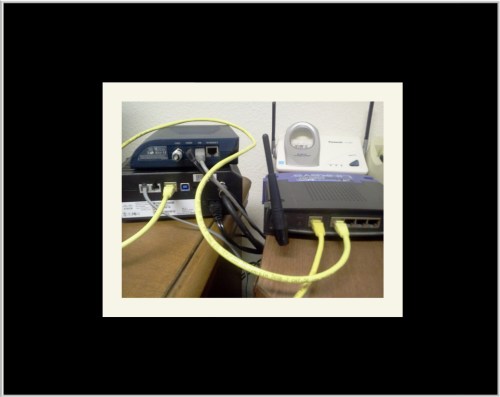
There was one unique aspect of our network (DD-WRT) that allowed us to see really great evidence of what was happening, which in turn allowed us to finally conclude that a Botnet was to blame. But to understand it well, I think I should explain more about our network and how we it evolved.

In those days we were using a Linksys router and our network was a broadband one provided by Time Warner. This was back in the days when Time Warner basically just brought the broadband connection to your house. You had to figure out what to do with it from there. Many homes back then just had one computer connected to the internet. But because our family loved computers, and our kids were at the age of applying to colleges, which was already almost entirely a web-based endeavor.  Our kids had managed to convince us that they each needed their own computer. That’s why I’d asked the father of my son’s friend to teach me how to set up a WiFi network in our home.

WiFi technology is so commonly used today in home networks, that it might be hard to envision a time when we didn’t have it! But back then it was still pretty cutting edge stuff!  That Dad had created a WiFi network in their own home, which as we all know today allows many computers and devices to be online at the same time, but just using one broadband connection. When we first got the WiFi working it seemed pretty miraculous to us at the time! 

Setting up the WiFi  Network

The hardest part of setting up out new network involved placing a network card in each computer, which gave the computer the communications hardware and software needed to even be able to reach the Internet and then communicate once it arrived there.

The next thing necessary was for us to place a router between our cable company’s modem and our computers. The router broadcast a wireless network that each computer could join for simultaneous internet use.

Sharing our Network Grew to be More Challenging

Everything was so great at first but within a few short years, as our boys grew into their teen years, sharing the network began to strain our network’s resources. Plus that our kids were beginning to stream much of their media content…which demanded decent bandwidth (but we didn’t use the term bandwidth back then ; -)

friends router

Our Strained Network Resources Led My Son to Update Our Router Software Using Open Sourced DD-WRT

Our elder son researched the strain that sharing our network was causing.  He came up with a brilliant solution! There was open-sourced firmware available for our router that would provide us with much better throughput (i.e….a leaner, faster network!) The solution he uncovered was called DD-WRT.  

DD-WRT was (and still is) some pretty amazing firmware! Because it is Open Source, anyone can download it and use it for free. Not only did DD-WRT speed up our network throughput enough to address our initial problems…but it also provided us with the tools we used to see exactly what was happening in our network.

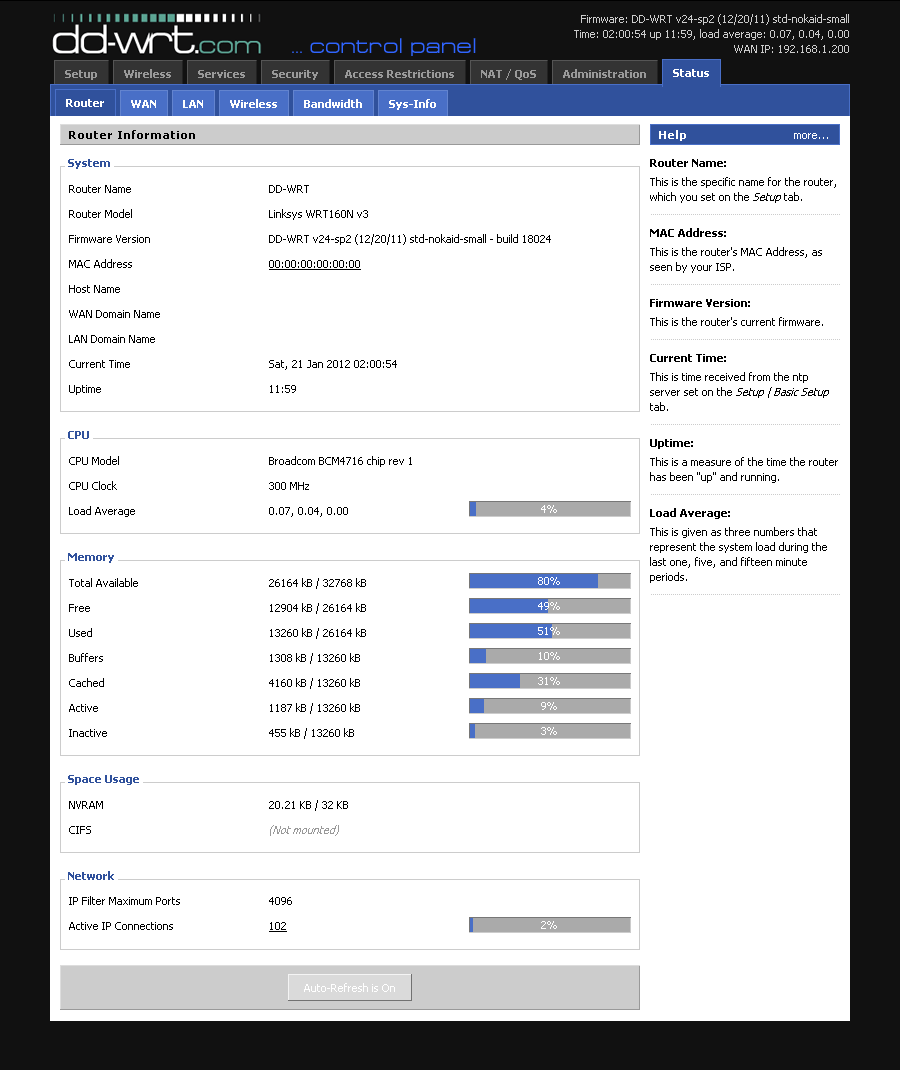
Below is a screenshot showing DD-WRT’s Dashboard. The consultants who I showed this too were blown away by the amount of data we found and it’s granularity. I spent hours pouring over management reports I accessed using the interface in this screenshot. I learned that at night there was a phenomenally high amount of network traffic…which was really odd given that almost everyone was generally asleep for much of that timeframe. The consultants helped us analyze that data to determine what was really going on.

What seemed even more unusual to us at first was that a high volume of network traffic also occurred when we weren’t even home! We generally took at least 2 family vacations a year back then. We were shocked to see how much traffic occurred when no one was home!

DD-WRT's Dashboard

The reports even drilled down further to tell us what kind of traffic it was. In our case the vast majority of the traffic was emails that were being sent. Without access to DD-WRT’s management reports I really doubt that we would ever have figured out that a Botnet was responsible for our problems. In the long run there were many, many more problems with our network and devices too…but the Botnet was the root cause for all of those too.

What We Did to Evict the Botnet

Had we known the correct approach earlier, once we diagnosed the problem we should have implemented it immediately! But we didn’t. What we tried for the better part of 6 months was to address the problem in a piecemeal fashion. We reinstalled operating systems, removed viruses and even replaced a few computers completely when the viruses proved to be too plentiful. But within a short amount of time newly restored machines were once again acting infected.

The only successful way to remove a botnet from a network is to restore every single device at the same time…and to make sure going forward that no device which hasn’t been cleaned and restored is allowed back onto the network. By device, it could be something as small as a USB flash drive which could re-infect the entire network if it wasn’t cleaned too. Once we figured this out it took the better part of a day to restore everything at once. Since both boys were in college at that point we also needed to wait until they were physically in our home with their devices so that theirs could be restored too at the same time.

Office Computer monitor

Restoring each device was simply a matter of reinstalling each operating system, and then putting back each computer’s data after having scanned that data for any viruses or malware.

We did this after Christmas in 2011. We had a consultant and his small team orchestrate the effort while we each needed to be present to provide operating system and other application keys for activation. It was an exhausting day preceded by several days worth of data backups, but in the end we were rewarded by once again being in control of our network and our computers. An added side benefit was that every family member had a new appreciation for digital safety and  because of that we’ve never encountered another situation like that. I think I can even go so far as to say that we’ve never even allowed a virus onto one of our machines again.

Of course, the other side benefits were that we learned about hardware firewalls, password managers, the importance of updating operating systems and antivirus software as well as using anti-malware and anti-exploit software too. Most of these have also been the subjects of posts I’ve written too. So we learned firsthand how true that old adage is that states:  ‘What doesn’t kill you makes you stronger!’

Below:   A combined logo I made for my websites using a free app

vsatips & vsatrends logo

My Transition into Writing My Blog

I first began to write about technology specifically because of that experience. I hoped that I could help other people who’d had similar problems. My earliest writing revolved entirely around one theme…keeping computers and networks safe.

Thankfully, those early writings are no longer readily available! I say ‘thankfully’ because writing for an online audience is really much different from any other form of writing I’ve encountered. Once I’d finally grasped that concept I was bound and determined to tackle that learning curve too.

My first true solo effort is also my first blog (although I went into it thinking I’d create a website, not a blog, on WordPress.com.  It’s called vsatips, because ‘vsa’ are my initials and I liked the way they sounded merged with ‘tips.’

vsatips is dedicated to helping others who use similar technologies accomplish little tasks that prove to be difficult at first glance. My main devices are primarily Apple mobile ones and Windows’ computers. Although I also dabble in Android a bit too as well as Mac computers…and we recently acquired a 3D printer which I’d love to begin writing about but just haven’t found the time for yet.

Dashlane & Yubi key

My 2nd Blog vsatrends

About a year after I began vsatips I realized that there were also a lot of non-tech subjects that I wanted to write about too! Which is why, after a lot of careful consideration, I decided to create a different site for those topics. I decided to call it vsatrends.

My original intent with vsatrends was to focus exclusively on topics I love that have a strong design element. Those topics included fashion, interior design, architecture, landscape design, jewelry design and beginning silversmithing concepts.

Of course, in practice I’m much to practical for that idealized approach. So for now at least, my posts have taken on much more of the same tone as those at vsatips. Essentially I’ve ended up writing a few ‘How to’ articles which have less to do with aesthetics and more to do with the mechanics of accomplishing tasks.

In watching how this all unfolds, I guess I feel that if my type of ‘how to’ approach brings value to readers, then I’m OK with that approach.

img_1771

How do I decide which site to publish a given post on then?  Well, vsatips has evolved into focusing on several broad categories of technology that I use a lot including, Evernote, Dashlane’s Password Manager, Apple mobile devices including hardware, ios, apps and accessories I love, digital data security, learning to blog, YouTube, general information about computers and tablets and my most recent obsession finding amazing deals on Amazon! If I encounter and then decide to write about something outside of these topics I usually post it on vsatrends instead. Or if the subject seems to have a wider general appeal than just those which fall within my smaller niche topics I’ll post it on vsatrends too. Last, if a topic is more focused upon the design part of the equation rather than the functionality part I usually decide that my vsatrends readers will be a better audience for that.

But there is definite overlap amongst core readers for both sites as well as the topics for each site too.

In the end, vsatrends was and continues to be more of an experiment for me. It’s one that I’m not sure will stand the test of time, since I’m already recognizing that the sheer workload of keeping up 2 active blog sites may be more than I bargained for. It will be interesting to see how my experiment evolves with time.

There are 2 things I’m certain of…vsatips has a well-defined audience now and there are more topics than I’ll ever find the time to write about. I can’t imagine a time when I won’t be writing my tips here. So, in the end, one good thing did come out of our botnet invasion…I rediscovered something I loved and it opened new doors for me too.

img_0121

Comments

Feel free to leave me any comments by scrolling down towards the bottom of the page and looking for the little comments box.

Posted in General Technology, Learning to blog, Password Managers, Password Security, Security | Tagged , , , , | 1 Comment

Amazon’s Best Deals Yet for the New Echo Dot & Thanksgiving

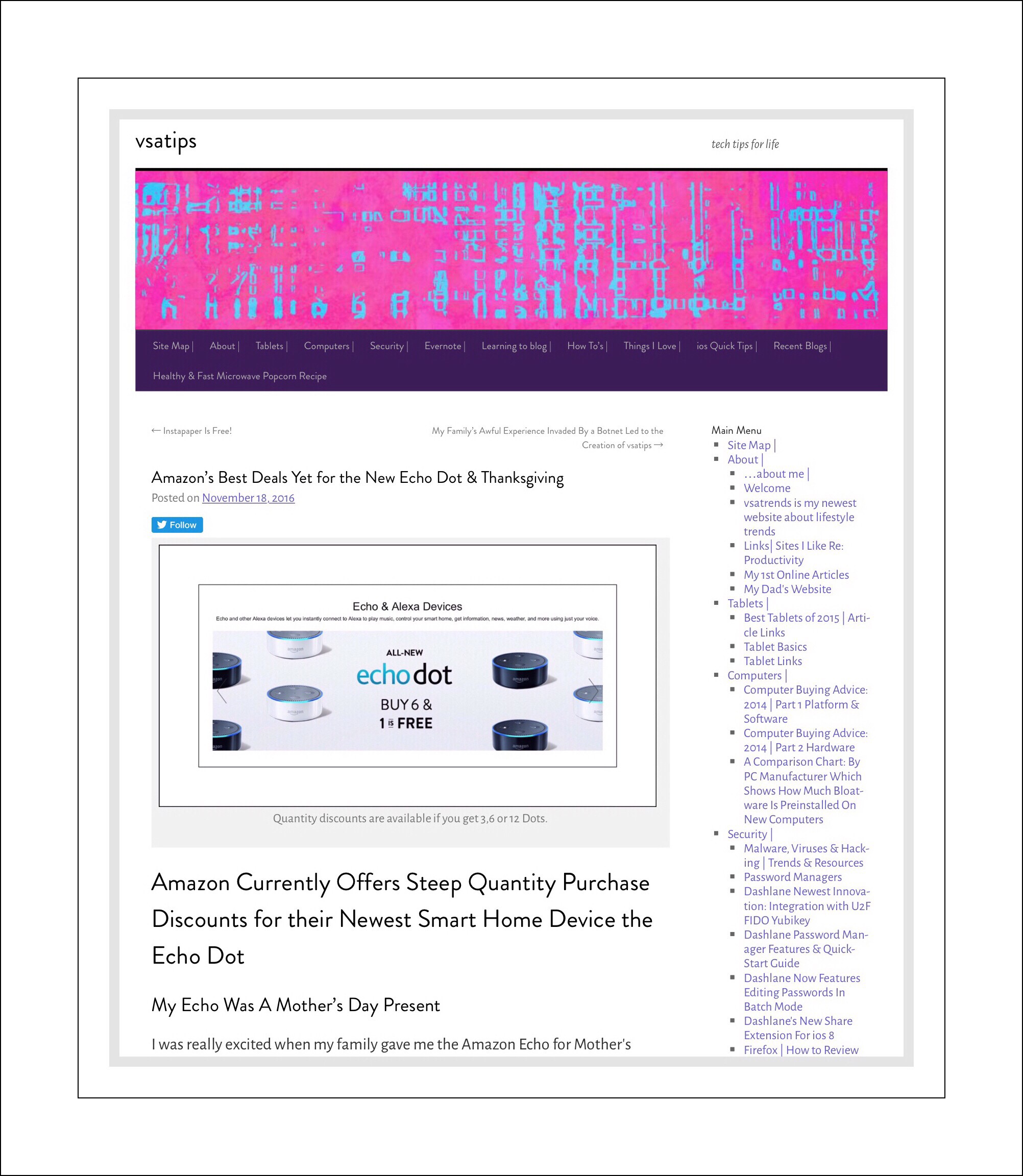
Quantity discounts are available if you get 3,6 or 12 Dots.

Amazon Currently Offers Steep Quantity Purchase Discounts for their Newest Smart Home Device the Echo Dot

My Echo Was A Mother’s Day Present

I was really excited when my family gave me the Amazon Echo for Mother’s Day! Setting it up was a breeze and we had a lot of fun exploring all the things Alexa could do to make our lives easier. But there was one big disappointment which I’m still hoping Amazon has prioritized to fix…Alexa can’t conduct web searches for you! As the reality of that really sunk in (because Amazon seems to go out of their way to not make that point clear)…our use of Alexa took a dramatic decline.

So you might be wondering why I’m so excited about Amazon’s newest Dot and the quantity discount pricing that currently prevails. My answer is because there are a lot of things that Alexa can do that are really helpful right now…but those things aren’t always needed in our study, which is where we’ve located our Echo device.  I’m extremely ‘time challenged.’ Despite my trying really hard I have a tendency to be late. But I don’t want to be…I don’t like the message that sends people. So I think that placing Dot in our bedroom would help me to be on time.

Having a Dot upstairs could help me to find out what to wear using Alexa’s great weather reporting feature, while I do things like make the bed. I could also use Alexa as an alarm clock to wake me up!  And I could even use the timer function to give me ‘15 minute warnings‘ as I’m getting ready to leave for an appointment or meeting. If I’m doing some work in our room, like right now I’m sorting through drawers and closets to find articles of clothing to donate…so I can make room for some new purchases (who knew Costco has some great clothing finds online!)…I can listen to news briefings. I could even listen to free Amazon Prime music, although I’ve read that Dot’s onboard speaker isn’t great for that. But the Bluetooth connectivity is supposed to be great and there’s an audio jack too.

Amazon’s 3 Main Products in The Smart Home Lineup

The 3 main smart home product’s Amazon offers are:

  • Echo – the most expensive but most robust of the 3 devices is $179.99. It’s an internet connected black tower or tube with glowing blue lights that wakes up to serve you when you say Alexa.
  • Tap – Amazon’s Tap ($129.99) is their answer for people who want a truly mobile device, because it can operate completely on battery power. For home use it’s less convenient though because you need to press a button to get Alexa’s attention…so that the batteries don’t burn out rapidly.  It’s also a tower/tube shape that’s a few inches shorter than the Echo.
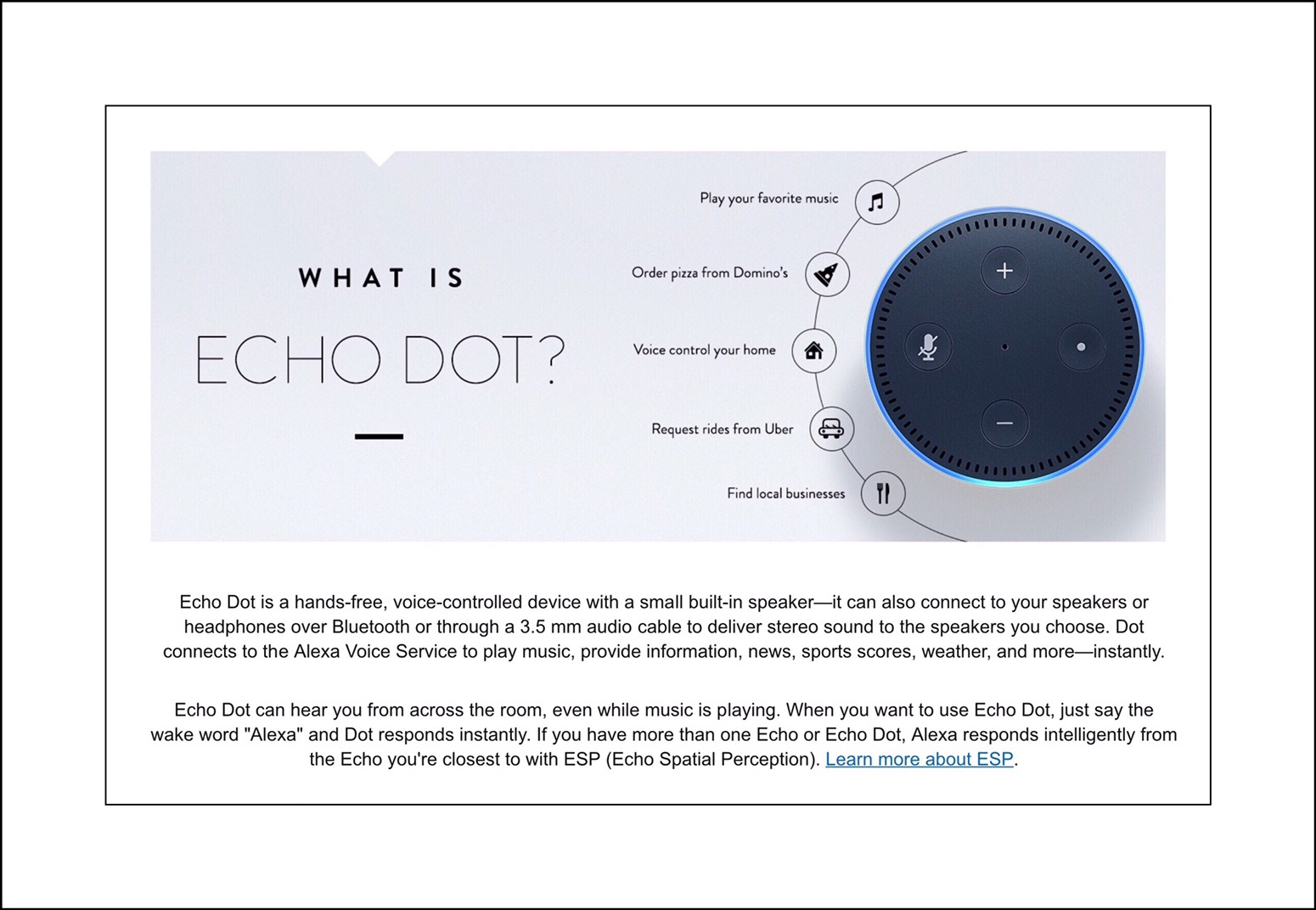
  • Dot – the Dot is a tiny version of the Echo…but instead of looking like a tower or tube, it looks more like….well, a Dot!  It does everything Echo does for less ($50 versus $179.99.)

Below is a comparison showing each devices’ specs and features. If you want to learn more about specific Alexa supported features for each device you can go here.

img_4978

Music is one thing that most people use Alexa for. If you love music having an Alexa enabled device…or set of devices is a fabulous way to listen to streaming music throughout  your home if you don’t have a great sound system installed. The Echo’s speaker is really pretty good!  From what I’ve read, the Dot’s is less than stellar…which explains the $129 price difference. Most people who get the Dot for music already have Bluetooth or wired speakers that they connect to their Dot.

Recently, I became an Amazon Associate which means that I can earn very small commissions on products I write about and recommend. I take this responsibility very seriously and so wanted to disclose that if you purchase one of these products using my links, I’d receive a small commission which has no impact upon the price you pay. It’s taken out of Amazon’s portion of the profits and probably one of their main sources of marketing.

Amazon Echo  Echo is Amazon’s top of the line smart home device

Link to order Echo $179.99

Amazon Tap  Amazon’s Tap can be used anywhere because it’s battery powered.

Link to order Tap $129.99

Amazon Dot  The 2nd Generation Dot is Amazon’s moust economical device at $50 (or less if purchased in quauntities of 3.)

Link to order Dot $50

My Overall Take on Alexa

The built-in features that I’ve described above are all really great and function so effortlessly that anyone could get them going quite readily. The main method to do this is via installing an Alexa app on a mobile device. There’s a large and rapidly growing set of additional features, functions and utilities available through add on apps which are called Skills.  The Skills library can also be accessed through the Alexa mobile app or the Skills can be enabled right on the Echo, Dot or Tap too. Amazon has taken great pains to make this hardware extraordinarily good. And I’m confident that Amazon knows that they’ll only be able to hold onto the upper hand edge that they currently enjoy in this market by enabling Alexa with the ability to conduct basic web searches.

A Little More About Web Searches

There are plenty of YouTube videos demonstrating Alexa’s skills, which appear to include searching for information online. But what I learned through trial and error was that many of those demonstrations rely upon data and knowledge that has been preprogrammed into Alexa. As new firmware updates come out this aspect is improved upon…but it’s unrealistic to think that programmers can anticipate every question a person might want to search for online and program answers to that. It’s really perplexing to me why Amazon chose this route versus the more traditional avenues used by Apple’s ‘Hey Siri‘ and Google Now’s ‘OK Google‘ hands-free web searching engines. I guess only time will tell.

The Price to Productivity Ratio

For me, the Alexa engine, even without the missing web search feature still offers enough bang for the buck to make it worthwhile. Especially because the newer Dot priced at $50, costs even less than its predecessor, yet it offers all the same great features, better hardware performance and most importantly all of the features that the much higher priced Echo ($179.99) does.

Add into that the quantity discounts available and it’s a no brainer for me to get at least a 3 pack of the Dots so I can have one and give each of my kids one too. Below are the quantity discounts currently available. In all of these cases you need to add a discount code such as DOT#PACK where the #=the quantity you’re purchasing, during the checkout process at Amazon.

Quantity Discounts Available for Buying Echo Dot

Here’s a link explaining more about the quantity purchasing discount deal. Amazon doesn’t give a time frame for how long this option will be available but I suspect it will end as they deplete their inventory. One reason that I don’t own the Dot yet is because I ran across a great deal for it (the gen 1 version) a few months back, which I learned about one day and decided to take advantage of it the next. Sadly, the next day that deal was no longer available. In retrospect, because gen 2 just came out this was actually a blessing in disguise!

Below Are the Codes for The Quantity Deals Available

     DOT3PACK Buy 3 save $20

     DOT6PACK Buy 6 get one free

     DOT12PACK Buy 12 get 2 free

How to Use Amazon’s Quantity Discount Codes

  • First go to the product page for Dot and enter 3 (6 or 12) in the Quantity field before you click on add to cart. Then go to your shopping cart.  If you forgot to update the Quantity you can do that in the shopping cart too.
  • Next copy and paste the appropriate code (example DOT3PACK) right above the shopping cart…into a small box that appears under Payment Method…then click on Apply.
  • You should notice that the price in your order summary has changed to reflect the discount.
  • Then click on Place Your Order.

Amazon’s Newest Thanksgiving Day Sale is Called Black Friday Week

Here’s a link to more information about this 8 day event.

Why It’s Important to Buy This Today (or really soon at least!)

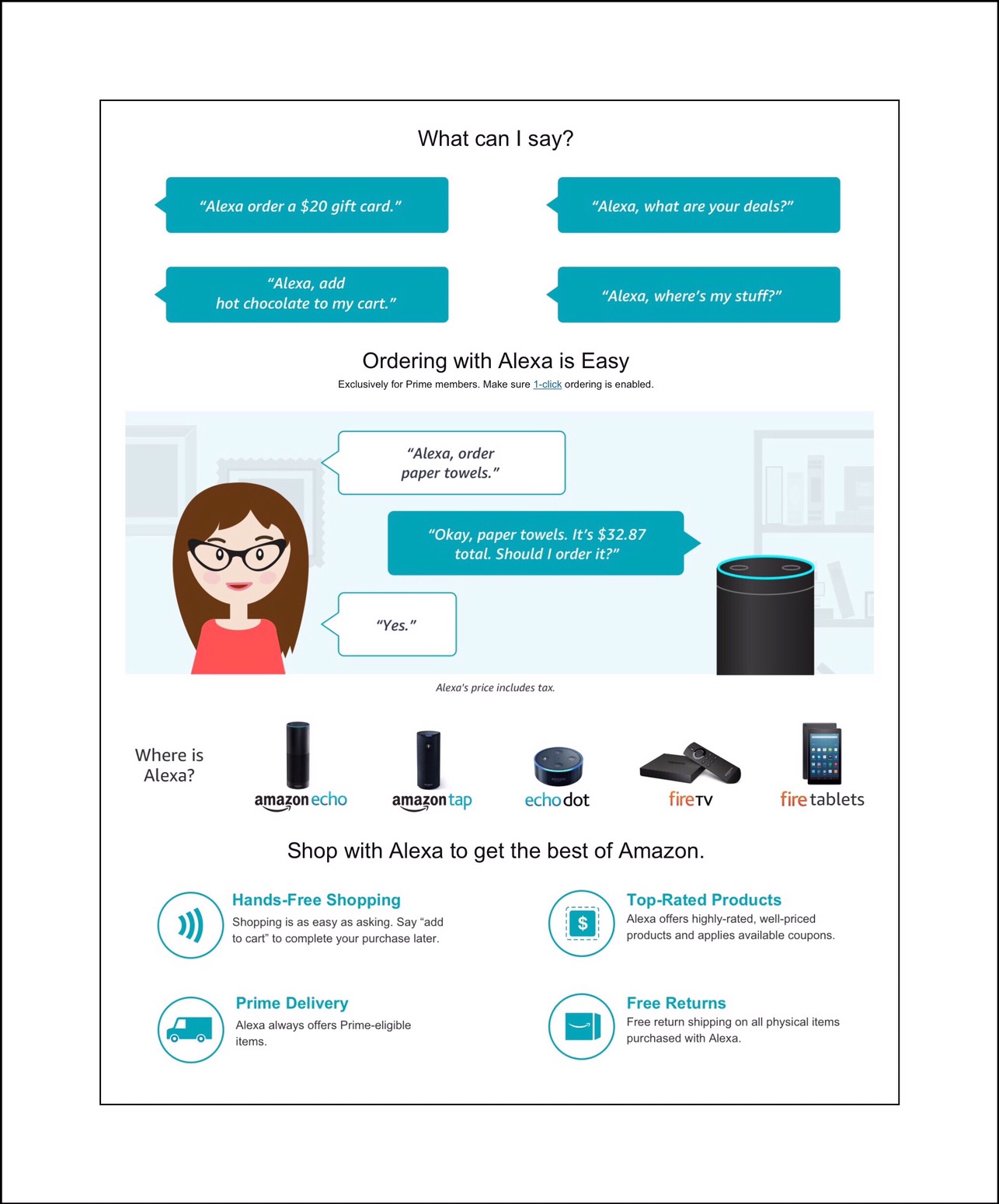
Everyone knows I’m a huge fan of Amazon Prime and get myself all worked up over their special events like Prime Days. Well, Prime Day is only once a year…but sales on Black Friday and Cyber Monday, also one day only, are almost as good at Amazon as their own annual event is. So when I went to Amazon today to add the audio upgrade to a Kindle book I’m reading currently and discovered that this year Amazon’s is combining those 2 days into a weeklong celebratory shopping event I got completely distracted and began reading all about that instead. Here’s what I learned. In a nutshell…this new event BEGAN TODAY! More important, there are deals that are only available via Alexa…meaning that there are special deals anyone who uses an Alexa enabled device can access…that the rest of the world can’t. But if you don’t have the Echo, Dot or Tap just yet…that doesn’t mean you can’t take advantage of these special offers.


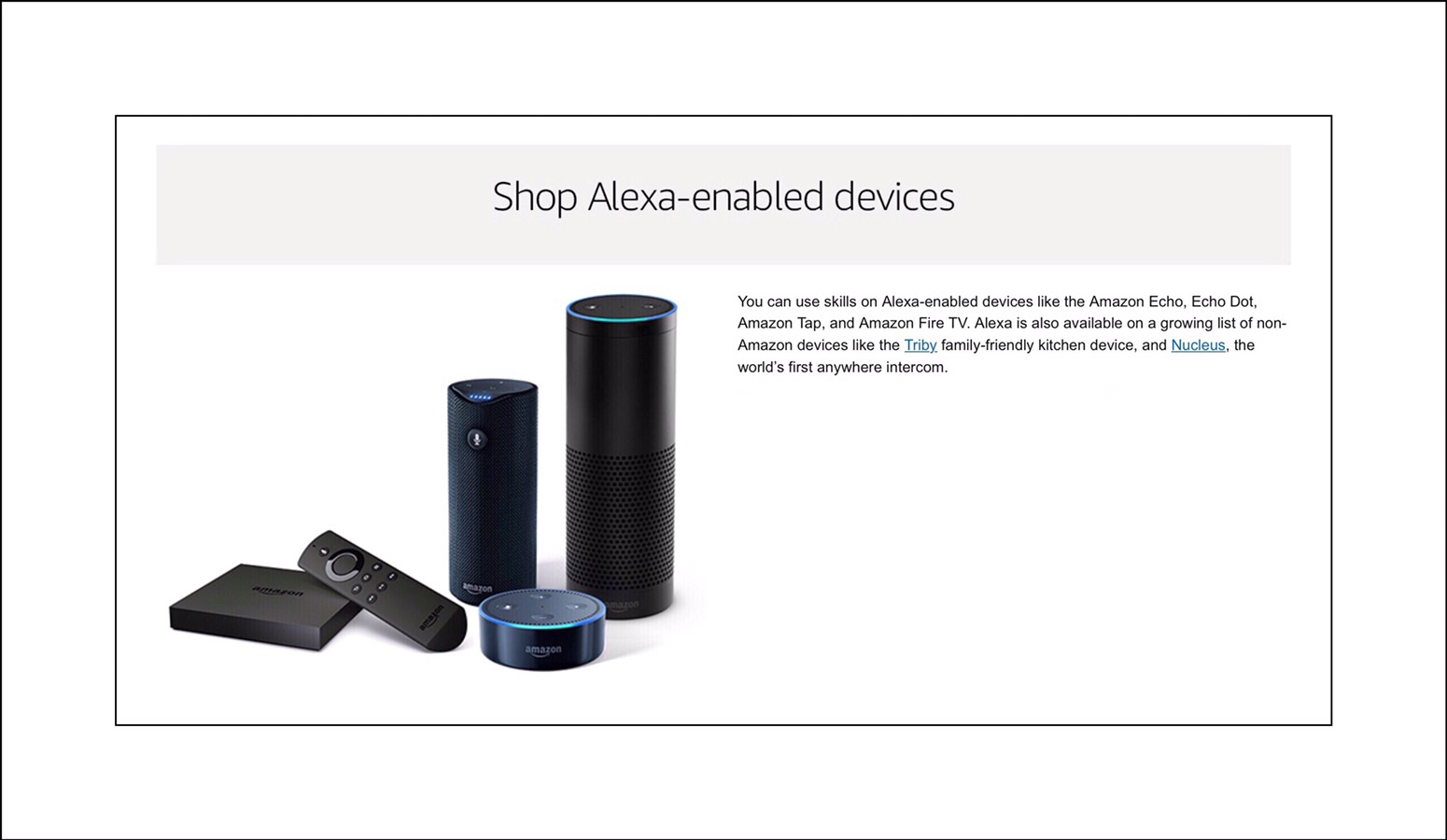
That’s because any Alexa enabled device can access these deals. In addition to the devices I’ve already discussed, this includes any Amazon Fire TV, Kindle or Amazon Fire Tablet too. Amazon has even begun to offer this capability to non-Amazon devices, although I’ve not yet heard anything about Android or Apple devices. But I discovered this news reading the fine print in the screenshot below.  If you want to see all the daily deals you can do so using this link. But you’ll only be able to order products using an Alexa, voice enabled device.

Conclusion

Some of these special deals are available only via Alexa voice search. That combined with the new week long shopping event that Amazon is hosting and which began today, is why for me, there’s no time to waste in placing my quantity order for the Echo Dot…it’s just a matter of deciding how many I would like to place around our home right now. I truly believe anyone currently familiar with Amazon’s Echo technology will find the quantity pricing a great surprise. Because  it’s something I discovered so randomly and it doesn’t seem to be well publicized I decided to share this with my readers too…even though this isn’t my typical kind of post.

Comments

Please feel free to leave me any comments…especially if you’ve run across other great Amazon Deals too!

← Back

Thank you for your response. ✨

Posted in Amazon, Amazon Prime, Tech Tips | Tagged , , , , , , | Leave a comment