Where to Find Apple News 2017 | Siri’s New Super Bowl Tips | Listen to Tim Cook Discuss Q1 2017 Earnings 

Apple Publishes Beautifully Designed News & Reports

Apple always has a lot of great free information for anyone who might be looking for something  interesting.  Everything from current beautifully designed Press Releases, to streaming conference calls discussing earnings, to streaming videos of recent live Keynote events.


img_0745img_0744
Finding historic information is easy too, since the Press Releases go back to the company’s very early days. You can search for Press Releases by date using this link. If it’s product images you need, look here for current products. Below are a few of those I find most interesting:


The Original iPhone Release was in June 29th, 2007.  It was only available for AT&T 2G service. The 4 GB version was priced at $499  the 8 GB at $599.  A mere 74 days later, on September 10th, Apple announced they’d sold their 1 Millionth iPhone! 

The Original iPad Release was in late March 2010. Apple called the iPad a ‘Magical & Revolutionary Device’ and it was priced at $499 for the smallest 16 GB version to $829 for the 32GB WiFi & cellular version. In less than 60 days they announced they’d sold their 2 Millionth iPad!

The Original Watch Release was finally at the end of April in 2015…but it was announced much earlier…in September 2014…making this the Apple product that was ‘the most anticipated’ one by users.

Original IPhone & iPhone 7

At their Press Release’s main page you can search for news by year or by product. Here’s an example of all the Press Releases and product images currently available from Apple on iPad products…dating back to the day the first iPad was released in 2010.

The main page for Apple’s Press Releases dates back to January 2000…so some of their earliest products like the Lisa computer announcement can’t be found here. But what’s interesting in looking at those early years is recognizing some of Apple’s early financial struggles…such as the announcement in December 2000 about significant corporate losses. The announcement states that:  ‘The company expects to report revenue of about $1 billion and a net loss, excluding investment gains, of between $225 and $250 million when actual results are announced on January 17, 2001.’

All the iPhones

Apple’s Quirky Side

From time to time Apple also has some quirkier Press Releases, like this most recent one showing you all the ways that Siri can help you with information about the upcoming Super Bowl. Or, their continual monitoring of app sales, and the company’s frequent bold news announcements of record breaking feats by the App Store. Their most recent announcement was for January 1, 2017. In it they announce that last New Year’s day marked Apple’s largest app sales earnings in a single day in their corporate history…$240 Million! During the holidays Apple released the ios 10.2 update which includes hundreds of new and redesigned emojis.

Apple's new emojis

Online Shopping Exclusives | Refurbished & Clearance Products

Not everyone knows that Apple offers a really great resource tool for buying their refurbished products. These all carry and 1 year warranty and they offer current products at sometimes substantial discounts. Occasionally they also sell new products at clearance prices.  You can find whatever they may have on clearance right now using this link and scrolling to the very bottom of the Refurbished items menu.
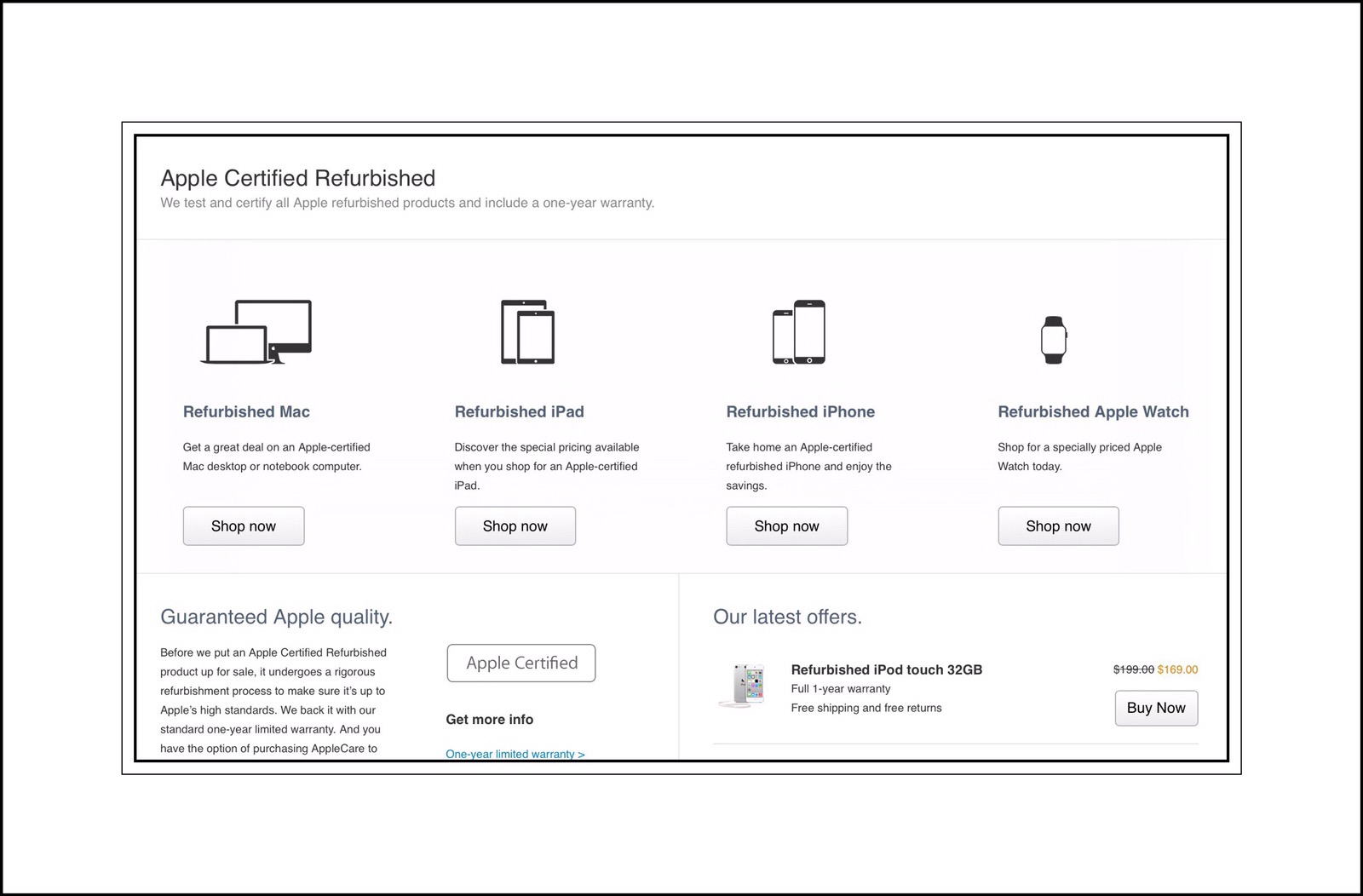
You can also customize a Mac computer online, or order engraving for an iPad…which aren’t usually services offered in their retail stores…although this can vary too. You can learn more about those services using this link to Shopping Help or this one to exclusive online deals.

Everything Else Apple

Last but not least, if you can’t find what you’re looking for using the above links, here’s a link to the main site map for all of Apple.com which includes current products, support, news, Press, Education & Business, workshops and learning, product user manuals, Apple Consultant’s Network, Requesting repairs and parts..and a lot more too!

Here’s the link to their main Support sitemap.

Remembering Steve Jobs is a webpage Apple created for people around the world to share their thanks and dedications to Apple’s late founding father, Steve Jobs. I could be wrong but it seemed to me that these are displayed in real time.  Because in the few brief moments I was visiting the site I watched as 4 new dedications appeared…see the screen shots below.

Investors and Financial News

Here’s a link to Corporate information including news about suppliers, people looking for jobs at Apple, finding an Apple Store anywhere in the world and Apple Developer programs.

Here’s a link for people who want to more about the company’s financial status and are interested in investment opportunities here are 3 links:

Apple RSS Feeds

Feeds to Apple news, developer news and server news as well as lots of iTunes content is available here.

Apple’s YouTube Channel

Many people aren’t aware of the fact that Apple hosts their own YouTube channel. In addition to a lot of product marketing videos and television ads, they also host a lot of artistic videos created by users in their ‘Shot on iPhone’ series of videos.

  • Remembering Steve Jobs is a beautiful and brief tribute to Steve Jobs contributions to Apple (it’s about a minute and a half long.)
  • The Books sell for $199 and $299.  If you can’t afford that and want to see a beautiful and interesting presentation and a complete walk through of the book you can watch this video.

Apple’s ‘Environmental Responsibility Report’ is a fascinating look at both their corporate culture and their manufacturing philosophies.

img_0746

Apple’s New Campus 2

For the last 3 years Apple has been working on an amazing new campus, affectionately referred to as the mothership in Cupertino. Their new headquarters is located on 150 acres of land that they purchased in a piecemeal fashion over several years. It’s main focal point is one large circular building that truly does resemble a mothership. It’s more than a mile around in circumference, 4 stories high and will house 13,000 people. Currently there are around 2600 people who will remain at Apple’s existing campus.


Apple is the largest taxpayer in Cupertino. It’s said that this video of Steven Jobs presentation to the Cupertino City Council on June 7, 2011, made to garner the city’s support, was the last public appearance he ever made before his death less than 4 months later.

img_0742
While I’ve shared a lot of informative links here, there are still many more I suspect that I’m forgetting…although I do think that I’ve remembered most of the important ones.

Please leave me any comments below:

← Back

Thank you for your response. ✨

Posted in Apple, Apple News, Apple Products | Tagged , , | Leave a comment

Find Missing iPhone Notes ios 10 & Change ‘On My iPhone’ Notes Default Group

Apple’s New & Improved Notes App Is Great

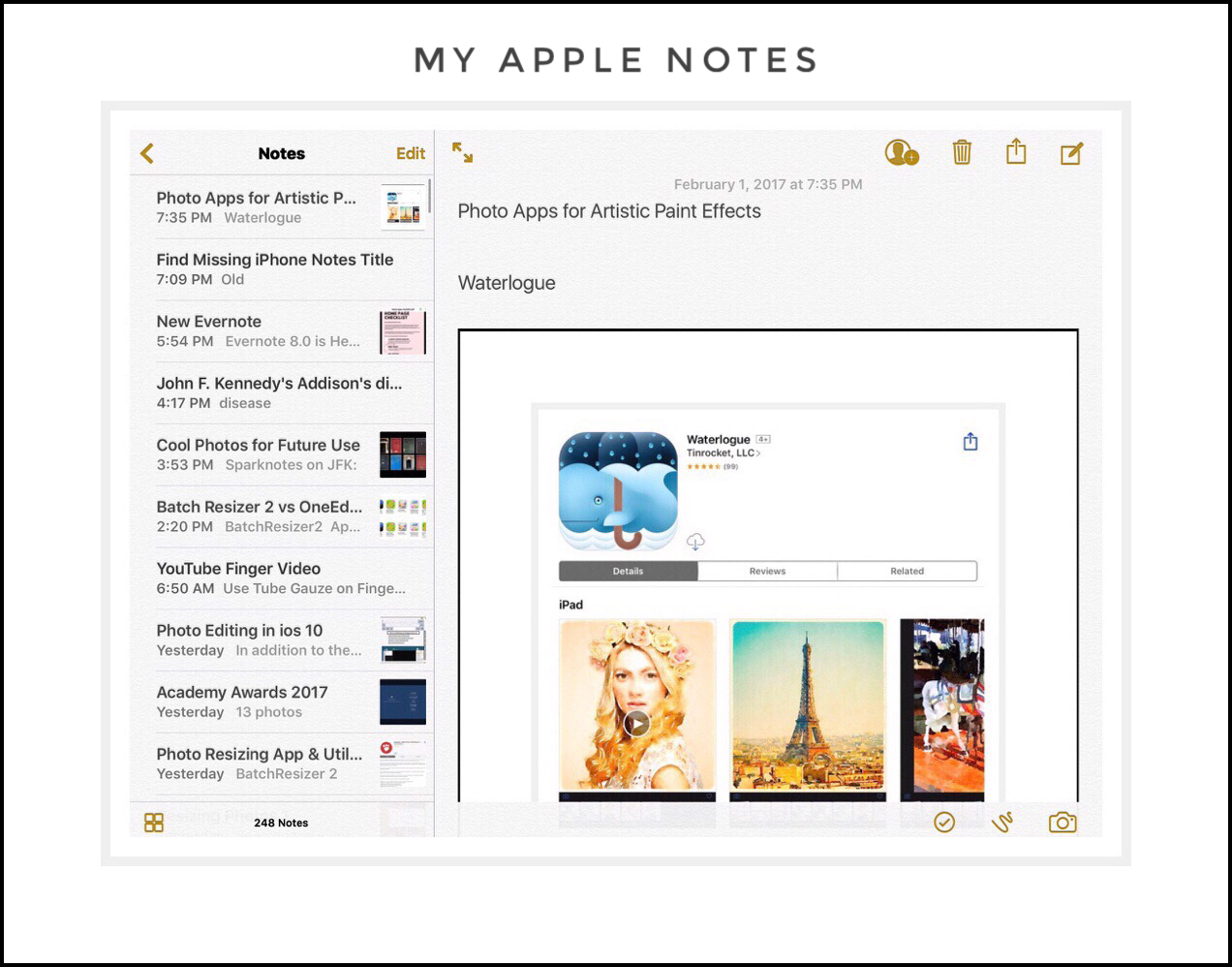
Apple’s significant enhancements to the Notes application in recent years has brought about much greater usage of the app. Some of the new things that you can do include vary the font size and weight, as well as create lists. You can also include handwritten notes or markup photos, and collaborate or share your notes easily with others now.

My Apple Notes

But, with all these improvements come a few more problems too. One big problem is finding the notes you’ve written using your iPhone on your other Apple devices.

This isn’t really a new problem, because the Notes app has offered several different Note accounts that are tied to your email accounts for many years.  Apple sometimes calls these Note groups. But for many who are using the Note’s app a lot more now or are essentially using it for their first time, the whole Note’s group concept can be really confusing. This is made worse by the fact that there is no good documentation on how these groups function.

Even worse is trying to discover how to change the default group for your iPhone once you know that it’s where your problem originates from. Because it appears that Apple has made the default group the one they call  ‘On My iPhone.’  But there’s no apparent or easy way to change it.

That’s why I wrote this post. I was at the Mayo’s Clinic in Rochester most of last week undergoing my 1st Executive Physical. I was using the Note’s app on my iPhone a lot. But I couldn’t get those notes to show up on my iPad!  Worse yet, I couldn’t find any current instructions on how to go about changing the default group for iPhone Notes. Older instructions didn’t pertain because you change this in Settings, and the Setting’s app has been drastically changed and reorganized beginning with ios 8.

There’s One Main Problem with Apple Notes:

The ‘On My iPhone’ Note Group

As I mentioned above, the ‘On My iPhonenote group appears to be a standard default for the Notes App. The main problem with this is that most people use their iPhone Notes app a lot more for creating new notes than they do using an iPad or Mac computer for creating new notes. Yet they will most likely want those notes to be available on all of their ios devices. But this note group only appears on the iPhone!

Rochester Art Center at the Mayo Civc Center

A recent photo I took with my 6+ at the Rochester Art Center located in the Mayo Civic Center

When I Travel I Use 2 iPhones Which Compounds the Problem

This problem is compounded even more if you happen to have 2 iPhones like I do. I use the iPhone 6+ for the camera primarily, and the iPhone 6s as my cell phone. But then I have the 6+ as a backup cell phone should anything happen to my 6s, which is really helpful for me when we are traveling. This method also works great for me because I’m a klutz and I drop my iPhone a lot!

Also, the 6+ camera is much better than the 6s, which I assume has something to do with the larger image processor, which lets in more light. The end result is that photographs taken on my 6+ are generally much better than those taken on the 6s…even though I have all other settings the same!


Apple Notes Biggest Problem Only Impacts iPhone Users

I think I can confidently state that this is the #1 problem experienced by ios Notes users…it arises for those people who are using iPhones with the Notes app, and who have their notes stored under the ‘On My iPhone’ category.

One simple solution would be for Apple to simply rename this category to:  ‘On My iPhone Only

This would clue people in to the fact that those notes will never appear anywhere else (unless they are manually moved.)

One additional factor makes this problem even worse:

A contributing factor that makes this problem even worse is the fact that the ‘On My iPhone’ category is the default category for many iPhone users.  How this arises is complicated and not really within the scope of this post. But, this is really an important aspect because many people aren’t even aware that their iPhones have different note groups!

If someone is oblivious to this fact (like I was years ago when I first started using an iPhone)…it’s likely that their Notes will sometimes inadvertently end up in different groups without their knowledge, which only compounds the initial problem even more!

It causes people to wonder why some notes appear on other devices and why others don’t.

The end result is that people grow increasingly frustrated after a few experiences of taking down some important information on their iPhones…and then later not being able to find that information again on other devices, and despite their sometimes spending a lot of unnecessary time searching for the data in vain.


Because of this many people assume that the Notes app isn’t a great method for sharing notes across devices!

But that is incorrect!

All one needs to do to make their notes appear on all of their devices is to change the default Notes group on their iPhone to the iCloud Group.


Sadly, Apple doesn’t provide users with the support they need to accomplish this. Even if someone is able to recognize what is causing the problem of their missing notes, finding a solution can be fraught with frustration.  I know, because this is the exact situation I found myself in about a month ago!

I spent way to much time researching this and trying to come up with the solution…a solution which is actually quite simple if you can only figure out how to do it.

The Solution

The solution is to change your default Notes group to something other than the ‘On My iPhone’ group. Once I had my research narrowed down to just this one concept…I wasn’t about to drop it. I knew there had to be a way…and once I finally figured out what it was, the solution itself ended up being quite simple too!

How to Change the Notes Group from ‘On My iPhone’ to the ‘iCloud’ Group

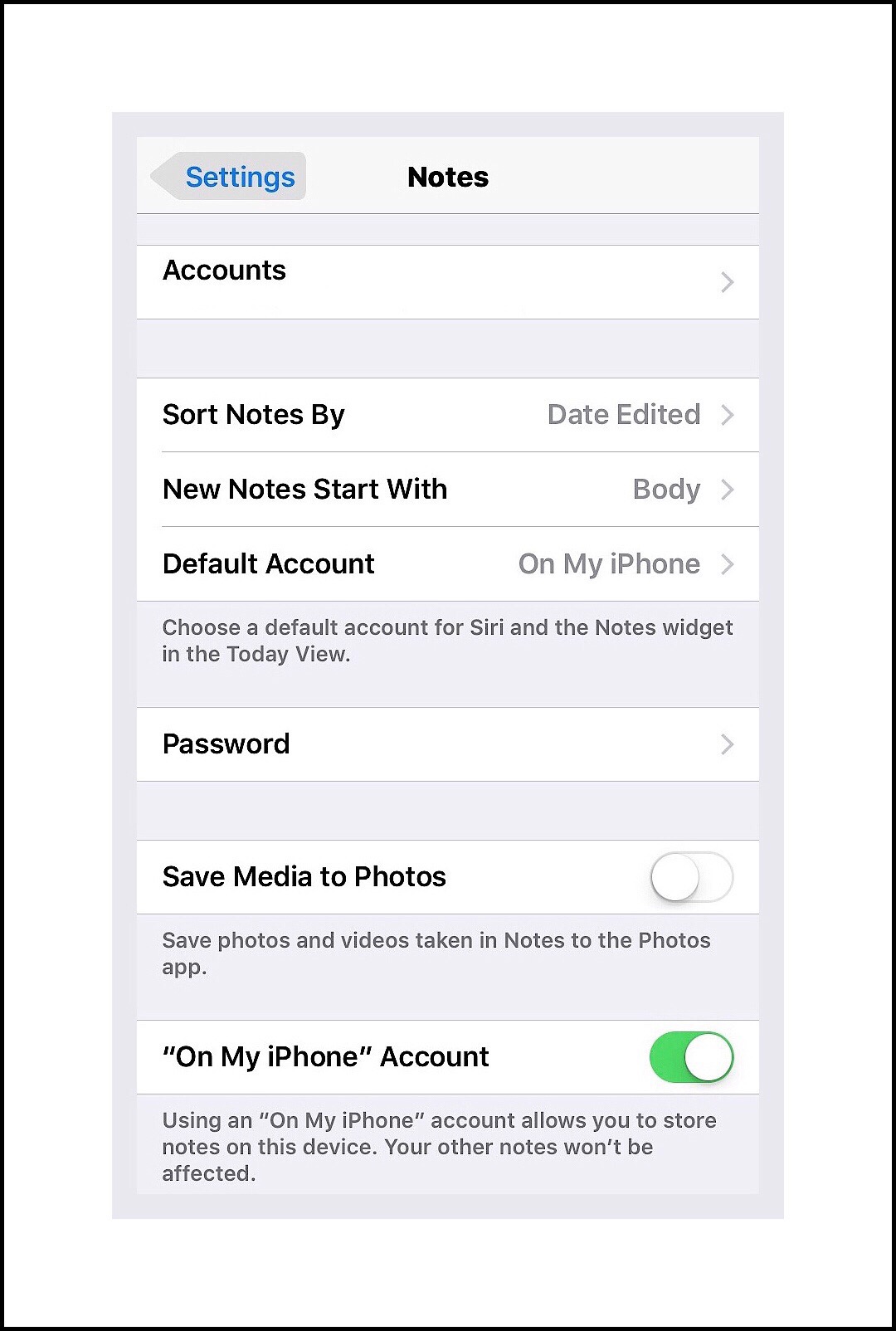
Go into Settings – Notes – Accounts

Go to Settings - Notes

You’ll arrive at the screen displayed in the screenshot below:

You'll arrive at the Notes detailed settings screen

Tap on ‘Default Account‘ and you’ll see something like the screenshot displayed below:

Change the default group to iCloud


You should see a check mark next to the groupOn my iPhone.’

To Change the Group Just Tap on a New Group

That’s It! You’re Done!


Finding Notes You’ve Created on Your iPhone

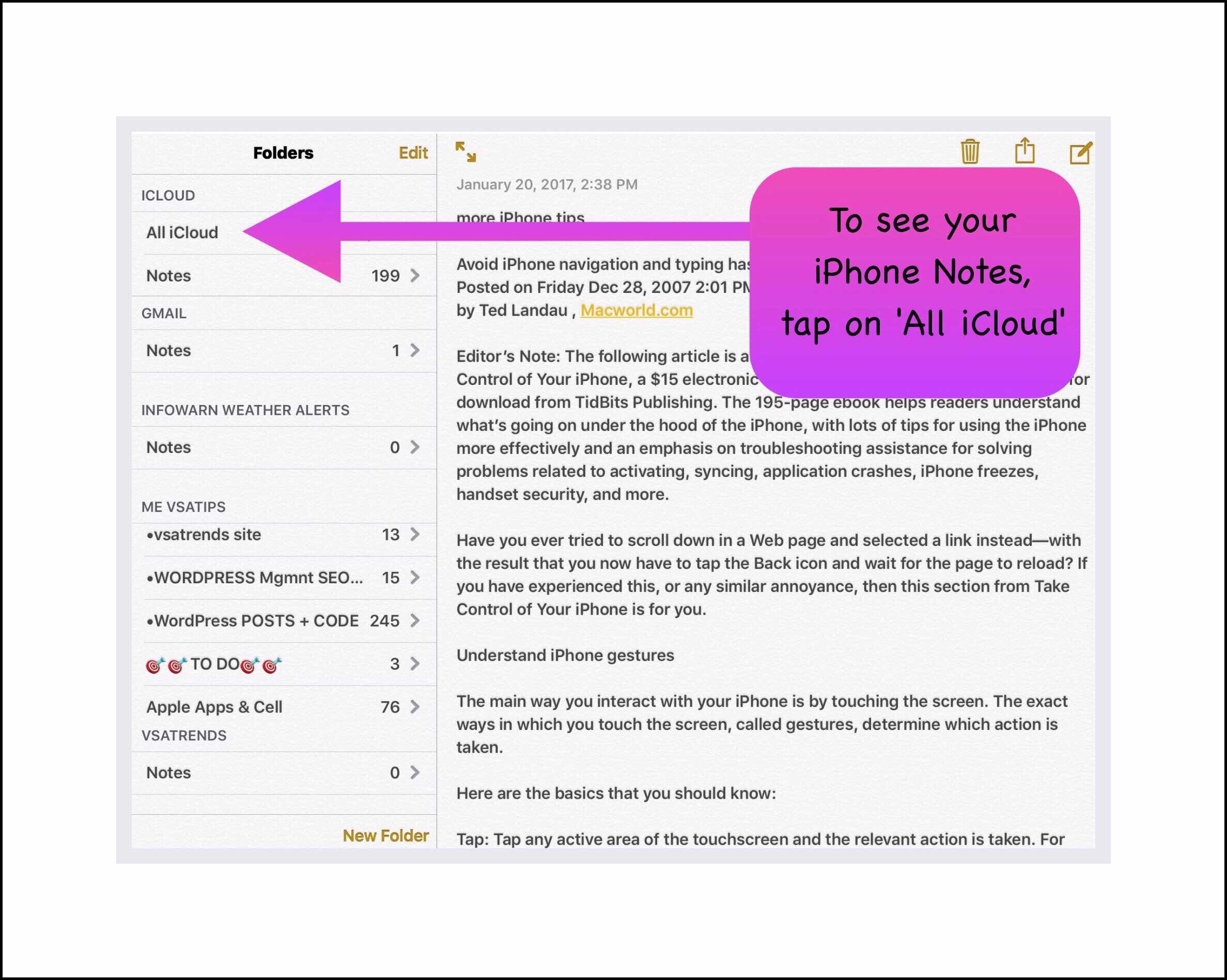
Now, when you want to see the notes that you created on your iPhone while using a different ios device,  just open the Note’s app and tap on the carot in the top left corner of the screen to get to all the Note Groups you currently have set up. Then, if you’ve changed the default to iCloud, you can tap on that to have all of the iCloud notes displayed.

Tap on the carot to see all note groups
Tap on iCloud to see all new test in your iCloud group

Please leave me any comments below:

← Back

Thank you for your response. ✨

Posted in Apple Devices, ios, ios apps, iPad, iPhone | Tagged , , , , , | Leave a comment

Are PokemonGo Gift Boxes Worth It? Tips to Catch Pikachu with Christmas Hat!

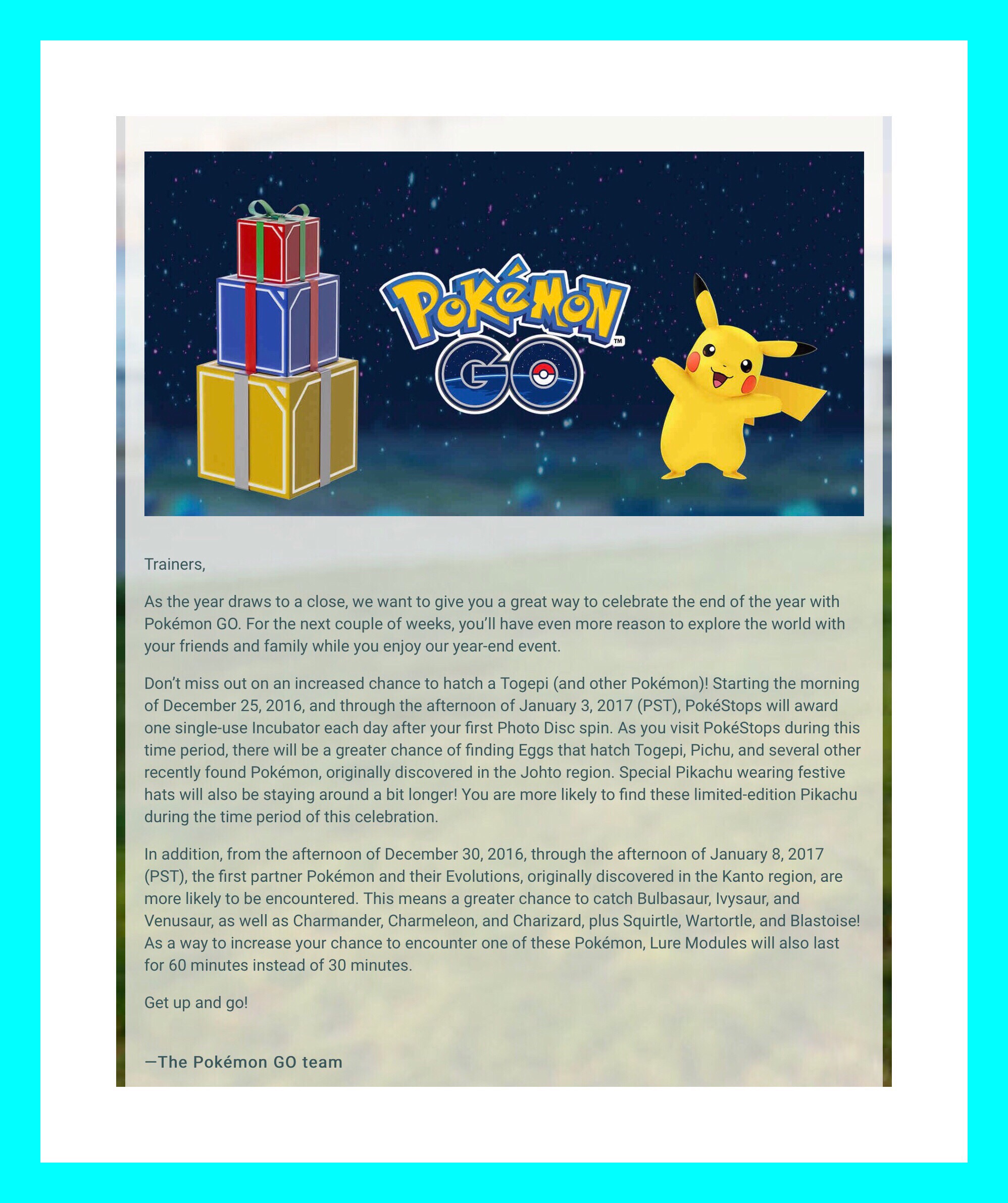
Important Holiday Event News for PokemonGo Players!

You Have Increased Odds of Capturing Pikachu with a Christmas Hat Right Now | Between Christmas & New Years

Capturing Pikachu With a Christmas Hat Isn’t Easy!

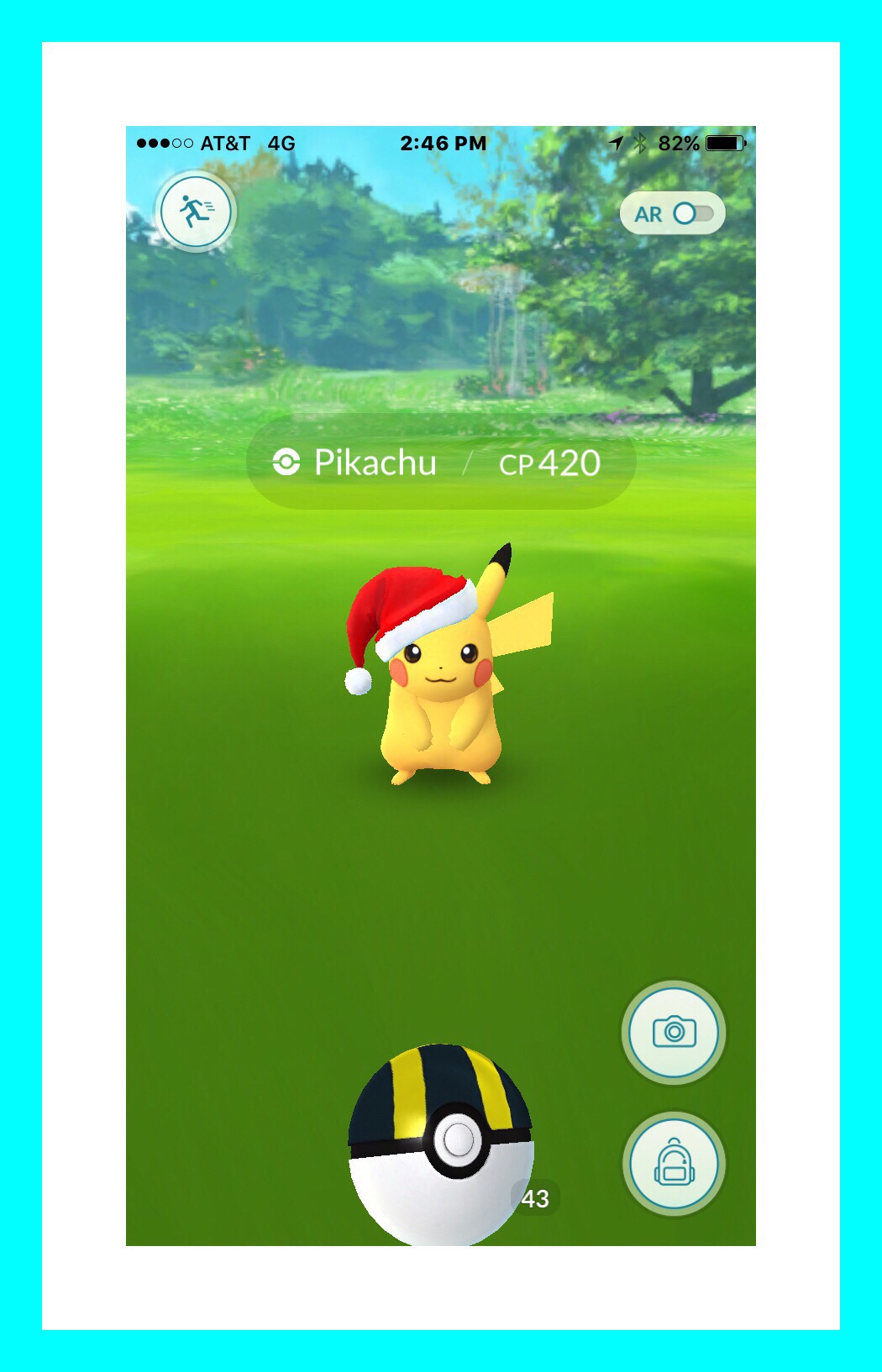
We’re on vacation for Xmas…on a Caribbean cruise with Royal Caribbean. I don’t know for sure that it’s easier to catch Pikachu with a Christmas hat right now…but I haven’t seen him until Christmas Day.  And I finally did catch him too…on Christmas Day…although it wasn’t easy! I spotted him on the island of St. John’s near the ferry shuttle to St. Thomas. He broke free from 2 regular Pokeballs so I switched to Ultraballs…where he broke free 6 more times before I caught him! So he broke free eight times total!

Below is my screenshot right before I caught him…I took it just in case he ran away!

Pikachu with Christmas Hat

Two Days Later

Pikachu With a Christmas Hat Will Be Gone Very Soon!

We visited the island of Aruba. Twice I encountered Pikachu with a Christmas hat…and twice I attempted to catch him…but failed.  In both cases he had a lower CP than the one I captured…only around 110. So I used regular Pokeballs, and caught him within one or 2 throws. But both times he broke free and then instantly ran away.

Pikachu Capture Tips

  • Look for him near active, or busy Pokestops
  • He appears more frequently right after egg hatchings
  • Use a Raspberry and a Great Ball or Ultra Ball if you have them to insure he doesn’t escape once captured.
  • My best advice is to use the strongest weapons in your arsenal immediately…if you don’t you risk wasting Pokeballs and his running away.
  • Try to get out find him now and before New Year’s Eve…in fact originally Niantics said he’d only be around through December 29th.

New Years Eve Pikachu with a Christmas Hat was Everywhere!

We were flying home from our Caribbean Cruise on New Year’s Eve. I caught 2 Pikachu’s with Christmas hats at the Orlando Florida airport within a matter of minutes after arriving there. He continued to appear randomly every time I opened the PokemonGo app on my iPhone. Even once we arrived home! I noticed Pikachu appeared under the revamped wild Pokémon near me tool as I was shutting down background apps before plugging my phone into its charger.

IMG_5474.JPG

On Christmas Niantics Began Selling Gift Boxes via the Shop Menu in PokemonGo Apps

This Post Examines One Gift Box Alternative to Determine if the Cost Savings of All Items In It Make This Box a Good Deal

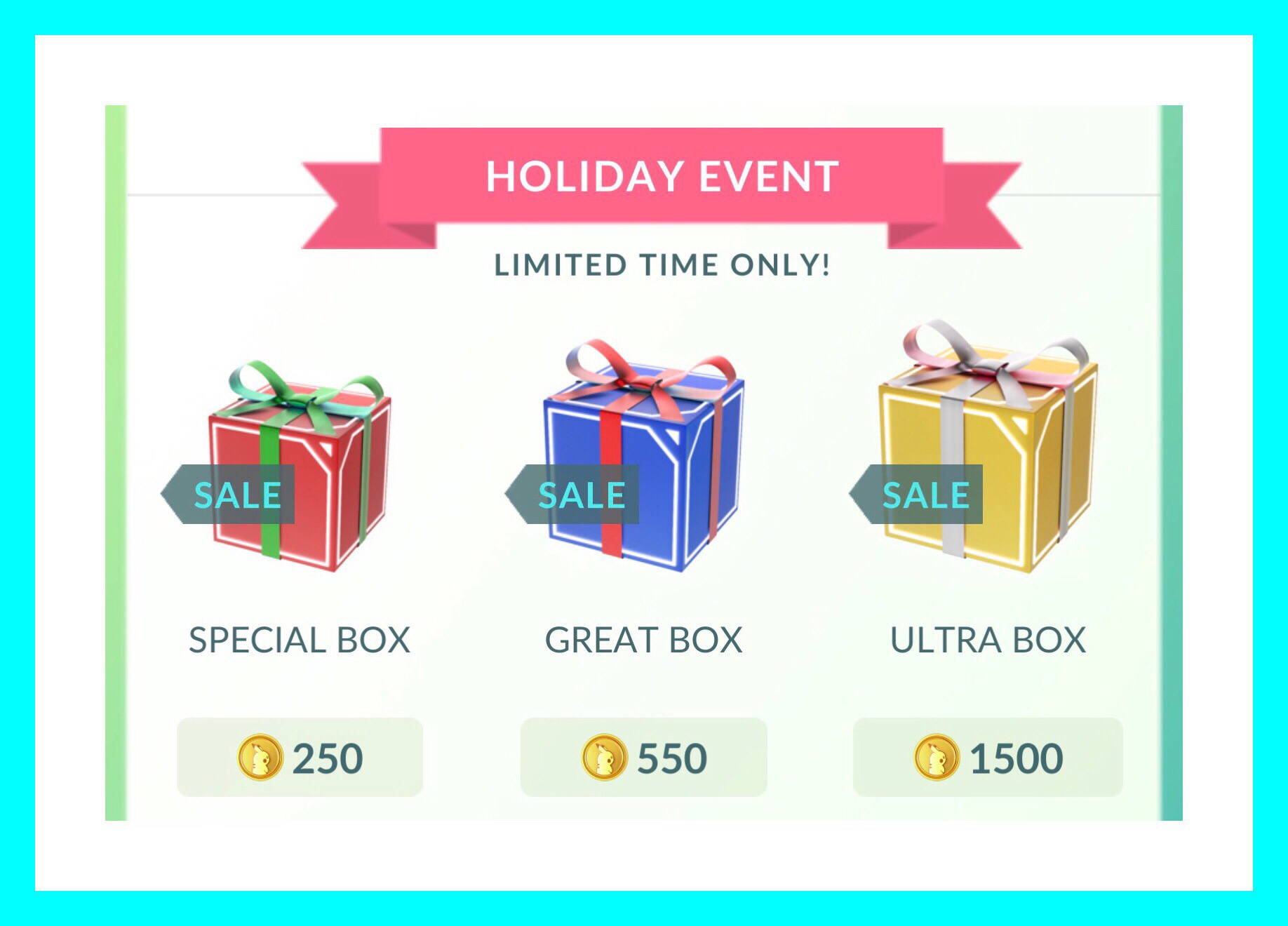
All 3 Christmas Gift Boxes are shown in the screenshot below.  I’ll be examining the most expensive gift box…the Ultra Box offered for 1500 Poke Coins.

Ultra Gift Box Item Costs Analysis


The screen shot above shows the 3 Gift Box alternatives. As you can see the prices range from 250 Poke Coins to 1500.

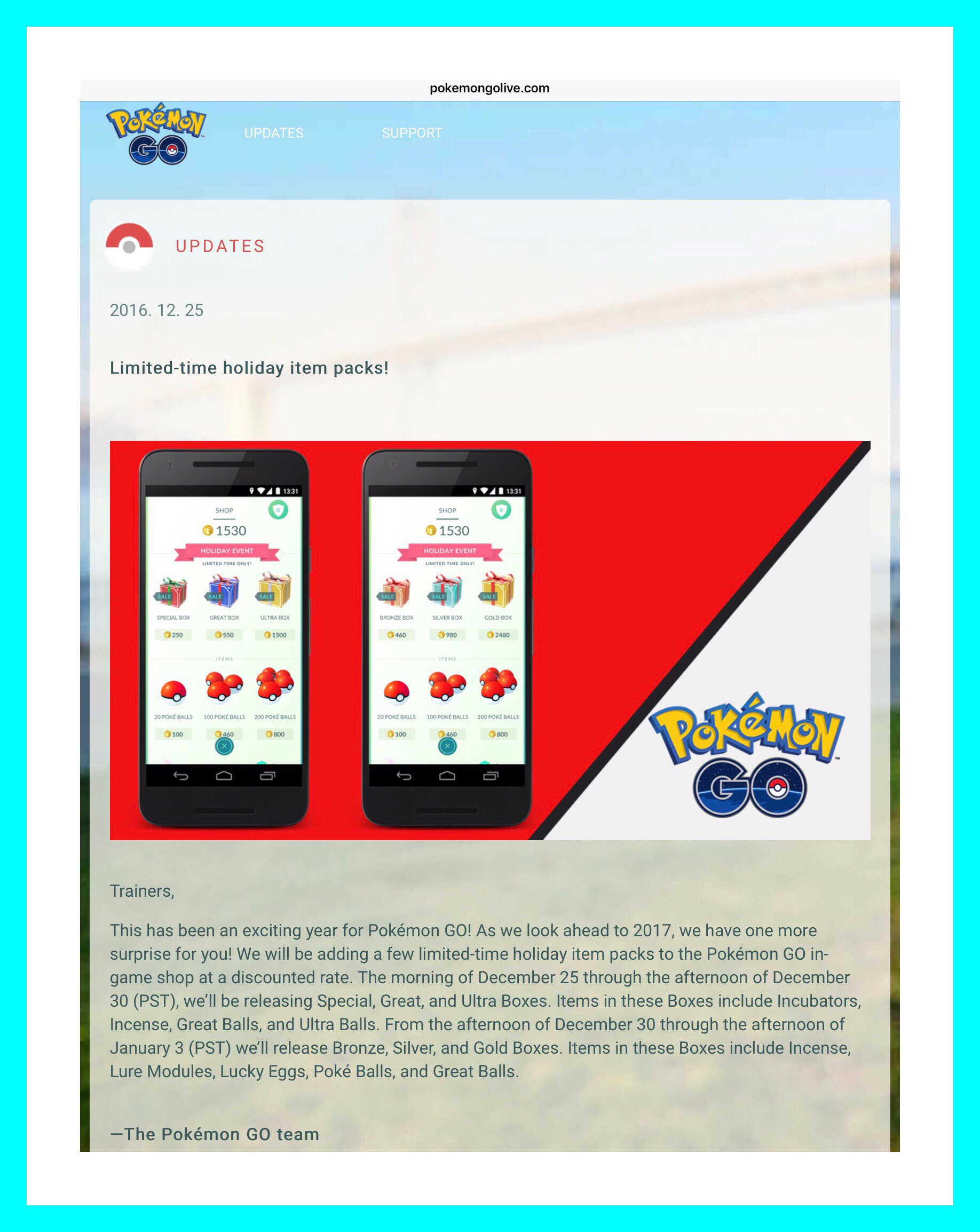
We need to know what’s in the Boxes fist to make any calculations.  Below is what Niantics has to say about their ‘Box’ offerings.


Unfortunately they don’t tell us exactly what is in each box. So I found someone who does.

Here’s a link to ToneDeaf’s post in GameFAQ’s.

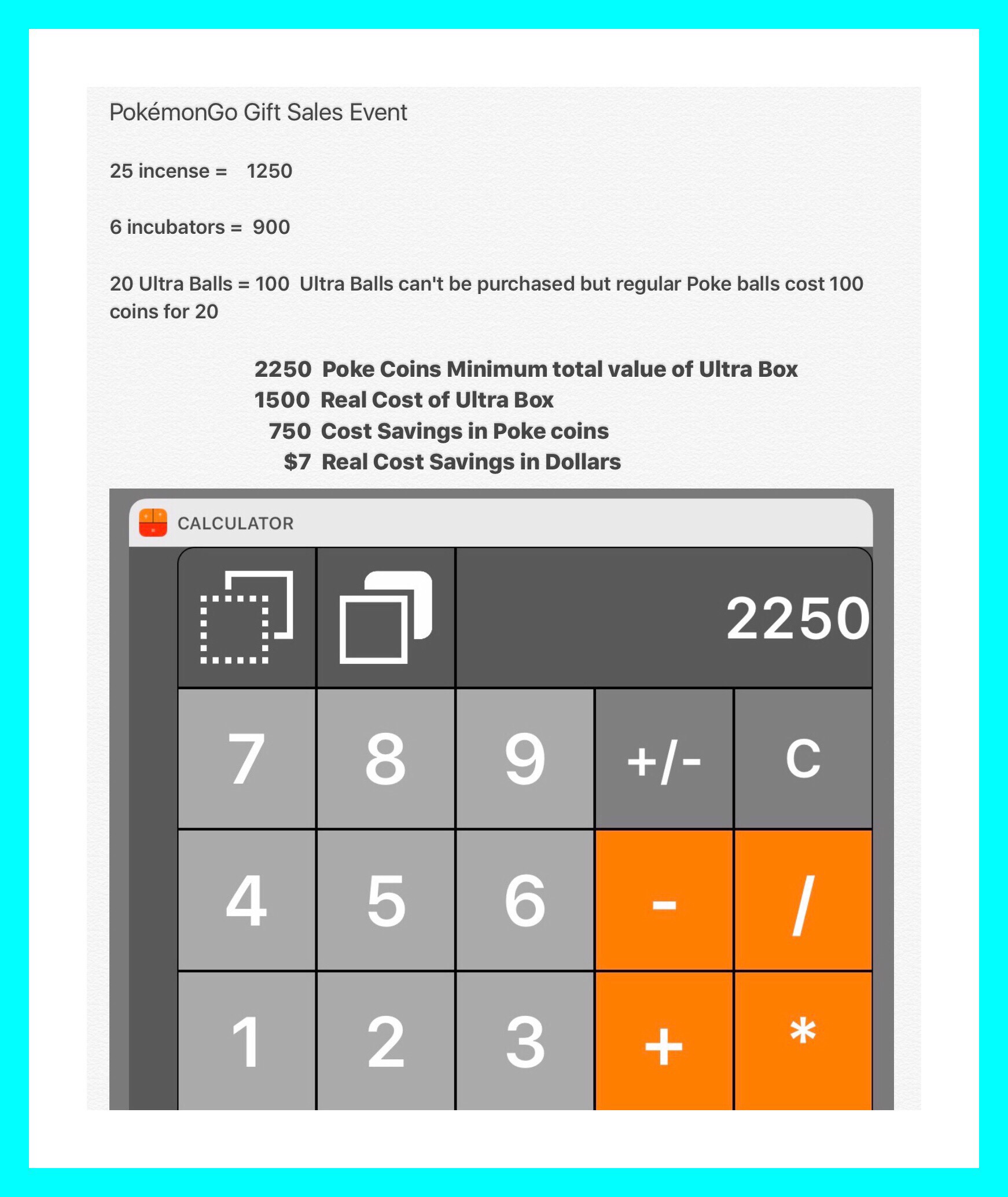
Based on ToneDeaf’s post above here are my calculations:

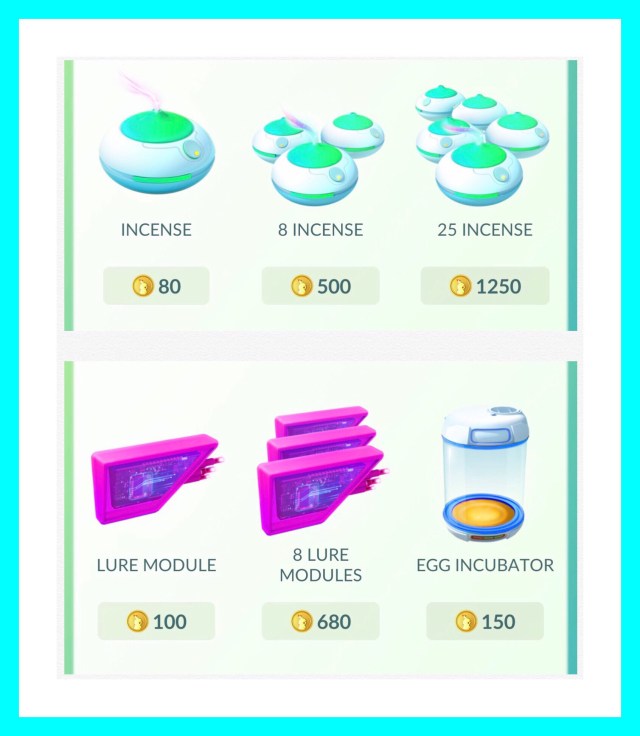
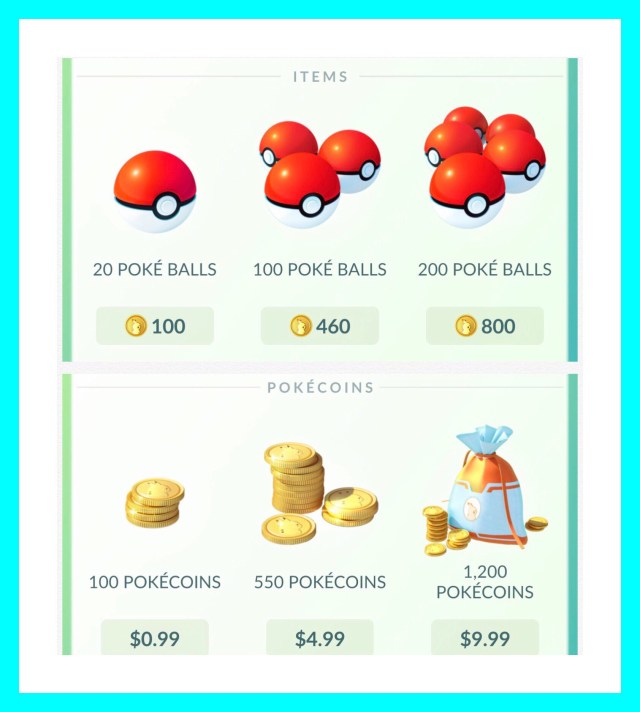
The prices for the various items in the Ultra Box are shown below.

Cost of incense, lures and incubators

Cost of incense, lures and incubators

Cost of Poke-balls & coins

Cost of Pokeballs & coins


Conclusion

In the case of the Ultra Box, it makes economic sense to get the box if you would have have purchased incense and egg incubators anyway. If not, well then Tone Deaf’s conclusion does make some sense. The one thing I would add however, is that while his statement is true that ‘finding Pokémon is now easier’ and there are more and better types of Wild Pokémon available more often right now…incense use isn’t completely a wasted effort. It depends a lot on where you live and how readily wild Pokemon are available to you. In less populated areas incense can still help out a lot. I know because I’ve tried it.

Also, in certain situations where you’re trying to maximize the amount of XP you earn…like when you follow up Pidgey spamming with a lot of evolutions and power ups, all while under the increased benefits of a lucky egg. Using incense can and does make sense if you can’t fill the entire 30 minute period of time the Luckey egg gives you with evolutions. Because catching Pokémon under the magical effects of a lucky egg also doubles (or sometimes even quadruple’s) the XP you earn.

During the time period of December 30th to January 8th, Lure modules active time will be doubled…from 30 minutes to 60. So it’s quite possible that using Lures and incense together will reap enough additional benefits to make incense use beneficial.

During this same timeframe, once the sale ends for the Christmas Gift Boxes, Niantic’s plans to offer additional deals in the form of newer gift boxes with different deals.

Great Balls & Ultra Balls Can Never Be Purchased Normally

The last point making these gift box deals worthwhile is the fact that most include Great Balls or Ultra Balls which are never available for purchase in the item store normally. Since use of these higher powered  balls seems mandatory for capturing Pikachu with a Christmas hat…if you’re not at the level where you earn these balls at Pokestops, this is your only opportunity to get these stronger pokeballs.

Posted in PokémonGo, Tech Tips | Tagged , , | Leave a comment

Last Minute Shopping Idea: Amazon’s Prime Program Save’s People A Lot of Money and Offers Tons of Additional Benefits Too

I Always End Up Needing to Get Some Last Minute Christmas Gifts Despite My Best Intentions

Once again I’m in that same boat and I’ve realized that Christmas time is perhaps the one time of year that I can benefit the most from having our Amazon Prime membership. Amazon Prime used to be all about the Free Shipping, and that’s still a huge benefit…but that’s far from being the only great benefit anymore. In fact, that hasn’t been the case for quite some time now. But to offset those benefits there’s also now a fee to join the Prime membership program, whereas back in the early days it was free. Despite the fact that there is a cost now…one which has increased slightly through the years..the advantages still far outweigh the costs because the value of the increased services is significant .

Amazon’s 12 Days of Deals & Last Minute Deals

Amazon's 12 Days of Deals

Amazon has become a leader in so many ways in the retail industry, including a leader in technology and in online commerce. Much of their business model centers around the Prime program. Some might say it’s the cornerstone upon which Amazon’s meteoric rise to dominance is based.

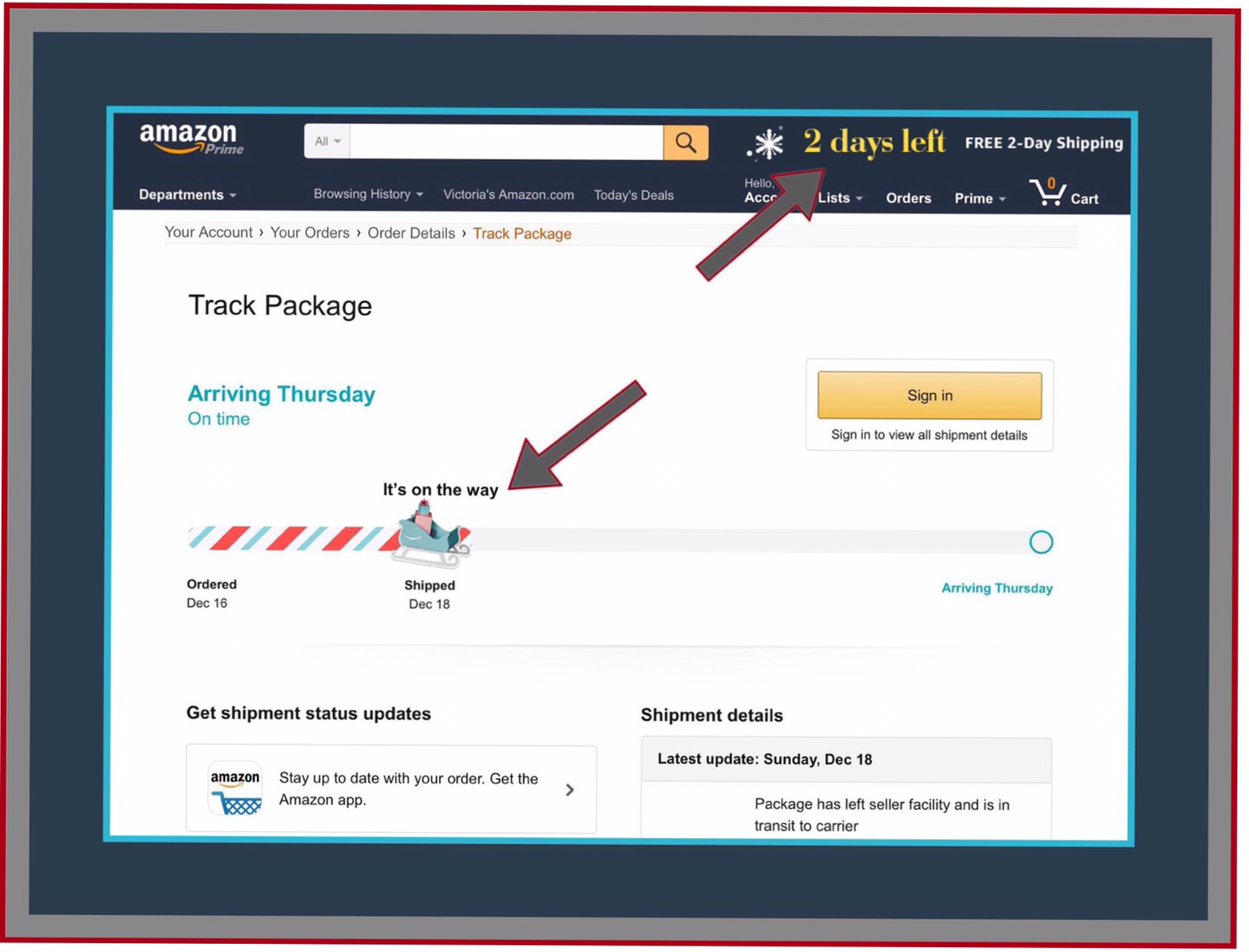
The Prime Program is brilliant, yet many people don’t really know much about it or about all the advantages it has to offer. Since I’ve been hurriedly trying to finish up with a few last minute Christmas shopping tasks, I’m undoubtedly racing to meet shipping and delivery deadlines both as a sendor and recipient. Amazon has a banner across the top of all their shopping pages giving customers a countdown to how many days are left for them to take advantage of Prime free shipping and still meet Christmas deadlines.


Today’s banner reads ‘2 Days Left!’ Today is December 21st and surprisingly there are still 2 days left for shoppers who have Amazon Prime to order and receive gift items in time for Christmas. That warning gave me the idea to write this post…especially because several friends recently have asked me for specifics about the Prime program and I wasn’t able to confidently answer all of their questions. I needed to do a little research first.

What Exactly is the Amazon Prime Program?

When the Amazon Prime program began it was all about the free shipping.

Specifically the program offered a way for customers to receive free shipping at expedited speeds for a small annual fee. But it didn’t really take off as planned so Amazon made it free to join and then it was pretty much free to stay in it as long as you shopped frequently enough and you paid attention to messages displayed while doing that. Because there were always ‘deals’ to be had for remaining in Prime for free.

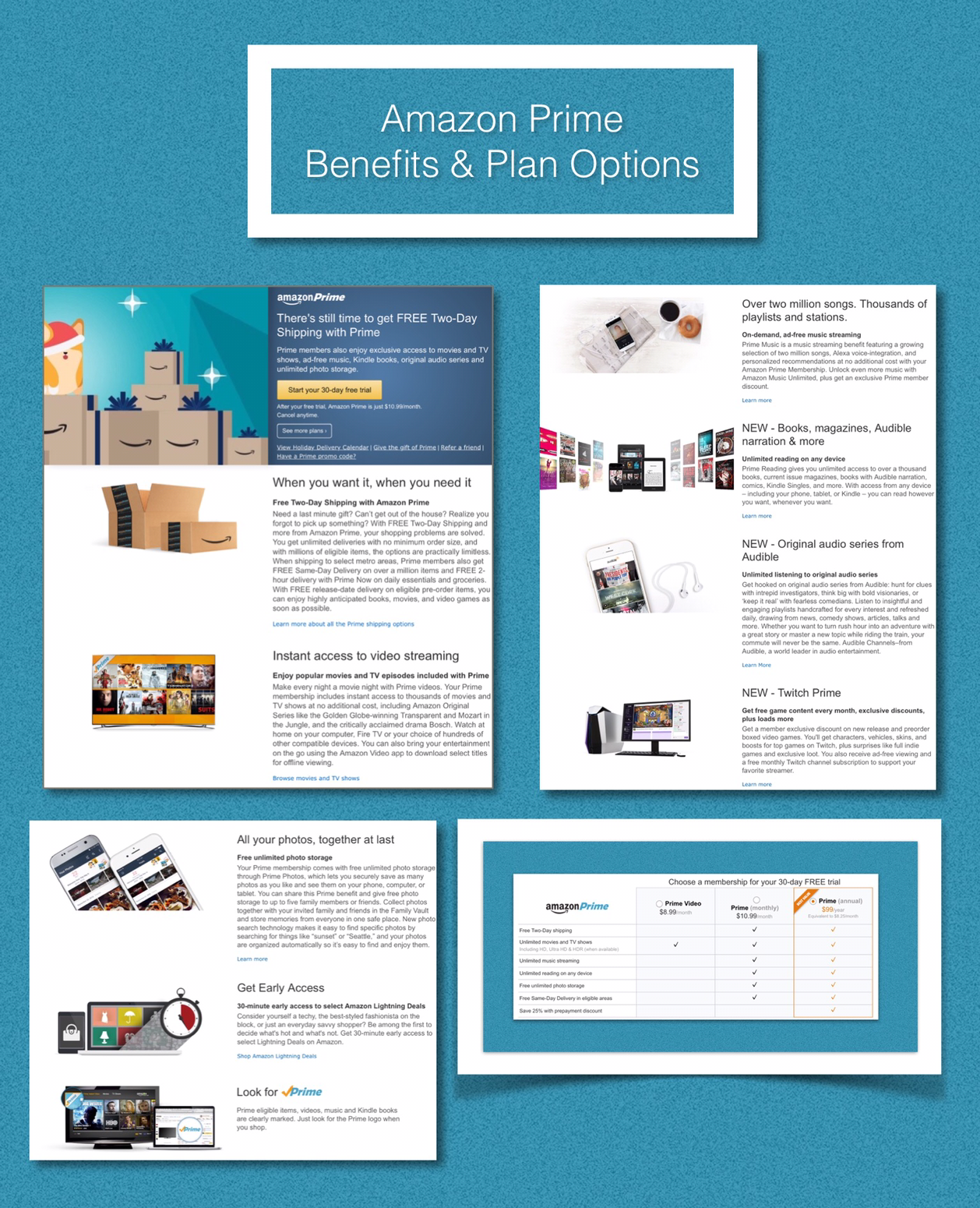
Now, that’s no longer the case. While there are a few different Prime options as shown is the screenshot above, the main $99 per year option is really the only one that the vast majority of people bother with. This $99 annual fee has been constant for many years now, while the additional program benefits to customers just keep going up and up.

Prime Program Membership Benefits

The vast majority of the benefits fall under the umbrella of free content. While that may not sound like a big deal…believe me it is. Amazon Prime free video streaming content is one big reason we were able to ‘cut the cord’ to our cable provider and the net savings for us has been $235 a month. That’s a gain of $2820 a year! Or technically $2721 if you deduct the $99 cost of out Prime membership fee. Plus, we get free shipping on almost everything we order.

If you’re a last minute shopper and haven’t yet finished your Christmas shopping you can still join Prime today and take advantage of their great free shipping and last minute shopping deals too. The link below will take you to where you can signup for a 30 day free trial of Amazon Prime.*

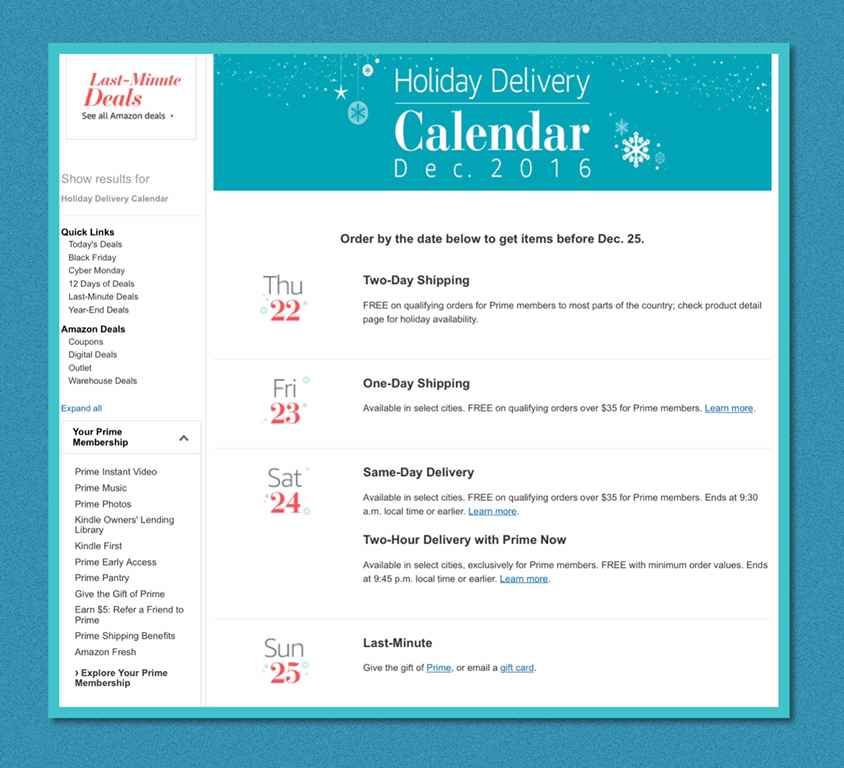
Here’s a link to the screenshot below which shows Amazon’s Holiday Delivery Calendar and spells out exactly when you need to place your order to have it show up in time for Christmas.

Use this link for a 30 day free trial:  Try Amazon Prime 30-Day Free Trial

Although its Not All About the Shipping…it Still Kind Of Is!

We have a sort of philosophy that we follow now…namely that if we can’t get a product from Amazon, there’s a good chance we just won’t get it at all!

That’s because we’ve really come to take the free shipping for granted. It’s not just that though…it’s also the expedited delivery aspect. We’ve come to expect being able to place an order one day and have it show up on our doorstep the next day…because we happen to live close to one of Amazons ginormous new distribution facilities. We’ve even had a few instances in which we’ve ordered something in the morning and it’s arrived later that same day! Which I discovered is actually a brand new feature that Amazon has been slowly debuting around the country.

Amazon Prime Now

If you’re lucky enough to live in one of the cities shown below that currently has Amazon’s newest fast shipping concept called Amazon Prime Now officially available to you, then you have access to lots of local shopping and even food deliveries by local restaurants…which you schedule when you place your order. Amazon guarantees free delivery in 2 hours! Since we don’t officially have a Prime Now available in our city, we can take advantage of some of the great features like carry out dinners…but with a distribution center so near us we can order from the regular Amazon website and sometimes reap NOW benefits…we just can’t actually schedule same day deliveries.

Because we aren’t officially served yet, I don’t know that much about the program. It appears to me that if you intend on using Amazon as your main meal delivery alternative…they may charge a separate, monthly fee based subscription for that…if I remember correctly it’s $7.99. But if I’m right I know that $7.99, which would be the monthly cost to for regular carry outs delivered to your home…is a steal compared to other services like this!

To find out everything you want to know about Prime Now use this link.


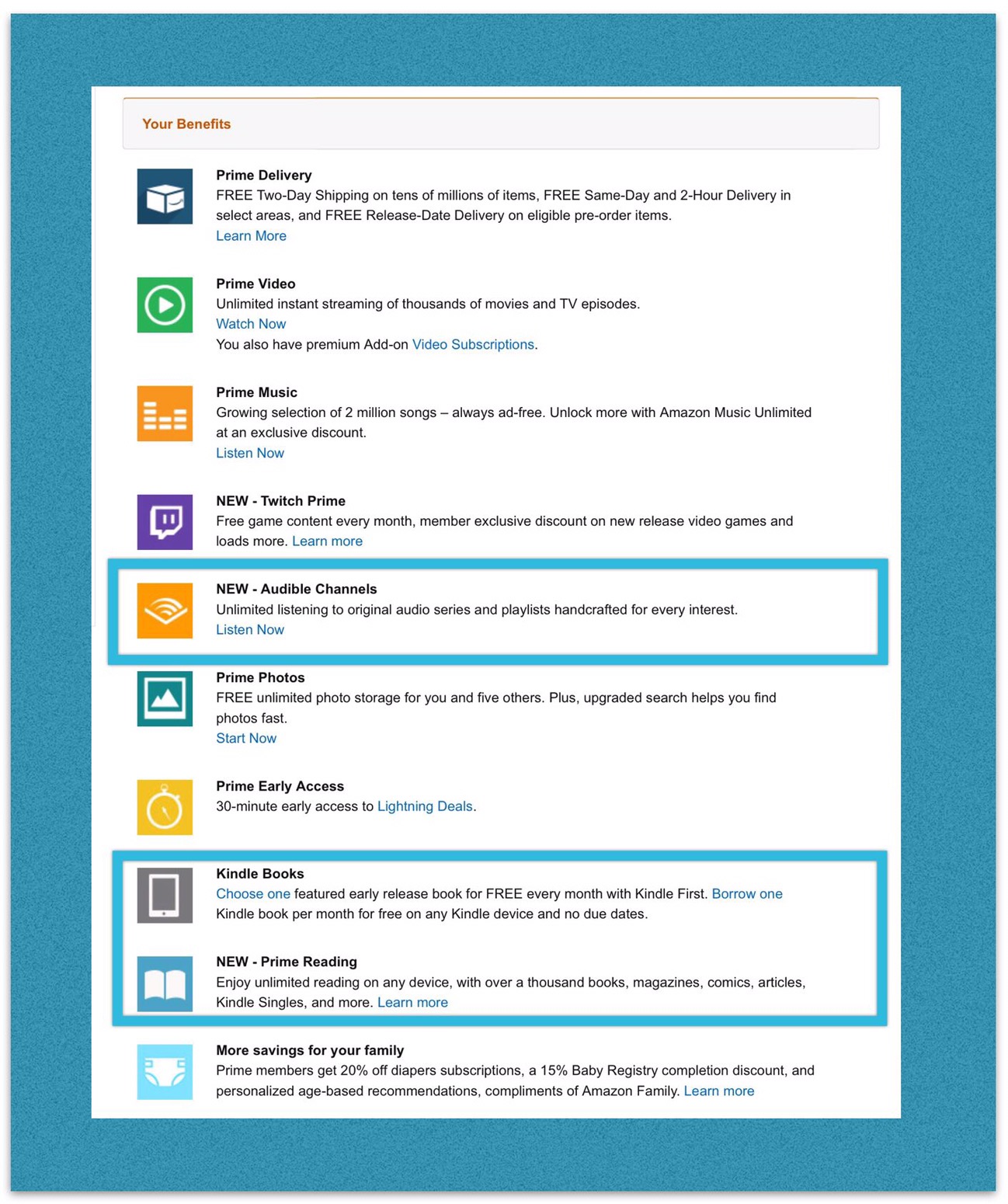
Below is Amazon’s  out comprehensive listing of all the benefits included in Prime. The benefits that are shown inside the turquoise boxes are what I call the free media category in the discussion below.

Prime Free Content Can Roughly Be Grouped Into 2 Main Categories

The First Category is Media

This includes music, streaming videos (made up of movies, TV shows and documentaries) and video games. Below are some charts showing more details for each category and representative examples for each.

Prime Video

I talked above about how my family recently began using Amazon video and how it’s helping us save about $2700 annually since we discontinued our cable television service or ‘cut the cord!’ I talk about the costs we were paying to Time Warner Cable in great detail in Part 1 post on ‘Cutting the Cord.’ In addition to using Rokus we use one Amazon Fire TV streaming box too. And we installed an HD antenna on our roof and hooked that up to a Tablo DVR (and an attached hard drive) that I got at Amazon. I’ll be writing a future post giving a lot more detail about all these things but one thing I probably won’t get to that (because there just so many details to cover) is how we find great things to watch on Amazon…so here briefly are some ideas.

Finding things to watch is easy. We just Google something like ‘the best Prime Movies‘ and always find quite a few current lists of some of the best movies (for example) right now. Here are a few current examples:

Link to Digital Trends list of the best free movies on Prime in the fall of 2016…with trailers too!

Link to Collider’s ‘The Best Movies on Amazon Prime Right Now.’

img_3573-1

Prime Video Games

Since I don’t really play video games (with the exception of PokémonGo) I can’t speak from personal experience about Prime video game services…but I do know that this is a relatively new offering and it seems to be quite popular.

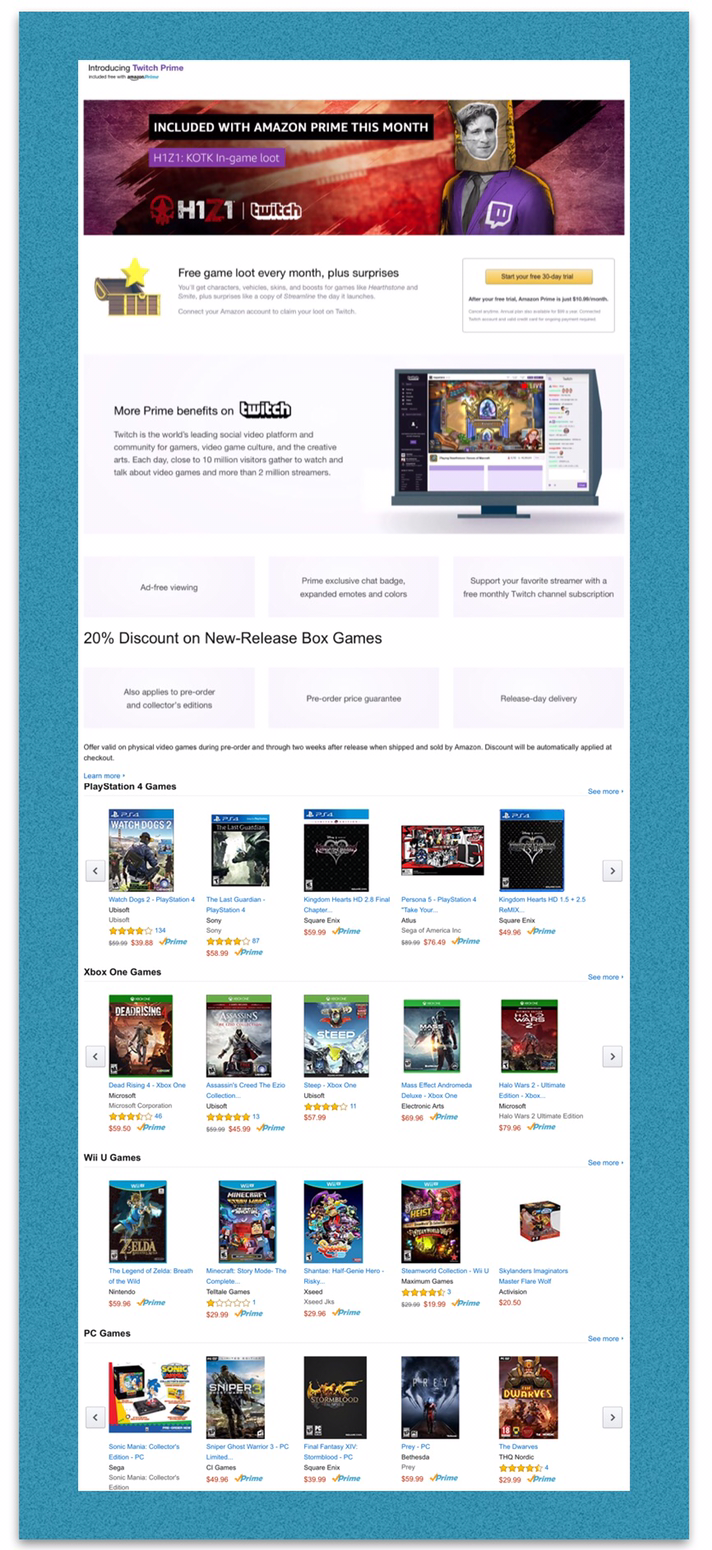
Here’s a link to more about Amazon’s Prime Video Game program which has partnered with Twitch, one of the leading social platforms for video gamers.

Prime Music

Prime music doesn’t really have a listing of music because there are so many titles and so many genres, it would be massive. Amazon created a really helpful video that demonstrates all the different ways that people can use Prime music easily. The link takes you to the pages shown in the screenshot below, which gives a lot more information about how to best utilize all the great features of Prime music.

The Second Main Category is Written Content

Amazon has a dizzying assortment of written content which is free for their Prime members.

They are all displayed in the screenshot below in the turquoise boxes…2 towards the bottom of this list of Amazon Prime member benefits, and one in the middle…New Audible Channels.

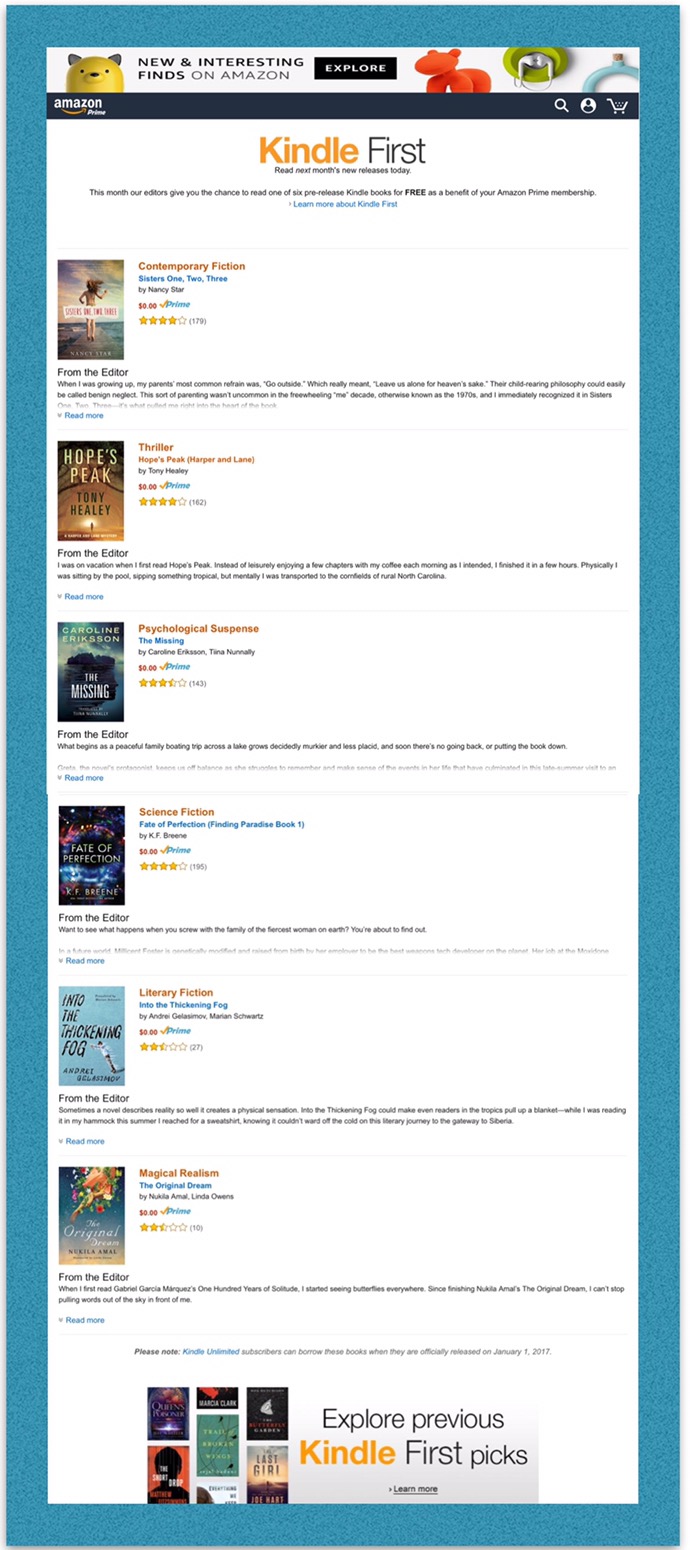
The first alternative I’ll discuss is Amazon’s Kindle First program (it falls under the Kindle Books category above.) This is where members get to choose 1 new book every month from a preselected list referred to as Amazon’s Kindle First. These are all pre-release versions of upcoming new books. The screenshot below shows the books available for the month of December.

Here’s a list of the books you can chose from in December (screenshot below.)


Here’s a Link to previous Kindle First Picks.

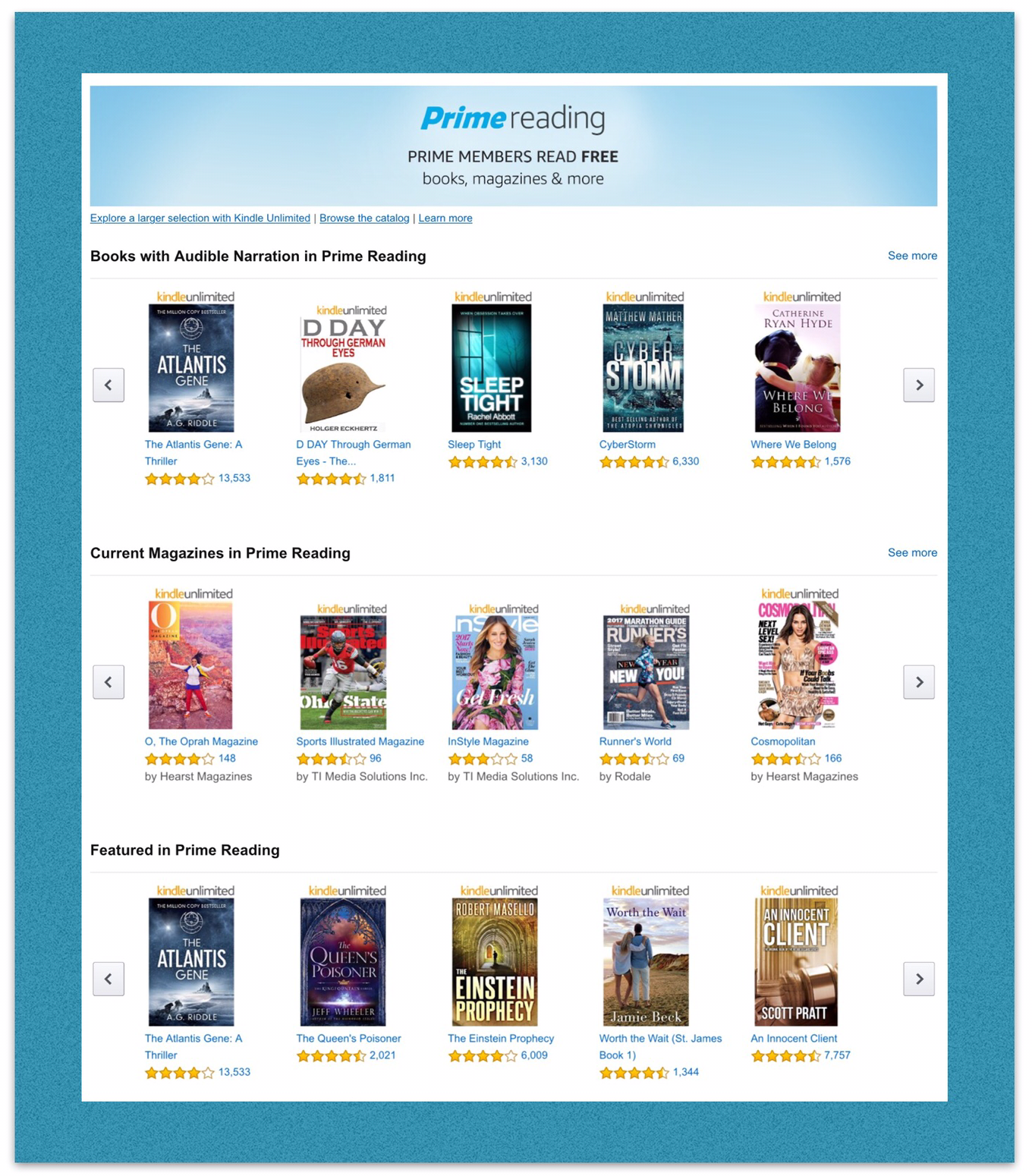
The second alternative is to find free reading material in Amazon’s huge Prime library.

Prime – Free Reading Material for Prime Members – Includes Books with Audible Narration

Here’s a link to Amazon’s Free Prime Reading Material collection. The webpage is shown in the screenshot below.

Prime Reading
The 3rd alternative is that members can choose to borrow one book a month from Amazon’s Kindle Owner’s Lending Library.

Below is a visual tutorial I put together for my family showing how to get content from our Kindle library onto people’s devices.

How to Download Kindle Content to Devices

Amazon Kindle Unlimited

Amazon Kindle Unlimited isn’t included as a part of Prime but I thought I’d mention here because it’s an additional service my family began using a few months back and we love it. It’s a huge money saver for people who like to read a lot. We tried it for 30 days free first before deciding to continue paying $9.99 a month for it. If you examine our most current Kindle reading material you’ll notice that the vast majority of it came from Amazon Unlimited.

Use this link to try out Kindle Unlimited for 30 days:  Join Amazon Kindle Unlimited 30-Day Free Trial

Additional Prime Member Benefits

Amazon Newsletter Subscriptions

Amazon publishes lot’s of newsletters for their Prime members, featuring their many different services and ways to save money. Here’s a link to their main newsletter listing which you can use to subscribe from. The main newsletter I subscribe to is the Prime Member newsletter which you can see at this link.

Directory of Prime Services…Top Movies and TV. Etc.

To see a lot more detailed information about the Prime program and find links to all of the content categories I talk about above you can go to the directory of Prime services page and begin exploring.

Amazon Wants Everyone to Have the Benefits of Prime

I think this is true because Amazon wants to expand their distribution centers across the US…so by having more people using expedited shipping services they can justify building these huge centers…it’s a win-win scenario! That’s why I believe Amazon and made it so easy to join Prime and even to share the benefits with family members.

Prime Membership’s Can Be Shared with Family Members 

Here’s a link to setup Prime sharing.

*Amazon Associate Disclosure: I’m an Amazon Associate therefore I may earn a small commission if you make a purchase through my links. This has no impact on price or any other consequence for you.

Comments

Please leave any comments you may have below..especially if you know about some Prime membership benefits that I’ve forgotten to mention in this post!

← Back

Thank you for your response. ✨

Posted in Amazon, Amazon Prime | Tagged , , | Leave a comment